Hexylon High-performance portable meter
34
LNB.
Halt: This command stops the motor
movement.
East: Allows to move the motor in the
EAST direction. Each click corresponds to
one step in the movement of the motor
(pitch motors). By holding the key down,
successive movement sequences will be
executed until the key is released.
West: Motor movement in the WEST
direction. Each click corresponds to
one step in the movement of the motor
(pitch motors). By holding the key down,
successive movement sequences will be
executed until the key is released.
Store: 8 storage positions are available
to store at up to 8 antenna positions . This
command allows one of 8 positions to be
chosen where the current position of the
antenna will be stored.
Goto: recovers one of the 8 positions
for the antenna that has been previously
stored
- SCR (only satellite band): Selects the SCR
parameters (multiswitch, standard and
slots) When a slot is enabled (for example
slot 3, freq. 1210MHz), the meter will tune
into the slot frequency (1210MHz) and
will set the slot with the meter parameters:
frequency, band (powering), and DiSEqC.
In addition, a SCR icon will be shown in the
bar at the top (SCR3) to indicate that the
slot is enabled. While the slot is enabled,
all the setting changes of the meter, will
be applied to the currently slot (SCR3).
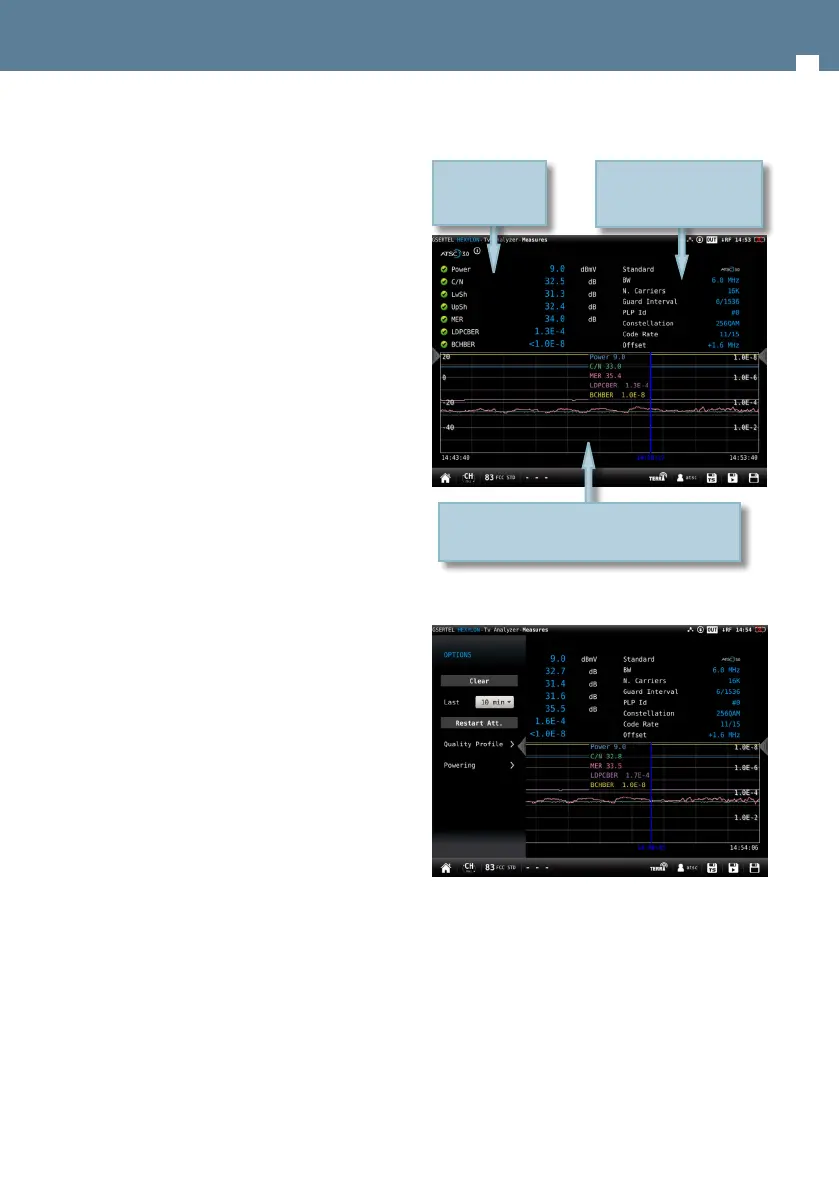
6.4.4.- Measurements (RF input)
This feature shows the measurements of the
selected channel. The measurements depends on
the signal modulation:
DVB-S: Power, C/N, MER, CBER, VBER
DVB-S2: Power, C/N, MER, LDPCBER, BCHBER
ATSC1.0: Power, C/N, MER, PreBER, PostBER
ATSC3.0: Power, C/N, MER, LDPCBER, BCHBER
QAM: Power, C/N, BER, MER
Analog: Level, C/N, V/A, Hum, CTB, CSO
If you see this feature in full screen, you will have
more detalied information.
6.4.4.1.- Main window
6.4.4.2.- Options context menu
• Clear: restarts the graph.
• Last: 5 min, ½ hour, ½ day, 1 day, 1 week. Allows
select the time interval shown in the graph
• Quality prole: allows to select the quality prole
• Powering:
- VDC: Selects the preamplier powering.
- DiSEqC (only satellite band): selects the
DiSEqC parameter (Sat A, Sat B, Sat C, Sat
D)
- Positioner (only satellite band): makes it
History of the measurements during an interval
selected by the user. Drag to move the blue mark
List of
measurements
List of signal parameters


 To Next Page
 Loading...