EN
45
Allows select the time interval shown in the graph.
•Restart Att: restarts the attenuation control.
•Quality Prole: allows to select the quality prole
•Powering:
- VDC: Selects the preamplier powering.
6.4.14.-IP Analysis (Ethernet Input)
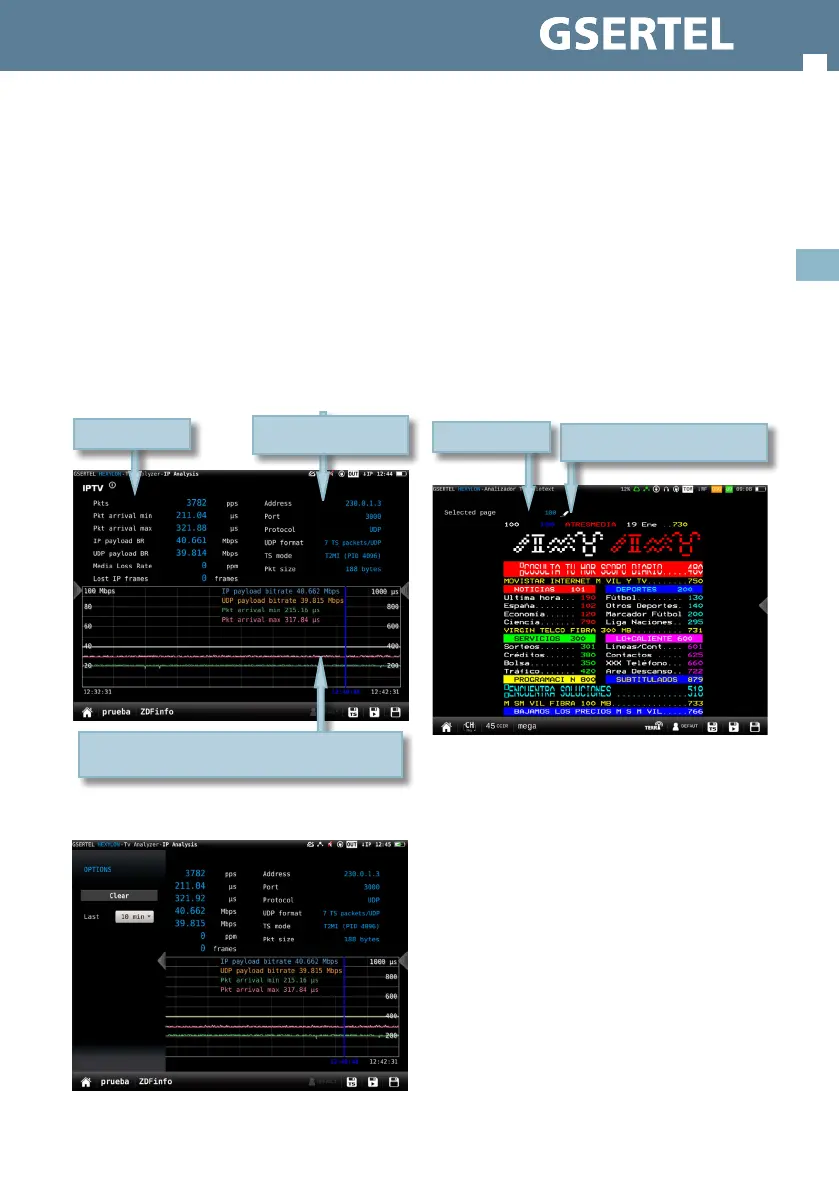
This function makes a deep analysis of the IP signal,
and shows the parameters of the signal and all the
corresponding measures, as well as a chart that
represents a history of the measurements in a
period of time selected by the user.
6.4.14.1.- Main window
6.4.14.2.- Options context menu
•
IP channel parameters
IP measurements
History of the measurements during an interval
selected by the user. Drag to move the blue mark
• Clear: clears the graph.
• Last: 10 min, ½ hour, 1hour, ½ day, 1 day, 1 week.
Allows select the time interval shown in the graph.
6.4.15.-Teletext
This function shows the teletext of the selected
service, whenever it has that feature, otherwise it
is shown “NO TTX”.
Please, note that the page number must be
between 100 and 899.
6.4.15.1.- Main window
6.4.16.-EPG
This function shows the Electronic Program Guide
of the selected service in the current day, whenever
the channel has that feature.
The information of the EPG may take some seconds
to be displayed.
Tap on the pencil icon to introduce
other page number
Selected page


 To Next Page
 Loading...