Hexylon High-performance portable meter
48
successive movement sequences will be
executed until the key is released.
Store: 8 storage positions are available
to store at up to 8 antenna positions . This
command allows one of 8 positions to be
chosen where the current position of the
antenna will be stored.
Goto: recovers one of the 8 positions
for the antenna that has been previously
stored
- SCR (only satellite band): Selects the SCR
parameters (multiswitch, standard and
slots) When a slot is enabled (for example
slot 3, freq. 1210MHz), the meter will tune
into the slot frequency (1210MHz) and
will set the slot with the meter parameters:
frequency, band (powering), and DiSEqC.
In addition, a SCR icon will be shown in the
bar at the top (SCR3) to indicate that the
slot is enabled. While the slot is enabled,
all the setting changes of the meter, will
be applied to the currently slot (SCR3).
• Aim Antenna: ON/OFF
Emits a modular audible signal with
frequency directly proportional to signal
level in the spectrum trace relative to
reference level. It is recommended to set
the reference level manually, as well as
to select the span to include a frequency
range wide enough. The audible signal
becomes continuous when the signal
level is close to the reference level. Then it
is necessary to increase the reference level
to get a more accurate adjustment. This is
a useful feature to point antennas without
having to look at the display.
• OOB Emissions (only for DVB-T and DAB): It is a
mask predened by the ETSI EN 302 296 stardard
(for DVB-T) or ETSI EN 302 077 stardard (for DAB) to
check if the channel complies with it or not.
• Relative Marks: ON/OFF
If ON is selected, the marks will be relative
to their position in the grid, not to their
frequency
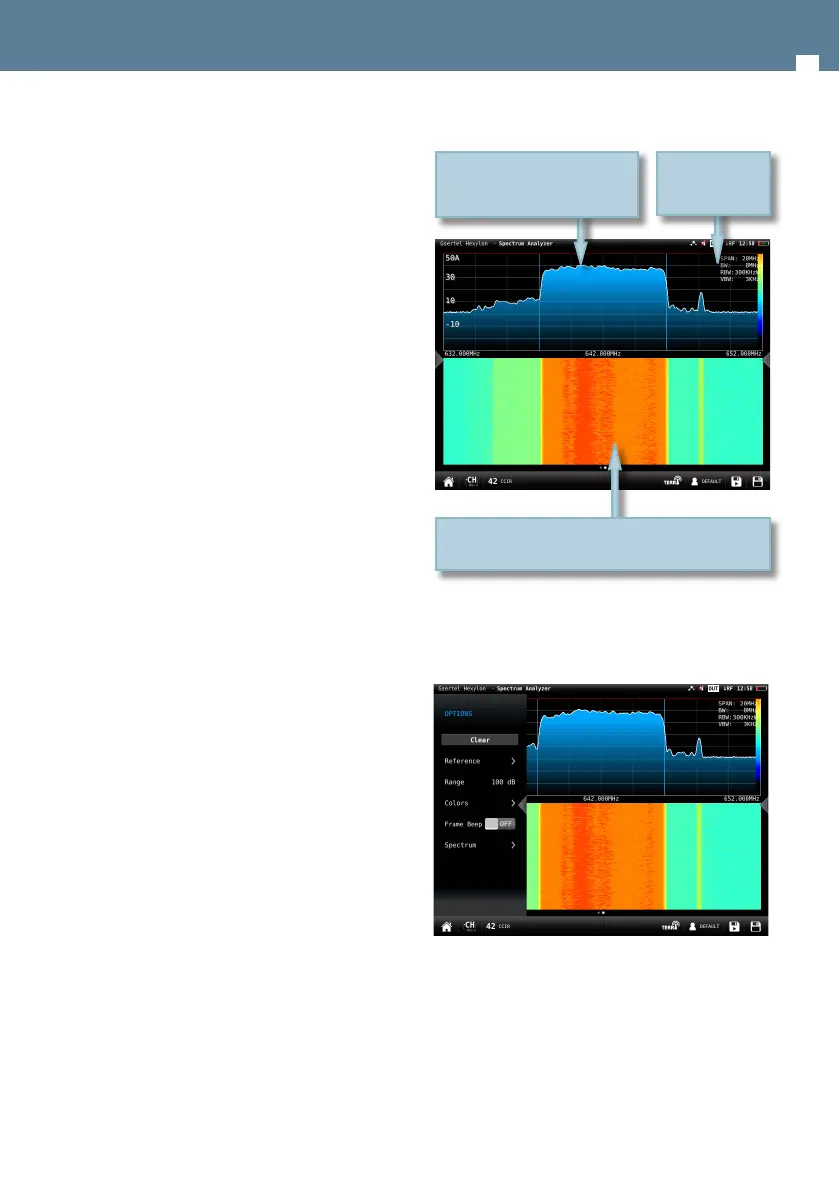
7.2.- Waterfall
The waterfall diagram is a three-dimensional
representation of the signal spectrum. Signal levels
are converted to colors and displayed along a time
axis.
7.2.1.- Main window
Every spectrum trace at the top half generates a
new waterfall line at the bottom half.
7.2.2.- Options context menu:
• Clear: It clears the waterfall display.
• Reference: it changes the level of the highest color
in the color scale. Signal levels above this reference
will be displayed in this color.
• Range: it changes dierence in dB between the
highest and the lowest color of the color scale on
the waterfall display.
Waterfall time axis is the vertical one and frequency axis
is the horizontal one, while level is converted to color
through the color scale at the top right side
Spectrum
parameters
Swipe to tune next/previous
channel
Drag to tune any channel
Spread/Pinch to change span


 To Next Page
 Loading...