Hexylon High-performance portable meter
62
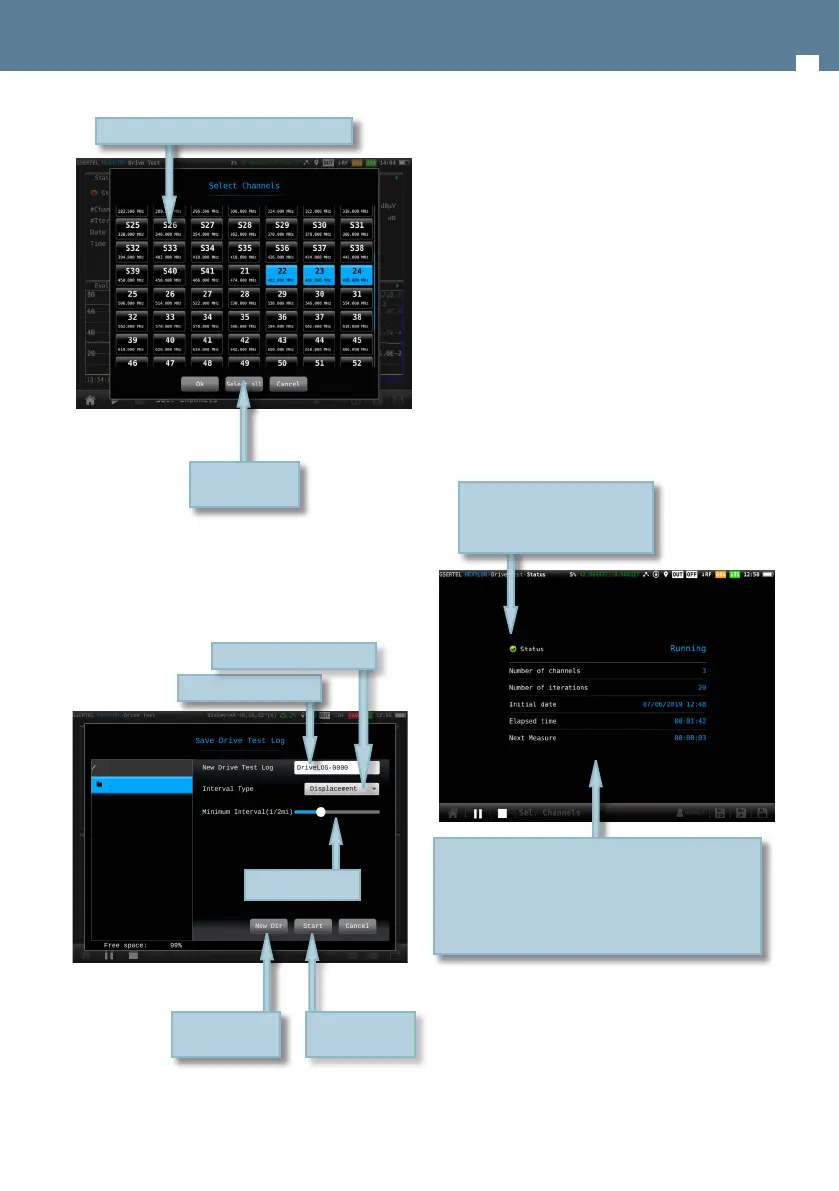
Once you tap on the Run button, you must select
the name of the Drive Test File and the time interval
between two consecutive measurements (you can
choose between time or distance interval):
Save in a new
directory
Edit le name
Start Drive Test
Select the type of interval
Select the interval
Note that, if the time necessary to perform the
measurements on all the selected channels is
greater than the time interval, the time between
one iteration and the next one will be the minimum
necessary to perform the measurements in all the
selected channels.
11.2.- Features
This section explains all the features available to
visualize in Drive Test function.
11.2.1- Status
This function shows the current status of the test.
11.2.1.1.- Main window
Number of channels: is the number of channels
selected by the user to be measured in each iteration
Iterations: number of iterations of the test made from
the start to now
Initial date: date when the test began
Elapsed time: time elapsed from the start date to now
Orange icon if the test is paused
Green icon if the test is running
Red icon if the test is stopped
Select/Unselect
all the channels
Tap to select the channels to measure


 To Next Page
 Loading...