EasyManua.ls Logo

hager TKP100A - Page 131

hager TKP100A
132 pages
Print Icon
To Next Page IconTo Next Page
To Previous Page IconTo Previous Page
Loading...
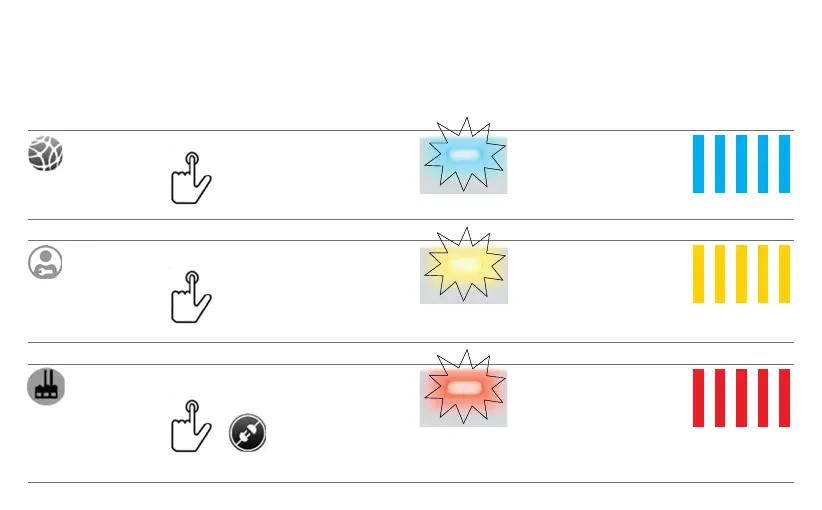
TKP100 Controller reset modes
For detailled description of use & effect of each reset modes please refer to "TKP100 Reset Modes"
page 22.
Network reset
1. Press the RESET
button for more than
5 seconds
2. When the unit
ashes in blue,
release RESET
button shortly, then
press it again to
conrm.
3. When successful,
a short series of fast
blue ashes of the
signalling RGB conrm
the reset.
Flashing
Users reset
1. Press the RESET
button for more than
20 seconds
2. The units ashes
in blue, then when it
starts ashing in yel-
low, release RESET
button shortly, then
press it again to
conrm.
3. When successful,
a short series of fast
yellow ashes of the
signalling RGB conrm
the reset.
Flashing
Factory reset
1. Simultaneously
press RESET
and power on
the TKP100
2. Maintaining
the RESET button
pressed while the
unit starts ashing
slowly (approximately
5 seconds).
3.
When the unit ashes
faster in red, release
the RESET button.
Wait for a few minutes
until the unit completely
stops ashing,
which
indicates the end
of the
sequence.
Flashing

Other manuals for hager TKP100A