EN
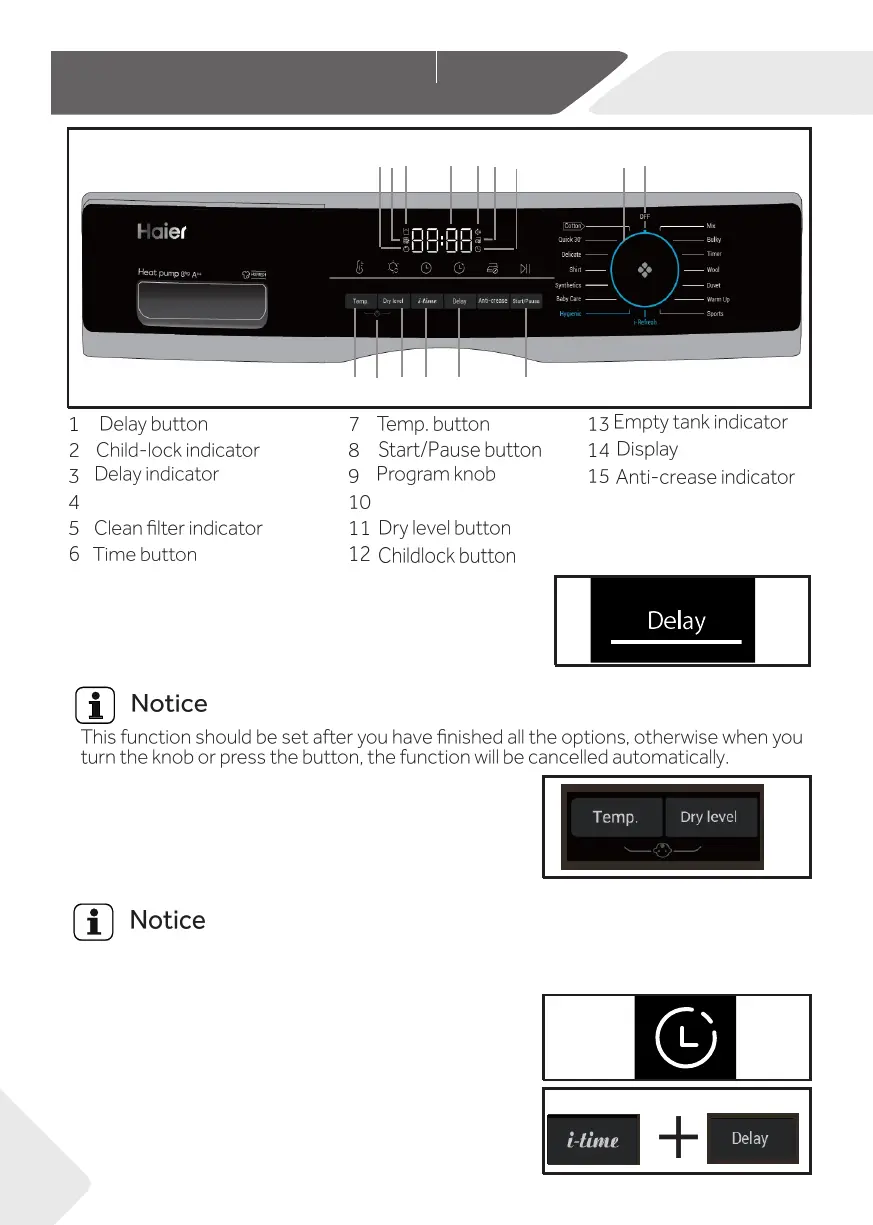
5-Control pannel
10
5
9
10
3
14
15
13
6
7
2
11
1
8
4
12
Temp.
The buzzer is design to alert users with a sound like
cycle. Press the button(Fig.5-2) to set the desired starting
Buzzer indicator
Delay function allows users to delay the start time of the
time (From 0 up to 12 hours). When activating,the indic-
ator icon (Fig.5-4) will light up.
Child lock is designed to prevent children from ad
the program setting. To activate this function, after a
cycle has been started, press the Dry level and Temp.
button (Fig.5-3) at the same time for 3 seconds until
the indicator icon lights up. To deactivate it, press these 2 buttons for 3 seconds again.
usting
j
beep. It is deactivated by default. To activate the buzzer
function, Press Delay and i-time buttons at the same
time for 3 seconds or until you hear a beep sound.
seconds again.
Power
5-1
5-2
5-3
5-4
5-5
When choosing the delay function (Fig.5-4),the icon will
5.4 Buzzer indicator
5.3 Delay indicator
5.2 Child lock indicator
5.1 Delay button
To deactivate it, press the same 2 buttons for 3
light up.
When the power supply is interrupted or turn the knob to off position,the function will
not be cancelled automatically.


 To Next Page