EN
9-Daily use
9.6 Set program and start
1.
2. Set functions such as Temperature, Dry level, De-
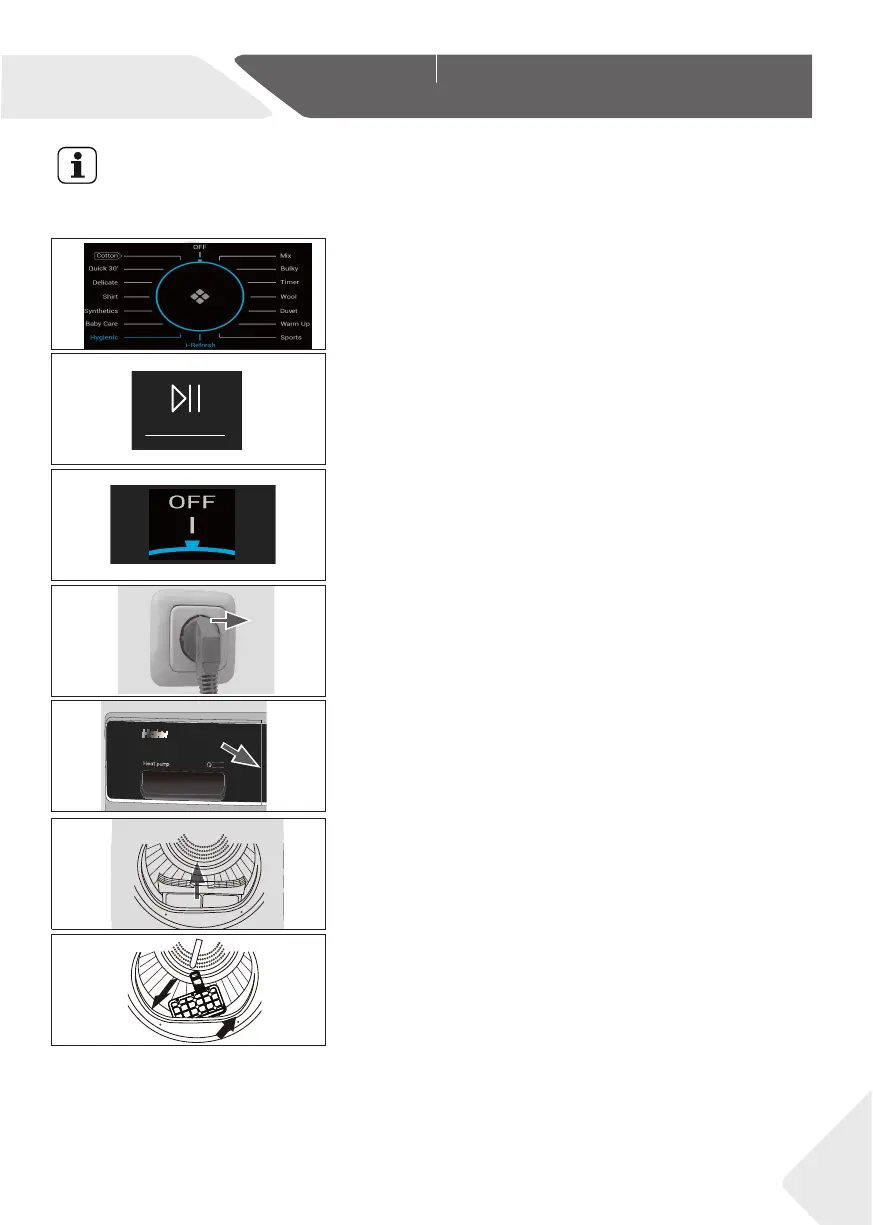
lay. Afterwards press theStart/Pause button (Fig.
9-9) to start the dry cycle.
9.7 End of dry cycle
The tumble dryer stops operation automatically when a
dry cycle is complete. The display shows END about
5S. Open the tumble dryer door and take out clothes.
If clothes are not taken out, the wrinkle free function
will start automatically and the screen shows 0:00
1. Turn the knob to the OFF position to shut down
the machine(Fig. 9-10).
2. Unplug the tumble dryer from the power socket
(Fig. 9-11).
3. Empty the water tank after each dry cycle (Fig.
9-12) .
4. Clean the lint fi lter after each dry cycle (Fig. 9-13).
5. Clean the condenser fi lter after each dry cycle
(Fig. 9-14).
Notice
Fabric softeners or similar products should be used as specifi ed in the manufacturer’s
instructions.
CONTROL PANEL
Dry Leve l
Delay
Wrink le F ree
Te mp.
k
g
9
A
++
Childl oc k i-Re fres h
kg
9
++
A
i-REFRESH
kg
9
A
++
kg
9
++
A
i-REFR
ESH
ry Level
Delay
Wrink le Fre e
Te mp.
Ba byca re
Quick Dry
Mix
Cotto n
Duvet
Synt hetics To wel
War m U p
Shir t
Wool T ime r
Bulk y
Delic ate Spo rts
Childl ock i-Re fres h
9-8
9-9
9-10
9-11
9-12
9-13
9-14
( This function is only available for some programs)
Cotton
Mix Synthetics Quick Dry Timer Delicate
Remote Wool
Sports
DuvetTowel i-Refresh
Select one of the 15 programs by turning the knob
(the OFF is not included) (Fig. 9.8), and its default
settings will be displayed.
19


 To Next Page