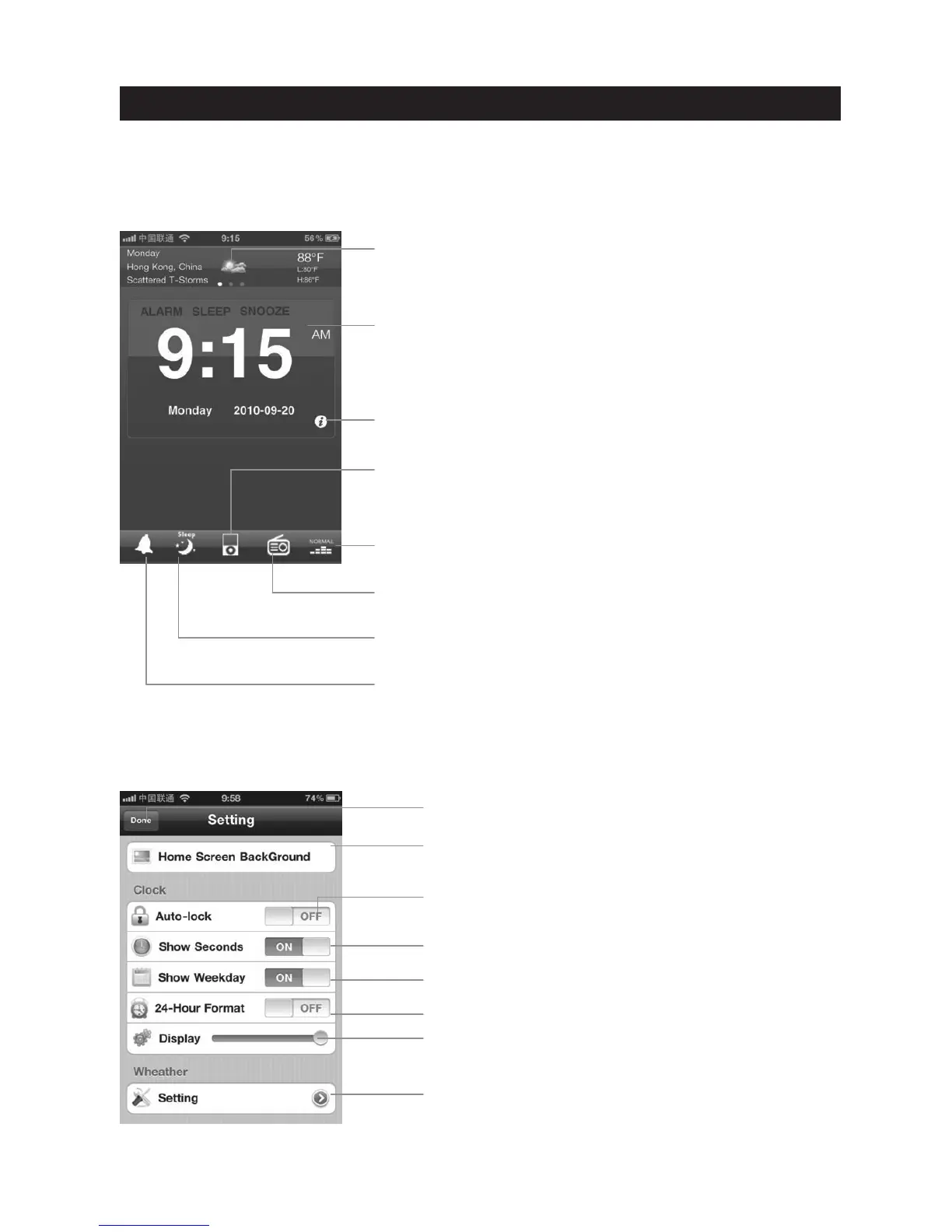
Home Screen
Launching “AppClockRadio(VIEW XL)” will bring you to the clock home screen from which
you can control and access all other settings
Weather Widget
• Swipe to view contextual weather forecast for the day ahead
• Change temperature scale, location or turn off via weather
settings
Clock with Custom Background
• Change from 12 or 24 hour mode
• Select any photo in your library for your home screen
background
iPod controls
• Click the iPod icon to bring up the iPod transport music
control panel
Radio settings
• Click the Radio icon to select the FM Radio station.
EQ Function
• Click icon to access EQ settings
Sleep setting
• Click to access sleep settings
Alarm setting
• Click alarm icon to view alarm settings view
Click to save and return to the app home screen
Select a custom background for the home screen
from your photo library
Select “Auto Lock” ON/OFF
Select “Show Seconds” ON/OFF
Select “Show Weekday ON/OFF
Select 12 Hour with AM/PM or 24 Hour
Slide to control your screen brightness settings for a
bedtime event
Manage your weather settings
Settings
• Click icon to access app settings
App Settings
Manage your setting.
13
AppClockRadio(VIEW XL) OPERATION



 To Next Page