12 13
ACTIVATE THE VOICE ASSISTANT·激活语音助手
EN
Double-tap the left bud to activate Siri*.
ES
Toca dos veces el auricular izquierdo para activar Siri*.
DE
Tippen Sie doppelt auf das linke Headset, um Siri* zu aktivieren.
FR
Appuyez deux fois sur le casque gauche pour activer Siri*.
RU
Дважды коснитесь левой гарнитуры, чтобы активировать Siri*.
DA
Dobbeltklik på venstre headset for at aktivere Siri*.
IT
Tocca due volte l'auricolare sinistro per attivare Siri*.
JA
左側のヘッドセットをダブルタップして、Siri* をアクティブにします。
KO
왼쪽 헤드셋을 두 번 탭하여 Siri * 를 활성화합니다 .
PL
Stuknij dwukrotnie lewy zestaw słuchawkowy, aby aktywować Siri*.
PT
Toque duas vezes no fone de ouvido esquerdo para ativar o Siri*.
TH
แตะสองครั้งที่ชุดหูฟังด้านซ้ายเพื่อเปิดใช้งาน Siri (ใช้ได้กับมือถือระบบปฏิบัติการ iOS เท่านั้น)
CN
蓝牙连接后双击左侧耳机激活语音助手 *。
CN
藍牙連接後雙擊左側耳機激活語音助手 *。
* 目前适用于 Siri 及部分安卓手机所内置的语音助手。
* Currently available for Siri and some Android built-in voice assistant.
* Funkcja obecnie dost pna tylko dla Siri i niektórych asystentów g osowych w systemie Android.
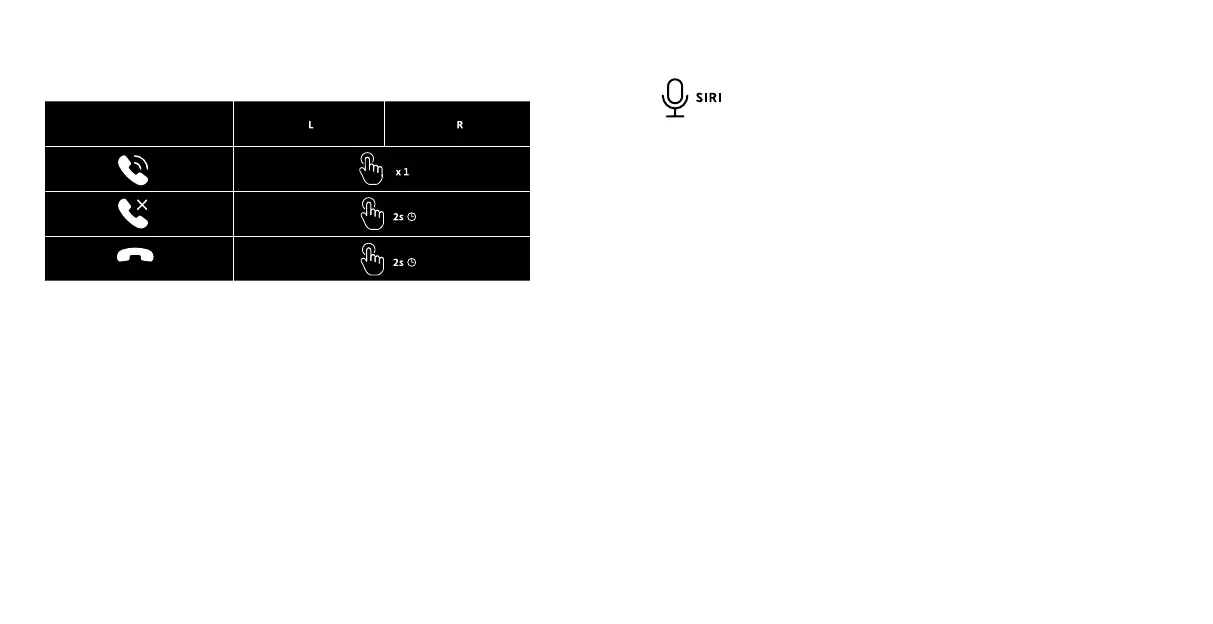
来电状态下,轻触一次任意一边耳机的触摸按键以接听来电
In the incoming call state, tap the touch button of any earbud once to answer the call.
长按任意一边耳机的触摸按键大于 2 秒后松开以拒接来电
Touch and hold the touch button of any earbud for more than 2 seconds and then release to reject
the call.
来电状态下,长按任意一边耳机的触摸按键大于 2 秒后松开
Touch and hold the touch button of any earbud for more than 2 seconds and then release to hang
up the call.
HANDS-FREE PHONE CALL·免提通话


 To Next Page
 Loading...