cq# m
Halemeier GmbH & Co.KG - Lange Straße 51 - D 49326 Melle Neuenkirchen
AppMitter
25.350.62
Montageanleitung
Installation instructions
4x
ON - OFF
1sec
≤ 10m
1x
1x
A
B
B
1
2
B
B
2
1
A
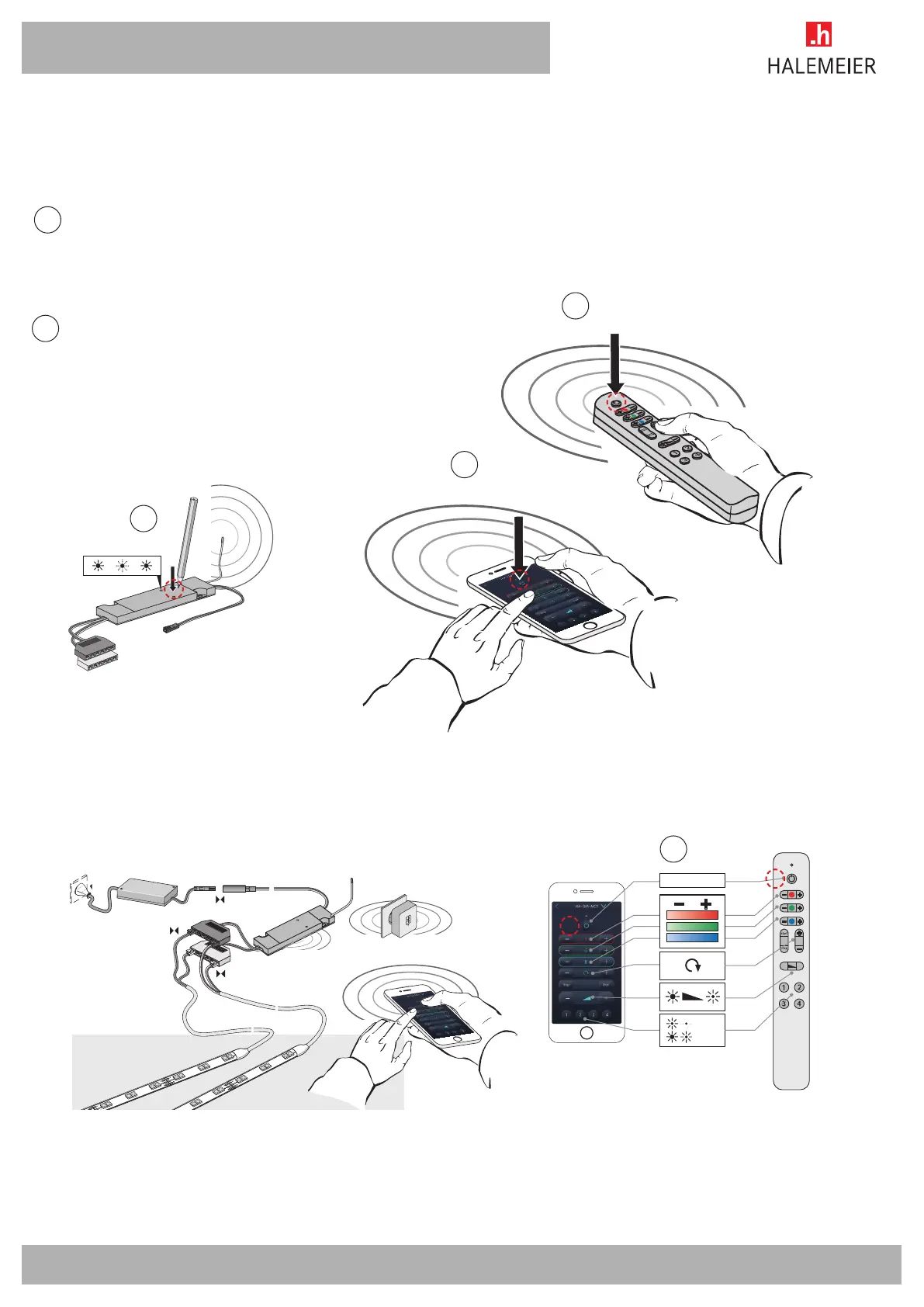
Ausgewählten Sender programmieren! Dazu Taste am Emfänger kurz drücken
Empfänger ist nun im Programmiermodus
Programme selected transmitter!
In order to do so, press the key on the receiver for a short time The receiver is now
in programming mode
App und Fernbedienung werden auf gleiche Art mit dem Empfänger gekoppelt.
ON / OFF Taste an der Fernbedienung (B1) oder in der App (B2) 1 x kurz drücken.
Die Fernbedienung oder die APP koppelt sich nun mit dem Empfänger. Es können
mehrere Fernbedienung gleichzeitig zur Steuerung genutzt werden. Das App kann
je AppMitter Dongle nur eine Verbindung aufbauen.
App and remote control are connected to the receiver in the same way. Press the ON
/ OFF key on the remote control (B1) or in the app (B2) down briefly once. The remote
control or the APP now connects with the receiver. Several remote controls can be
used at the same time. The app can only make one connection for each AppMitter
dongle.
Programmierbeipiel S-Mitter MultiColor
(Für andere Funkschalter siehe Montageanleitung des spezifischen Empfängers)
Example of programming for S-Mitter MultiColor
(See the installation instructions of the specific receiver for other remote switches)
Anschlussbeispiel S-Mitter MultiColor
Example of connection for S-Mitter MultiColor
25.350.62 / 03.03.2016


 To Next Page
 Loading...