Typ: HA-ZSM-MW²
Halemeier GmbH - Lange Straße 51 - D 49326 Melle Neuenkirchen - www.halemeier.de
4
21.04.2021
cm
>3s
Press + hold
>3s
press + hold
3x
3x
25.825.10 /
S-Mier MulWhite²
4-channel 12V
Teach-in – Connecon
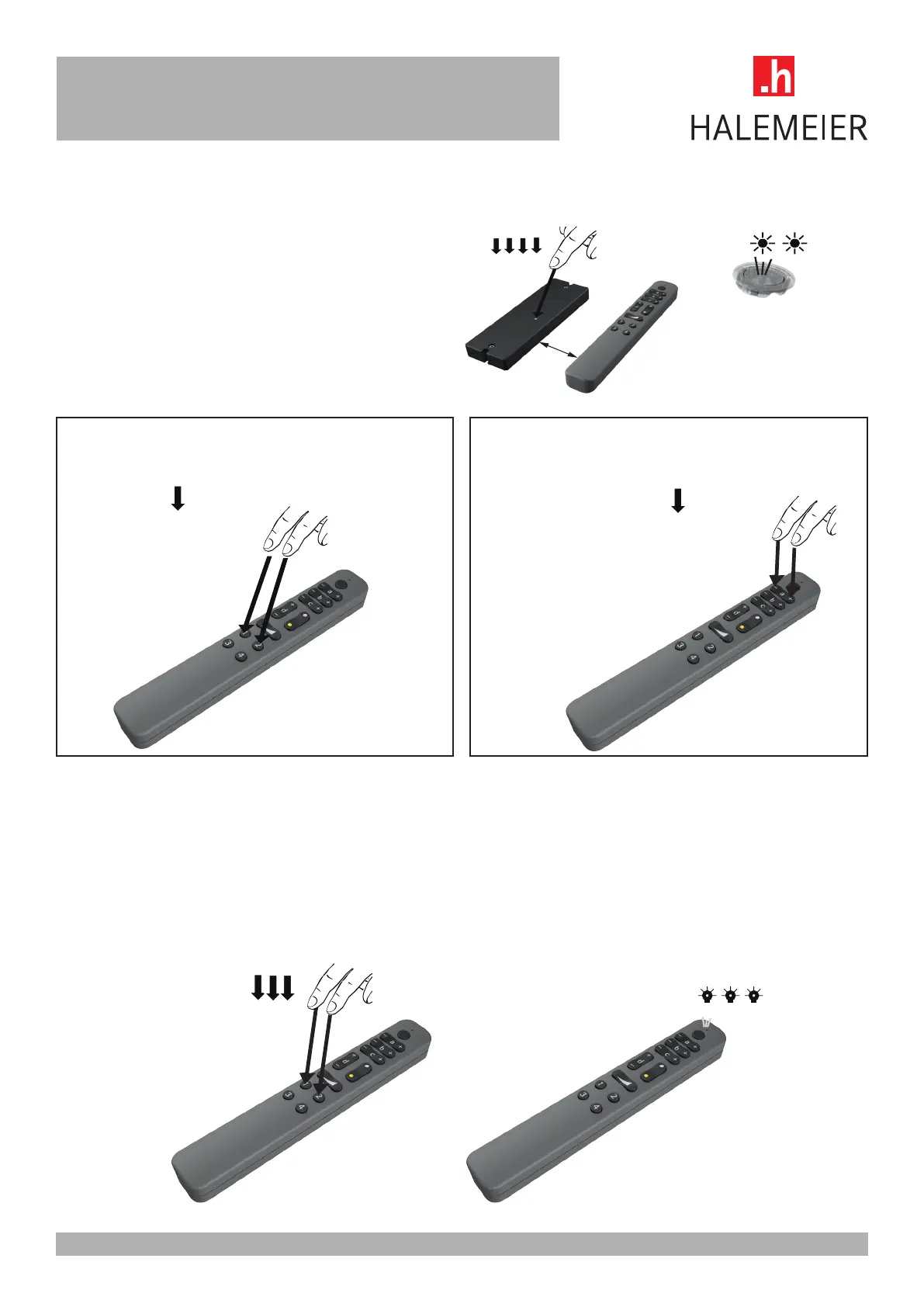
via Touchlink to another compable device, e.g. Halemeier Zigbee Transmier
First, the receiver is set to teach-in mode.
Zigbee receiver: Press Prog. buon 4x
Teach-in with 4-channel receiver
Press + hold buons 1 & 2 >3s
Teach-in with 1-channel receiver
Press buons + & -> and hold 3s
Repeat from channel a to d
The successful start is conrmed by a fast ashing of the red indicator LED. If the connecon is successful, the red LED ashes
6 mes. The successful connecon is also conrmed by the ashing of the connected LED light
Factory reset – Remove all connecons to start a new conguraon
!!! All connecons to devices and the connecon to the network will be deleted!!!
Press buons 1&2 3 mes simultaneously to reset the remote control. This is acknowledged
by the indicator LED ashing 3 mes



 To Previous Page