EasyManua.ls Logo

Halex ORB - Page 3

Halex ORB
12 pages
Print Icon
To Next Page IconTo Next Page
To Previous Page IconTo Previous Page
Loading...
Halex
Electronic
Dartboard
4
Setup
/
Mounting
Instructions
Choose
a
location
to
hang
the
dartboard
where
there
is
about
10
feet
of
open
space
in
front
of
the
board.
The
“toe-line”
should
be
7’
9
1/4”
from
the
face
of
the
dartboard
Try
to
mount
it
close
to
an
electric
outlet
so
that
you
can
reach
the
power
source
with
the
AC
adapter.
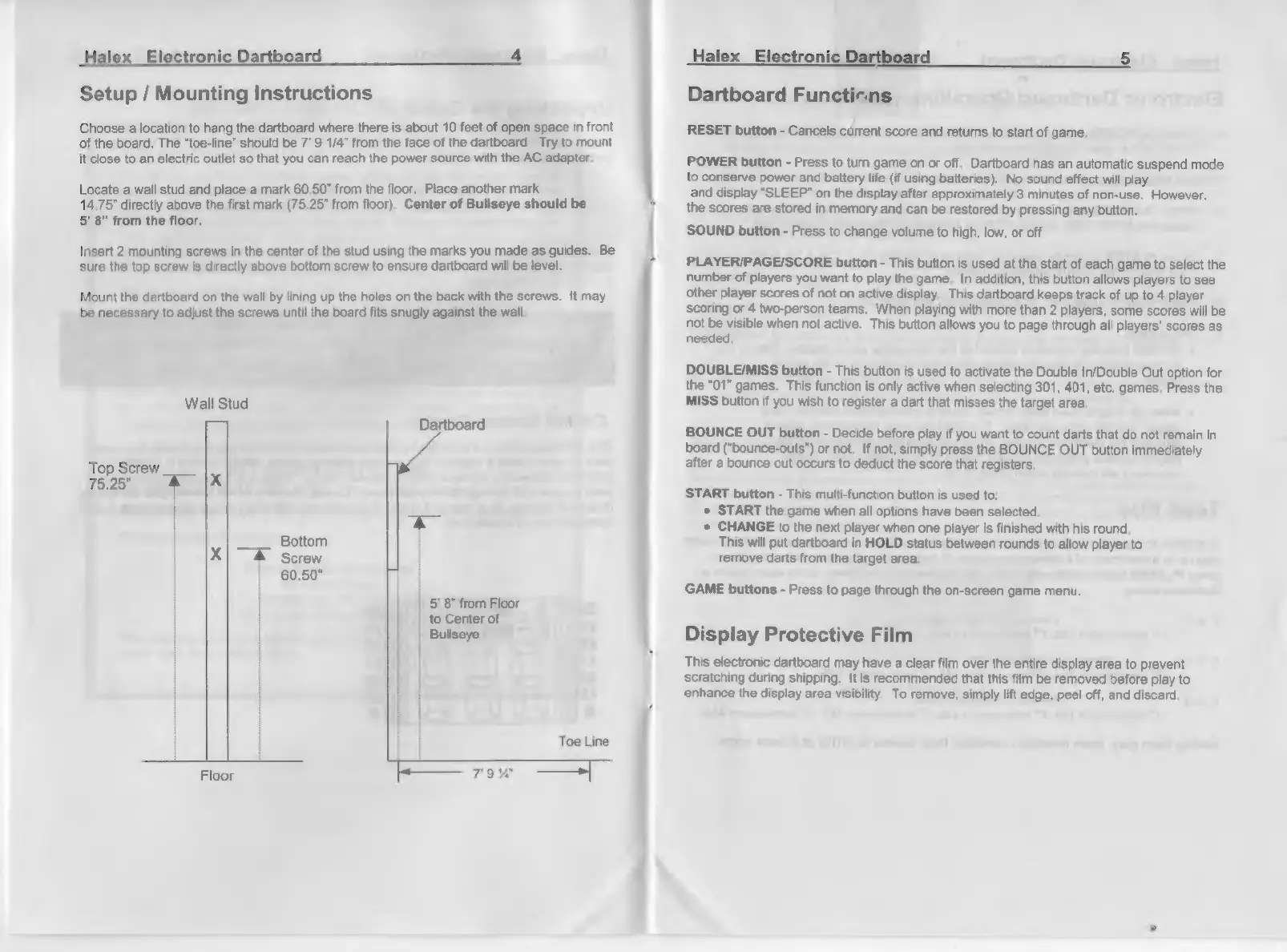
Locate
a
wall
stud
and
place
a
mark
60.50”
from
the
floor.
Place
another
mark
14.75”
directly
above
the
first
mark
(75.25”
from
floor).
Center
of
Bullseye
should
be
5’
8”
from
the
floor.
Insert
2
mounting
screws
in
the
center
of
the
stud
using
the
marks
you
made
as
guides.
Be
sure
the
top
screw
is
directly
above
bottom
screw
to
ensure
dartboard
will
be
level.
Mount
the
dartboard
on
the
wall
by
lining
up
the
holes
on
the
back
with
the
screws.
It
may
be
necessary
to
adjust
the
screws
until
the
board
fits
snugly
against
the
wall.
Wall Stud
ial
Dartboard
Top
Screw
75.25",
RIX
|
yes
Bottom
X
Screw
60.50"
5'
8"
from
Floor
|
to
Center
of
i
Bullseye
f
Floor
Halex
Electronic
Dartboard
5
Dartboard
Functions
RESET
button
-
Cancels
cúrrent
score
and
returns
to
start
of
game.
POWER
button
-
Press
to
turn
game
on
or
off.
Dartboard
has
an
automatic
suspend
mode
to
conserve
power
and
battery
life
(if
using
batteries).
No
sound
effect
will
play
and
display
“SLEEP”
on
the
display
after
approximately
3
minutes
of
non-use.
However,
the
scores
are
stored
in
memory
and
can
be
restored
by
pressing
any
button.
SOUND
button
-
Press
to
change
volume
to
high,
low,
or
off.
PLAYER/PAGE/SCORE
button
-
This
button
is
used
at
the
start
of
each
game
to
select
the
number
of
players
you
want
to
play
the
game.
In
addition,
this
button
allows
players
to
see
other
player
scores
of
not
on
active
display.
This
dartboard
keeps
track
of
up
to
4
player
scoring
or
4
two-person
teams.
When
playing
with
more
than
2
players,
some
scores
will
be
not
be
visible
when
not
active.
This
button allows
you
to
page
through
all
players’
scores
as
needed.
DOUBLE/MISS
button
-
This
button
is
used
to
activate
the
Double
In/Double
Out
option
for
the
"01"
games.
This
function
is
only
active
when
selecting
301, 401,
etc.
games.
Press
the
MISS
button
if
you
wish
to
register
a
dart
that
misses
the
target
area.
BOUNCE
OUT
button
-
Decide
before
play
if
you
want
to
count
darts
that
do
not
remain
in
board
(*bounce-outs”)
or
not.
If
not,
simply
press
the
BOUNCE
OUT
button
immediately
after
a
bounce
out
occurs
to
deduct
the
score
that
registers.
START
button
-
This
multi-function
button
is
used
to:
+
START
the
game
when
all
options
have
been
selected,
+
CHANGE
to
the
next
player
when
one
player
is
finished
with
his
round.
This
will
put
dartboard
in
HOLD
status
between
rounds
to
allow
player
to
remove
darts
from
the
target
area.
GAME
buttons
-
Press
to
page
through
the
on-screen
game
menu.
Display
Protective
Film
This
electronic
dartboard
may
have
a
clear
film
over
the
entire
display
area
to
prevent
scratching
during
shipping.
It
is
recommended
that
this film
be
removed
before
play
to
enhance
the
display
area
visibility.
To
remove,
simply
lift
edge,
peel
off,
and
discard.