

EasyManua.ls Logo

Halo Wireless Hub - User Manual

Halo Wireless Hub
12 pages
Print Icon
To Next Page IconTo Next Page
Loading...
WIRELESS HUB
PLEASE READ BEFORE OPERATING THIS EQUIPMENT
Question and Answer IconNeed help?

Do you have a question about the Halo Wireless Hub and is the answer not in the manual?

Summary

Important Safety Instructions

Child Supervision and Handling

Supervise children closely; prevent them from putting fingers or hands into the product to avoid injury.

Environmental and Electrical Safety

Avoid rain, snow, fire, and excessive temperatures. Use only recommended power supplies to prevent fire or injury.

Product Use and Integrity

Do not use damaged or modified units. Do not disassemble; seek qualified service for repairs or modifications.

Operating Environment and Damage Prevention

Operate in open-air conditions only. Avoid enclosed spaces and protect from drops, bumps, and physical damage.

Abnormal Operation and RF Exposure

Stop use if device is hot, emits odor, or shows abnormal phenomena. Device meets RF exposure requirements.

Included Items

Product Components

Lists the HALO WIRELESS HUB, AC Adapter, USB-A to Micro USB Cable, and USB-C to USB-C Cable.

Component Identification

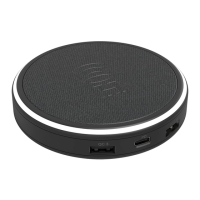
Identifies key parts of the HALO WIRELESS HUB: Wireless Charging, Ring Light, DC Input Port, USB-A/USB-C ports, and Non-slip Feet.

Operating Instructions

Powering the Wireless Hub

Connect the supplied AC wall adapter to the charging base and the wall outlet to power the HALO WIRELESS HUB.

Wireless Device Charging

Place the wireless device on the HALO WIRELESS HUB, aligning the device center over the charging base center for charging.

Product Features and Specifications

Halo Wireless Hub Ring Light

Describes the Ring Light behavior: 5 seconds on power-up, 15 seconds during charging, flashing on error/foreign object detection.

Charging Personal Electronic Devices

Use provided cables to charge up to four devices simultaneously; charging starts automatically upon connection.

Technical Specifications

Details DC Input, WPC/Type-C/USB-A output ratings, dimensions, weight, and operating/storage temperatures.

Compliance and Warranty Information

FCC Compliance Regulation

States compliance with FCC Rules Part 15, outlining conditions for operation and potential interference mitigation.

FCC Radiation Exposure Statement

Confirms compliance with FCC RF exposure limits for uncontrolled environments, requiring minimum 20cm distance.

Modification and Legal Disclaimer

Warns against unauthorized modifications and outlines manufacturer liability limitations and user responsibilities.

Limited Warranty Details

Covers product warranty for defects, repair/replacement within 90 days, and limitations on implied warranties and damages.

Summary

Important Safety Instructions

Child Supervision and Handling

Supervise children closely; prevent them from putting fingers or hands into the product to avoid injury.

Environmental and Electrical Safety

Avoid rain, snow, fire, and excessive temperatures. Use only recommended power supplies to prevent fire or injury.

Product Use and Integrity

Do not use damaged or modified units. Do not disassemble; seek qualified service for repairs or modifications.

Operating Environment and Damage Prevention

Operate in open-air conditions only. Avoid enclosed spaces and protect from drops, bumps, and physical damage.

Abnormal Operation and RF Exposure

Stop use if device is hot, emits odor, or shows abnormal phenomena. Device meets RF exposure requirements.

Included Items

Product Components

Lists the HALO WIRELESS HUB, AC Adapter, USB-A to Micro USB Cable, and USB-C to USB-C Cable.

Component Identification

Identifies key parts of the HALO WIRELESS HUB: Wireless Charging, Ring Light, DC Input Port, USB-A/USB-C ports, and Non-slip Feet.

Operating Instructions

Powering the Wireless Hub

Connect the supplied AC wall adapter to the charging base and the wall outlet to power the HALO WIRELESS HUB.

Wireless Device Charging

Place the wireless device on the HALO WIRELESS HUB, aligning the device center over the charging base center for charging.

Product Features and Specifications

Halo Wireless Hub Ring Light

Describes the Ring Light behavior: 5 seconds on power-up, 15 seconds during charging, flashing on error/foreign object detection.

Charging Personal Electronic Devices

Use provided cables to charge up to four devices simultaneously; charging starts automatically upon connection.

Technical Specifications

Details DC Input, WPC/Type-C/USB-A output ratings, dimensions, weight, and operating/storage temperatures.

Compliance and Warranty Information

FCC Compliance Regulation

States compliance with FCC Rules Part 15, outlining conditions for operation and potential interference mitigation.

FCC Radiation Exposure Statement

Confirms compliance with FCC RF exposure limits for uncontrolled environments, requiring minimum 20cm distance.

Modification and Legal Disclaimer

Warns against unauthorized modifications and outlines manufacturer liability limitations and user responsibilities.

Limited Warranty Details

Covers product warranty for defects, repair/replacement within 90 days, and limitations on implied warranties and damages.

Overview

The HALO WIRELESS HUB is an innovative and easy-to-use universal charging source designed for both wireless and non-wireless devices. It provides a powerful and convenient way to charge multiple electronic devices simultaneously.

Function Description:

The HALO WIRELESS HUB serves as a central charging station. Its primary function is to wirelessly charge compatible devices placed on its top surface, while also offering multiple wired output ports for charging other electronic devices. The device is powered by an AC adapter, connecting to a standard wall outlet.

Important Technical Specifications:

  • DC Input: 15V/4A
  • WPC Output (Wireless Charging): 10W Max
  • TYPE-C Output: 5V/3A, 9V/2A, 12V/1.5A (PD18W)
  • USB-A Output 1: 5V/2.4A
  • USB-A Output 2: 5V/3A, 9V/2A, 12V/1.5A (QC18W)
  • USB-A1+USB-A2 Output (Combined): 15W MAX
  • Dimensions (L x W x H): 3.78 x 0.87 inches
  • HALO WIRELESS HUB Weight: 0.2 lbs
  • AC Adapter Weight: 0.4 lbs
  • Operating Temperature: 32°F - 104°F (0°C - 40°C)
  • Storage Temperature: 68°F - 158°F (20°C - 70°C)

Usage Features:

  • Wireless Charging: The top surface of the hub supports wireless charging. To use this feature, a compatible wireless device should be placed on the charging base, ensuring its center is aligned with the center of the hub. Charging initiates upon contact.
  • Multiple Wired Charging Ports: The device includes several output ports for wired charging:
    • One USB-C Output Port
    • Two USB-A Output Ports (USB-A Output Port 1 and USB-A Output Port 2)
    • These ports allow for simultaneous charging of up to four devices (one wireless, three wired).
  • Ring Light Indicator: The HALO WIRELESS HUB features a "Ring Light" that provides visual feedback on its status:
    • When powered on, the Ring Light illuminates for 5 seconds.
    • During active charging, the Ring Light illuminates for 15 seconds before turning off.
    • If a foreign object is detected on the wireless charging surface or if an error occurs, the Ring Light will flash, and the wireless output will turn off for safety.
  • Included Cables: The product comes with an AC Adapter, a USB-A to Micro USB Cable, and a USB-C to USB-C Cable, providing immediate connectivity for various devices. Users can also utilize the USB cables supplied with their personal electronic devices.
  • Non-slip Feet: The base of the hub is equipped with non-slip feet to ensure stability during use.

Maintenance Features:

The manual emphasizes several important safety and maintenance instructions to ensure the longevity and safe operation of the HALO WIRELESS HUB:
  • Avoid Disassembly: Users are strictly advised not to disassemble, re-purpose, or modify the product. Any service or repair should be performed by a qualified service person.
  • Environmental Protection: The device should not be exposed to rain or snow, fire, or excessive temperatures above 70°C/158°F. It must be operated only in open-air conditions and not in enclosed, unventilated spaces like bags, pockets, purses, or bedding, as this can lead to overheating.
  • Physical Care: Users should be cautious of drops, bumps, abrasions, or other impacts. If any damage such as dents, punctures, tears, deformities, or corrosion is observed, discontinue use immediately and contact the manufacturer or dispose of the product appropriately.
  • Output Rating Adherence: Do not use the product in excess of its output rating, as overloading can result in a risk of fire or injury.
  • Unplug When Not in Use: To conserve energy and for safety, the product should be unplugged when not in use.
  • Supervision with Minors: Close supervision is necessary when the product is used near children. The purchaser is responsible for providing supervision, instruction, and warnings to minors.
  • Quality Assurance: All products undergo a thorough quality assurance inspection. If the device becomes excessively hot, emits odor, is deformed, abraded, cut, or exhibits any abnormal phenomenon, users should immediately stop using it and contact the manufacturer.
  • FCC Compliance: The device complies with FCC regulations, and any changes or modifications not expressly approved by the responsible party could void the user's authority to operate the equipment. It should be installed and operated with a minimum distance of 20cm between the radiator and the user's body. Certified peripherals and shielded cables must be used to comply with Class B digital device limits.

Halo Wireless Hub Specifications

General IconGeneral
BrandHalo
ModelWireless Hub
CategorySwitch
LanguageEnglish