2
G Operating instruction
Thank you for choosing aHama product.
Take your time and read the following instructions and information
completely.Please keep these instructions in asafe place for
futurereference. If you sell the device, please pass these operating
instructions on to the new owner.
1. Explanation of Warning Symbols and Notes
Risk of electric shock
This symbol indicates product parts energized with adangerous
voltage of sucient magnitude to constitute arisk of electric
shock.
Warning
This symbol is used to indicate safety instructions or to draw
your attention to specichazards and risks.
Note
This symbol is used to indicate additional information or
important notes.
2. Package Contents
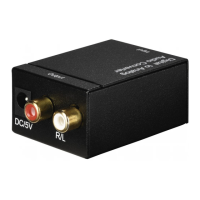
•‘AC80’ audio converter
•These operating instructions
3. Safety Notes
•The product is intended for private, non-commercial use only.
•Protect the product from dirt, moistureand overheating, and
only use it in adry environment.
•Keep this product, as all electrical products, out of the reach
of children!
•Use the product for its intended purpose only.
•Donot use the product in the immediate vicinity of heaters or
other heat sources or in direct sunlight.
•Donot operate the product outside the power limits given in
the specications.
•Donot use the product in areas wherethe use of electronic
devices is not permitted.
•Donot use the product in moist environments and avoid
splashes.
•Donot drop the product and do not expose it to any major
shocks.
•Donot modify the product in any way.Doing so voids the
warranty.
•Keepthe packaging material out of the reach of children due to
the risk of suffocation.
•Dispose of packaging material immediately according to locally
applicable regulations.
Risk of electric shock
•Donot open the device or continue to operate it if it
becomes damaged.
•Donot use the product if the AC adapter,the adapter cable
or the mains cable aredamaged.
•Donot attempt to service or repair the product yourself.
Leave any and all service work to qualied experts.
4. Introduction
The audio converter is an ideal expansion for TVs, home cinemas
and game consoles. Frequently,these devices do not have all of the
connections that arerequired. Most often, thereisadigital audio
output for connecting to asurround sound system. However,ifyou
want to connect to astandardstereo system or active speakers, the
required connections areoften not available.
The audio converter lets you tap into the digital sound output using
the coaxial output or the optical output. The device converts the
digital sound and then outputs it to an analogue stereo sound
output (2 xRCA).
The converter is suitable for digital sound signals at sampling rates
up to 96 kHz and resolutions up to
24 bits, and can thus be used in almost any situation.
5. Getting started and operation
Note
•Always refer to the operating instructions for all the devices
you areconnecting.
•Lay all cables so that they do not pose atripping hazard.
•Donot bend or crush the cable.
Beforeinstallation, ensurethat all devices to be connected are
switched off.
•Connect aToslink cable (not included) to the ‘Toslink’ audio
input (1) or an RCAcable (not included) to the ‘Coaxial’ audio
input (2) and to your playback device (for example, TV,Blu-ray
player,game console).
•Now connect another RCAcable (2 RCA–2RCA,not included)
to the ‘R/L’audio output (5) and to your audio device (for
example, amplier,active speaker).
Note
The white RCAplug connects to the LEFT audio output, the red
RCAplug to the RIGHT audio output.


 To Next Page
 Loading...