Note
Pleasenote that youcannot establish the
Bluetooth connectiondescribed under4.1
and 4.2ifanaudio cable is connected.
4.3 Bluetoothpairing
Note
•Check whether yourmobiledevice
(MP3player,mobilephone, etc.) is
Bluetooth-capable.
•The functions describedinthissection
areonly available for Bluetooth-capable
terminal devices.
•Note thatthe max.range of Bluetooth
without any obstacles such aswalls,
people,etc. is 10 metres.
•Make surethat your Bluetooth-capable
terminaldevice is on andBluetoothis
activated.
•Make surethat your Bluetooth-capable
terminaldevice is visible for other Bluetooth
devices.
•Make surethat the speaker is locatedwithin
the Bluetooth rangeofmax. 10metres.
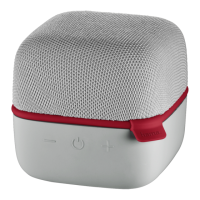
•Switch on thespeaker (1). Thedevice
willemit asoundand thestatus LED will
ash, conrmingthat the deviceisready
for operation.
•The speaker automatically searches for a
connection.The LED display ashes.
•Openthe Bluetooth settings on your
terminaldevice and wait until Hama
Speaker appears in thelistofBluetooth
devicesfound.
•SelectHamaSpeakerand wait until you
hearthe speakeremit asoundand the
speaker is listed as connected in the
Bluetoothsettings on your terminaldevice.
•Start andstopaudio playback on your
terminal deviceorusing Play/Pause (2) on
thespeaker.
Note –Bluetooth password
Some terminaldevices requireapassword
in order to connecttoanotherBluetooth
device.
•Ifyourterminal device requests a
passwordfor connection withthe
speaker, enter 0000.
4


 To Next Page