9
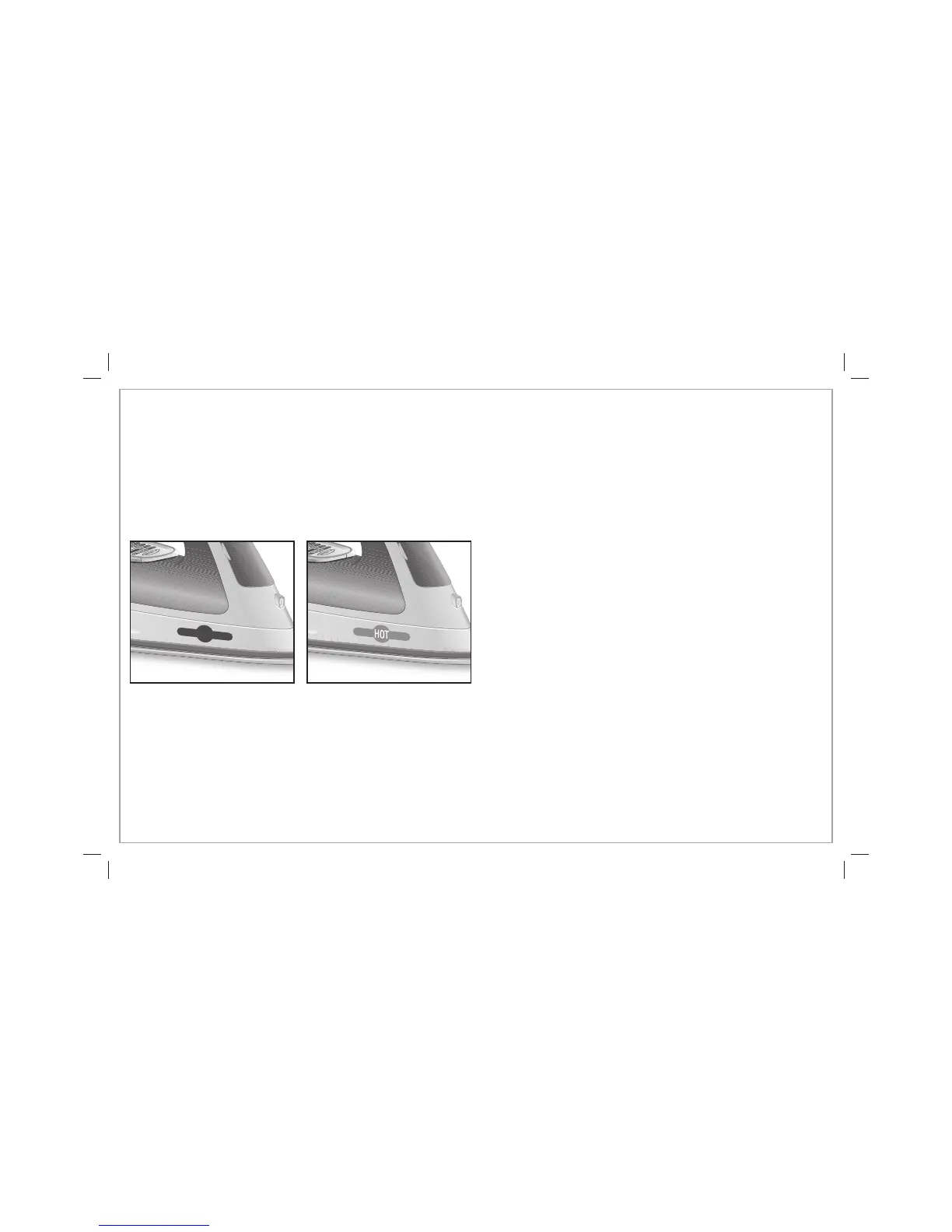
Hot Dot Indicator
After the iron has been preheated (approximately 2 minutes after turning on the iron), the Hot Dot Indicator will gradually change from
all black to red, and the word “HOT” will appear in the center of the dot in white letters. When the word “HOT” is no longer visible
(approximately 35 minutes after turning off the iron) and the dot is all black again, the iron is cool enough to put away.
WARNING! Burn Hazard: The Hot Dot Indicator is a guideline only. Always avoid contact with the soleplate of the iron.
Due to usage conditions, the Hot Dot Indicator may stop working before the end of the iron’s useful life. If may start to remain red after the
iron cools down. Replacement Hot Dot Indicators are available by calling 1.800.851.8900.
Iron is cool enough to store. Iron is too hot to store.
840202101 ENv02.indd 9840202101 ENv02.indd 9 3/19/12 4:14 PM3/19/12 4:14 PM




 To Next Page