6
How to Steam (cont.)
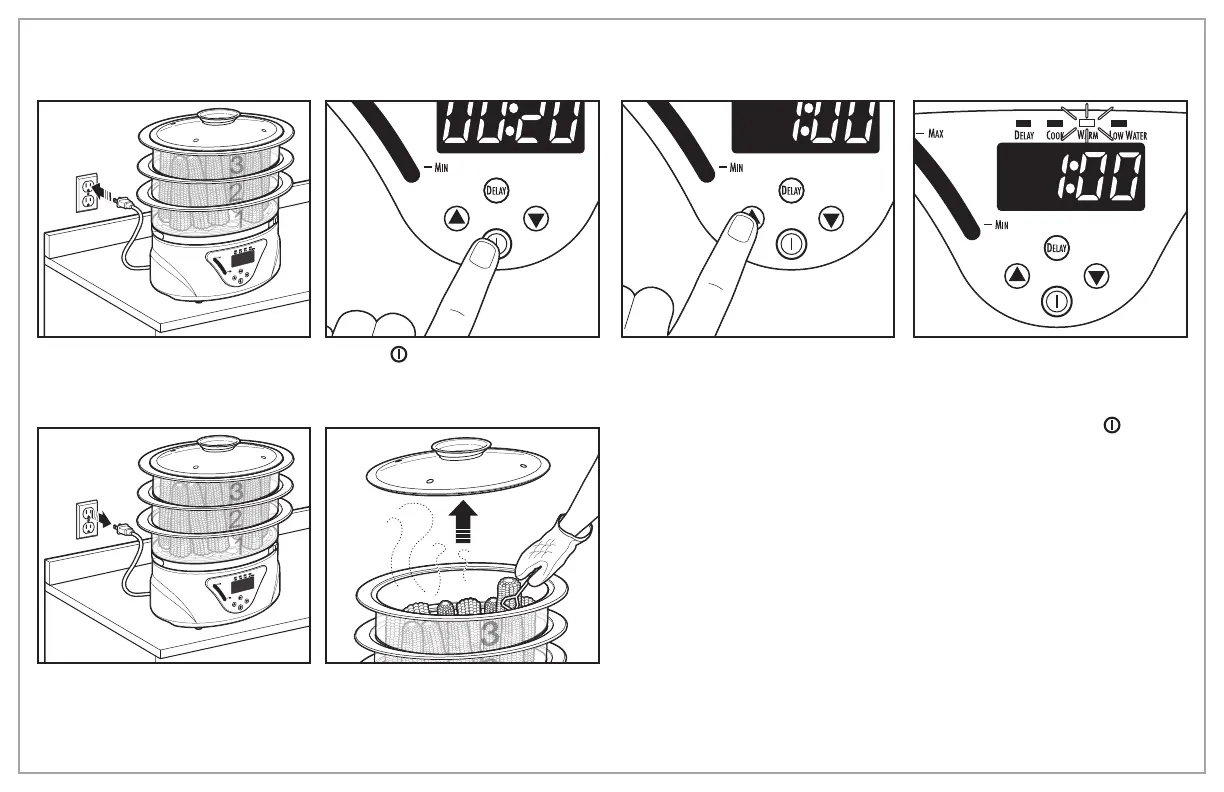
7. Plug into outlet. Food Steamer will
beep when turned on.
8. Press (on/off) button to start
steaming cycle.
9. To adjust desired cooking time, press
up or down arrows. Maximum steam
time is 1 hour.
NOTE: If no adjustment is made to
cooking time, unit will begin steaming
after approximately 5 seconds.
10. Unit will beep when cooking time
is complete and will automatically
switch to WARM mode for up to 1
hour. WARM mode can be cancelled
at any time by pressing (on/off)
button.
MIN
MAX
MIN
MAX
11. Unit beeps when turned off and
beeps again when unplugged.
NOTE: Unit will automatically shut off
after 1 hour of WARM time.
12. Using an oven mitt, carefully remove
Lid and food.
NOTE: Poultry, meat, fish or seafood
should always be placed in #1 Steam
Bowl to avoid dripping on food in lower
Steam Bowls.


 To Next Page