9
How to Use the Brew Option and Keep-Warm Features
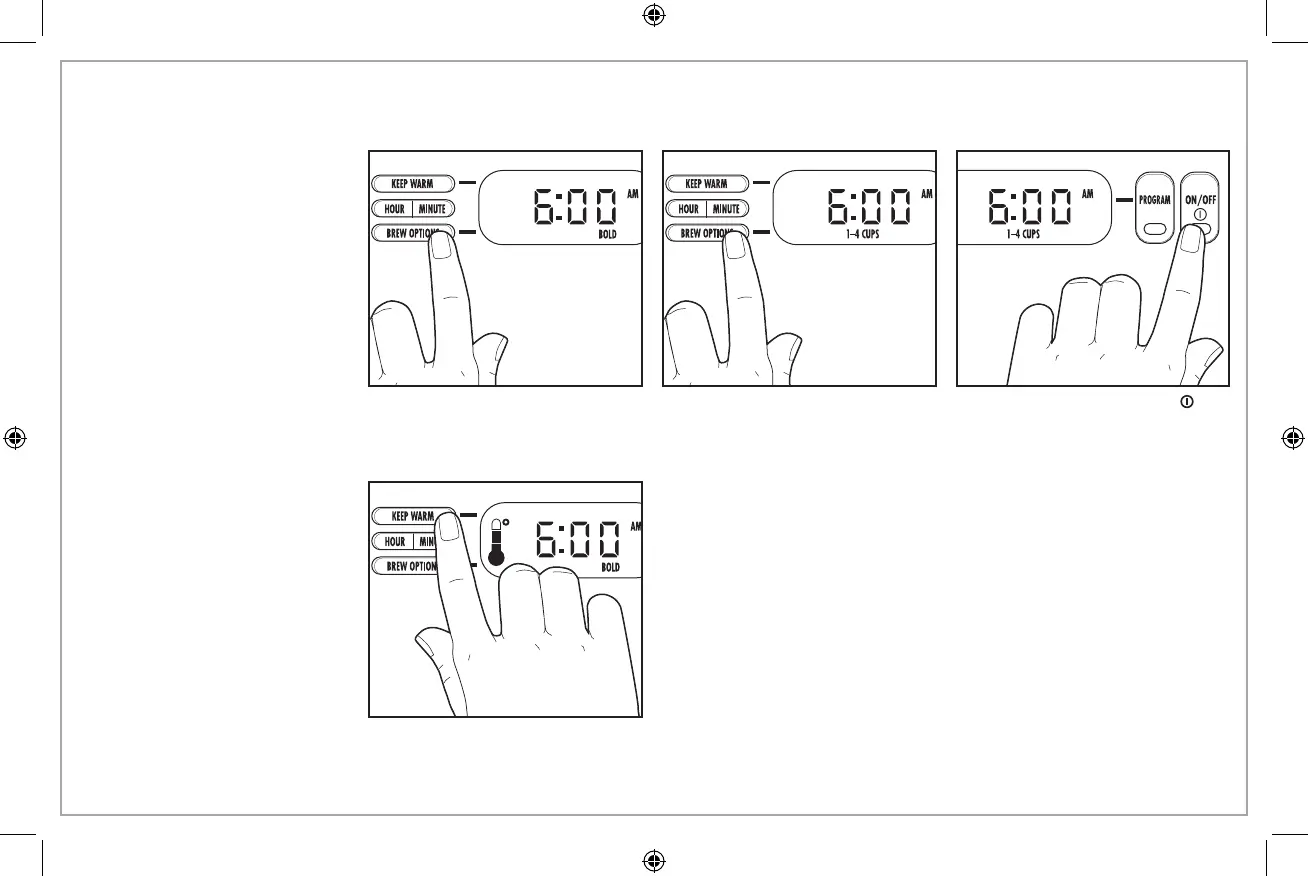
BREW OPTIONS
Your coffee maker will default
to the “Regular” strength coffee
setting when brewing.
NOTE: Using the brew strength
options will increase the length of
brewing time slightly.
1. For stronger coffee, hold the
BREW OPTIONS button until
“BOLD” is illuminated; then
release.
2. For small amounts, use the
1–4 cup setting by holding
the BREW OPTIONS button until
“1–4 CUPS” is illuminated;
then release.
3. Then, press the ON/OFF (
)
button or set the Automatic
Brew to start the coffee maker
after your brew option has
been selected.
KEEP WARM
This unit is equipped with an
adjustable keep-warm feature
and will default to the highest
(warmest) temperature setting.
NOTE: If adjusting the keep-warm
temperature after brewing, allow
approximately 15 minutes for
the coffee maker to adjust its
temperature setting.
4. Adjust the keep-warm setting by pressing the KEEP WARM button
until your desired temperature setting is displayed; then release.
840183103 ENv05.indd 9 11/11/2016 11:08:01 AM






 To Next Page