8
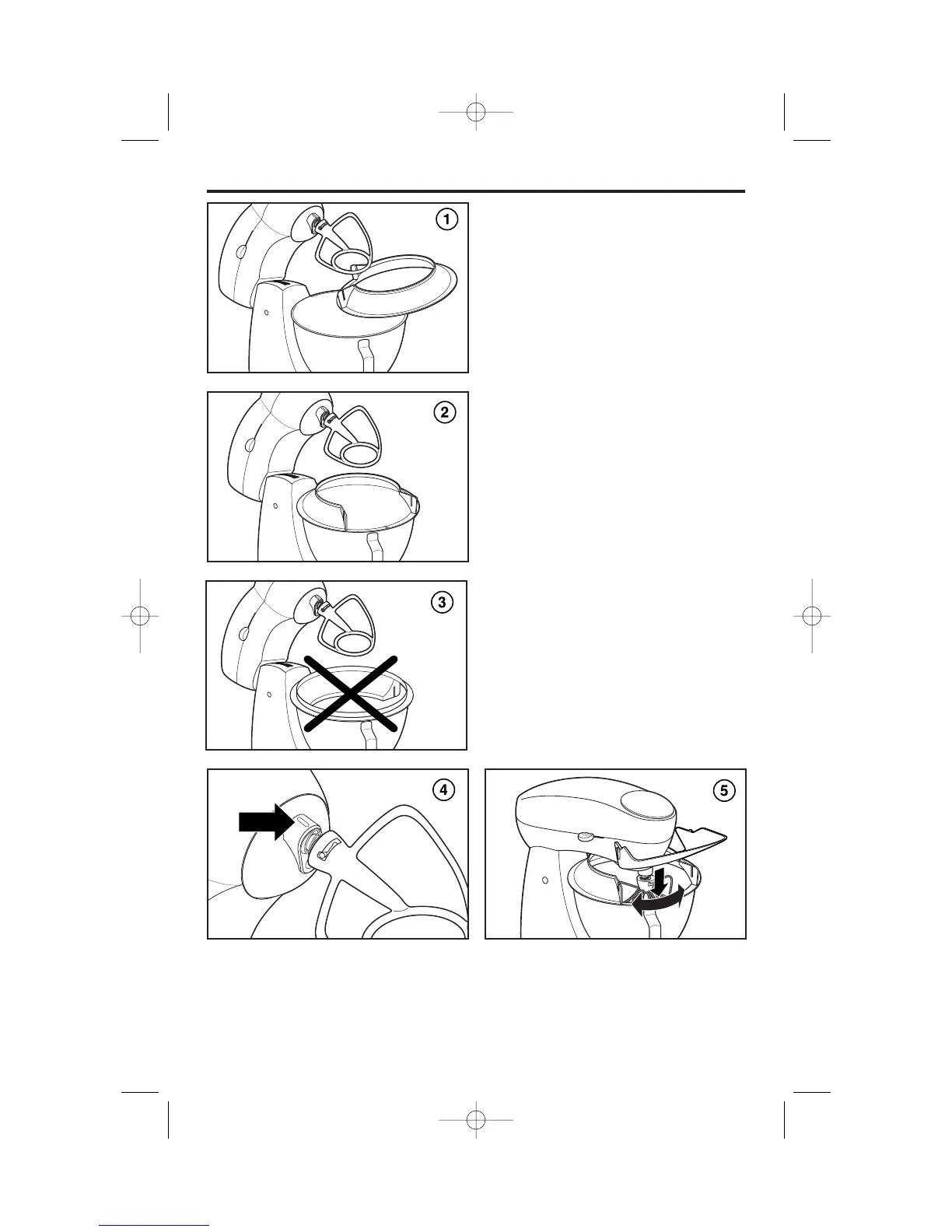
1. Make sure Setting Control is set to
O and Mixer is unplugged.
2. Press up on Mixer Release Button
and tilt Mixer Head up.
3. Attach Bowl and desired Mixer
attachment. See page 7 for more
information.
4. Slide the narrow section of
Pouring Shield under Mixer
attachment. See Illustration 1.
5. Place Pouring Shield on bowl.
See Illustrations 2 and 3.
6. Align the narrow section of collar
on Pouring Shield with indent on
beater shaft. See Illustration 4.
7. Press up on Mixer Release Button
and tilt Mixer Head down.
8. Turn opening of Pouring Shield
to desired position.
9. Insert Pouring Shield tabs in slots
on collar. See Illustration 5.
10. To remove the Pouring Shield,
reverse the order of directions.
To Attach the Pouring Shield



 To Next Page