7
How to Install and Flush Water Filter (and Replace Filters)
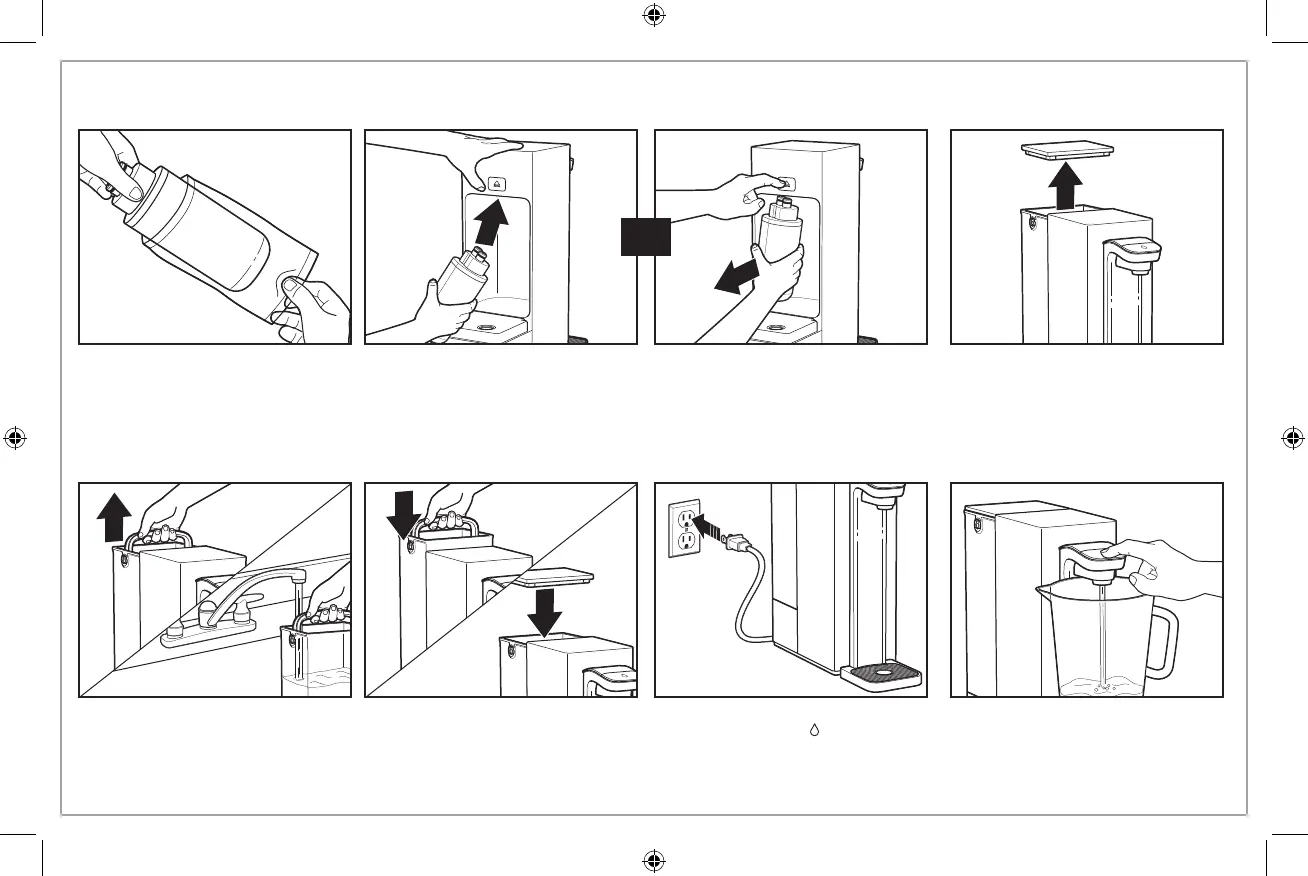
4. Remove Lid on Water Reservoir.
5. Grasp Water Reservoir Handle
and lift straight up to remove. Add
only cold water up to MAX Fill
Line.
6. Align and lower Water Reservoir
onto Water Reservoir Base. Place
Lid on Water Reservoir.
1. Unplug. Remove Water Filter from wrapper.
2. Place hand on top of Brita Hub™ Compact to steady while inserting new Water Filter. To insert Water Filter: Using
other hand, hold Water Filter with Brita logo facing you, then insert and push top end of Filter into Water Filter
Holder (see page 5) until you hear 2 clicks to ensure Filter is fully inserted.
3. OR To remove used Water Filter, hold sides of Water Filter with one hand while pressing Eject Button, pull straight
down and dispose or recycle with TerraCycle. Visit brita.com/recycling to learn more.
7. Plug into outlet. Place a large container on Drip Tray. For automatic
dispensing, press ( ) Dispense Button 2 times until Reservoir is almost
empty, then press Button again to stop dispensing. Dispose of water, or use
to water plants. Refill Reservoir to MAX Fill Line and repeat process. New
Filter must be flushed with an entire Water Reservoir of water twice before
it is ready to use.
OR



 To Next Page