2
1
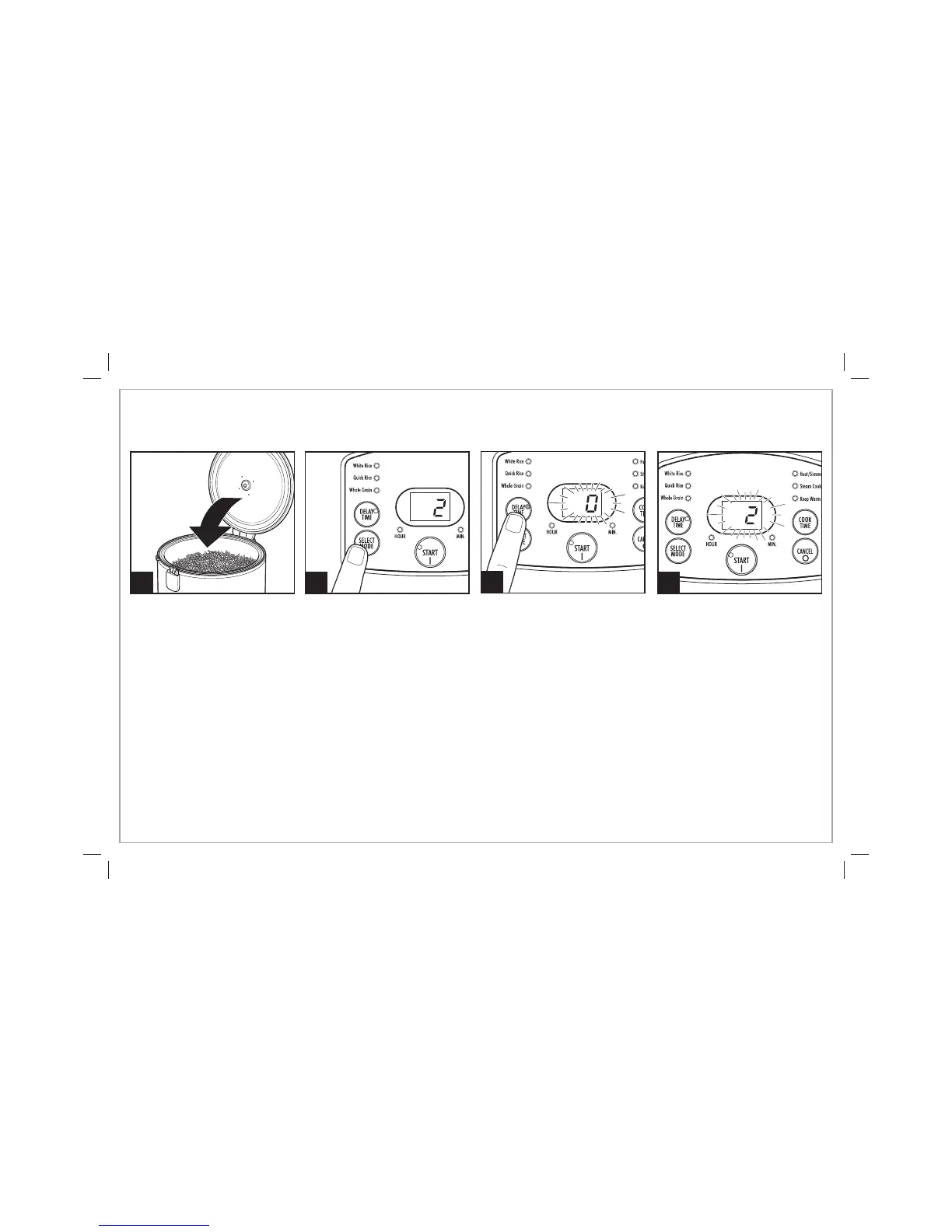
Press SELECT MODE to set cooking
function. Set time if using Heat/
Simmer or Steam Cook.
3
How to Set Delay Start Time
Delay Time can be used with
White Rice, Whole Grain, Heat/
Simmer, and Steam Cook. Place
water and food items in cooking
pot or food in steamer basket.
See How to Steam Food.
Press DELAY TIME. The display
will flash “0.” Continue to press
DELAY TIME to set delay time from
1 to 15 hours. Press START
(I)
to
begin delay start countdown or
rice cooker will automatically start
after 5 seconds.
NOTES:
•
Cooking/steaming will begin once the unit has completed the delay
time countdown.
•
This function is ideal for soaking and cooking dried beans.
The display will flash and then
begin counting down the set delay
time. After cooking is complete,
the rice cooker will go to Keep
Warm (except for Steam Cook).
4
8
840213400 ENv06.indd 8840213400 ENv06.indd 8 5/3/12 1:02 PM5/3/12 1:02 PM


 To Next Page