EasyManua.ls Logo

Hamilton Beach FlexBrew 49983 - Page 12

Hamilton Beach FlexBrew 49983
48 pages
Print Icon
To Next Page IconTo Next Page
To Previous Page IconTo Previous Page
Loading...
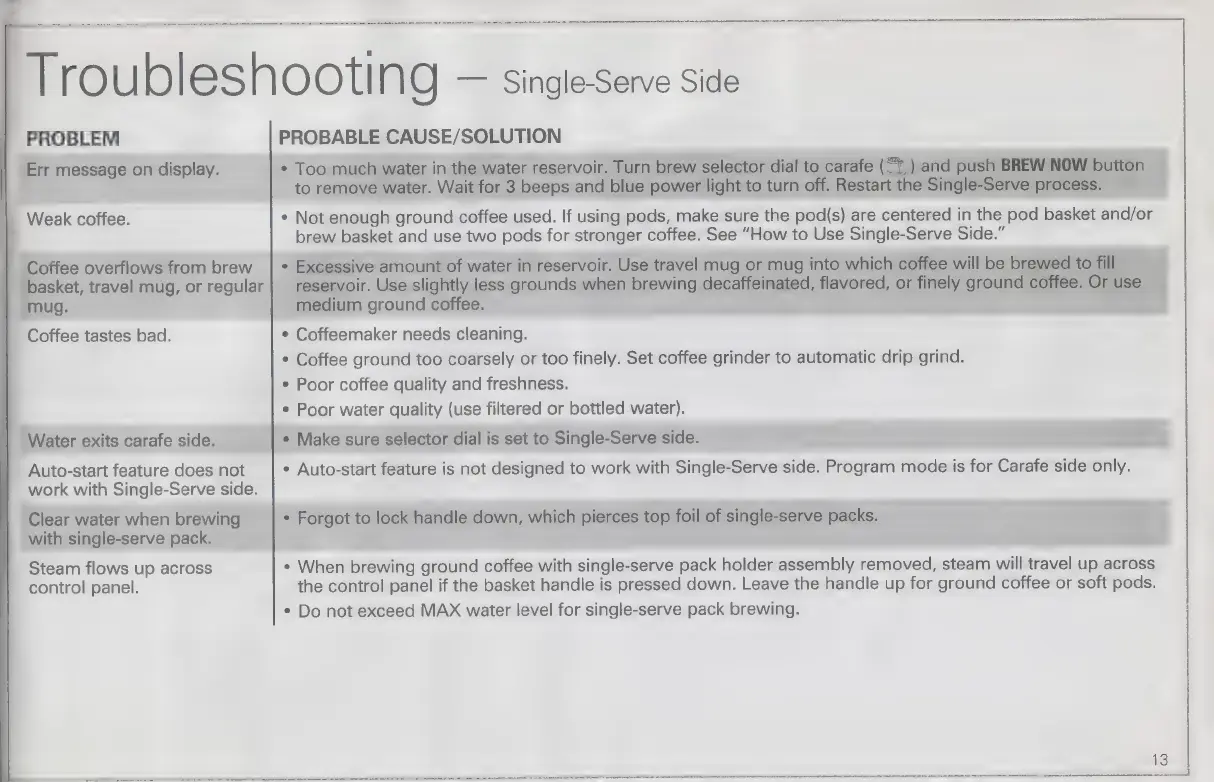
PROBLEM
Err
message
on
display.
|
Weak
coffee.
Coffee
overflows
from
brew
basket,
travel
mug,
or
regular
|
mug.
Coffee
tastes
bad.
Water
exits
carafe
side.
Auto-start
feature
does
not
work
with
Single-Serve
side.
|
Clear
water
when
brewing
with
single-serve
pack.
Steam
flows
up
across
control
panel.
|
Troubleshooting
Single-Serve
Side
|
+
Make
sure
selector
dial
is
set
to
Single-Serve
side.
PROBABLE
CAUSE/SOLUTION
+
Too
much
water
in
the
water
reservoir.
Turn
brew
selector
dial
to
carafe
(51)
and
push
BREW
to
remove
water.
Wait
for
3
beeps
and
blue
power
light
to
turn
off.
Restart
the
Single-Serve
p
OC
+
Not
enough
ground
coffee
used.
If
using
pods,
make
sure
the
pod(s)
are
centered
in
the
pod
pen
andor
brew
basket
and
use
two
pods
for
stronger
coffee.
See
“How
to
Use
Single-Serve
Side.”
+
Excessive
amount
of
water
in
reservoir.
Use
travel
mug
or
mug
into
which
coffee
will
be
brewed
:
o
reservoir.
Use
slightly
less
grounds
when
brewing
decaffeinated,
flavored,
or
finely
ground
offe
medium
ground
coffee.
e
Coffeemaker
needs
cleaning.
e
Coffee
ground
too
coarsely
or
too
finely.
Set
coffee
grinder
to
automatic
drip
grind.
e
Poor
coffee
quality
and
freshness.
+
Poor
water
quality
(use
filtered
or
bottled
water).
e
Auto-start
feature
is
not
designed
to
work
with
Single-Serve
side.
Program
mode
is
for
Carafe
side
ca
e
Forgot
to
lock
handle
down,
which
pierces
top
foil
of
single-serve
packs.
e
When
brewing
ground
coffee
with
single-serve
pack
holder
assembly
removed,
steam
will
aval
up
across
the
control
panel
if
the
basket
handle
is
pressed
down.
Leave
the
handle
up
for
ground
coffee
or
soft
pods.
+
Do
not
exceed
MAX
water
level
for
single-serve
pack
brewing.

Related product manuals