
 Need help?
Do you have a question about the Hamlet HWCAM720 and is the answer not in the manual?
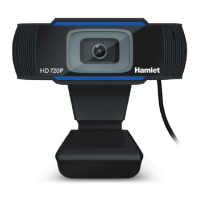
The Hamlet HWCAM720 is a versatile USB webcam designed to enhance your video conferencing and communication experience. It provides a clear visual feed and integrated audio capabilities, making it suitable for a wide range of applications, from personal calls to professional meetings. The webcam is engineered for ease of use, featuring a plug-and-play design that minimizes setup time and complexity.
One of the primary functions of the HWCAM720 is to facilitate high-definition video communication. It is compatible with popular communication software, including Skype, Skype for Business, Microsoft Teams, Zoom, and MS Lync2010/2013, ensuring broad usability across various platforms. This compatibility allows users to seamlessly integrate the webcam into their existing communication workflows without encountering significant technical hurdles. The device is particularly well-suited for videoconferencing, offering a reliable solution for remote work, online learning, and virtual social interactions.
The HWCAM720 is designed with user convenience in mind, offering flexible placement options. It can be securely mounted on an LCD monitor or a laptop screen, providing an optimal viewing angle for most desktop setups. The mounting clip is adjustable, allowing users to fine-tune the webcam's position to achieve the best possible framing for their video calls. Alternatively, the webcam can be placed directly on a desktop, offering another convenient option for users who prefer not to attach it to their screen or who are using a separate display. This adaptability ensures that the webcam can be integrated into various workspace configurations, catering to individual preferences and technical requirements.
Setting up the HWCAM720 is straightforward. Users simply need to connect the webcam's USB cable to an available USB port on their computer. The device is designed to be recognized and installed automatically by the operating system, typically within about one minute, eliminating the need for manual driver installation. This driverless connection feature is a significant advantage, particularly for users who may not be technically proficient or who prefer a hassle-free setup process. It is compatible with Windows 8/10 and Mac OS, ensuring broad accessibility for a wide range of computer users. Once connected and recognized, the webcam is ready for immediate use with any compatible communication software.
The webcam incorporates an integrated microphone, which is a key feature for comprehensive communication. This microphone is equipped with background noise reduction technology, aiming to deliver clearer audio during calls by minimizing ambient distractions. This is particularly beneficial in environments where background noise might otherwise interfere with communication, such as busy offices or homes. The combination of high-definition video and clear audio ensures a more immersive and effective communication experience for both the user and their interlocutors.
For maintenance and longevity, users are advised to handle the webcam with care. While the manual does not detail specific cleaning instructions, general best practices for electronic devices would apply, such as keeping it free from dust and moisture. The product is manufactured with materials and components that comply with various environmental directives, including RoHS Directives 2011/65/EU & 2015/863/EU and WEEE Directive 2002/96/CE. This commitment to environmental responsibility extends to the end-of-life disposal of the device. Users are encouraged to dispose of the webcam in an environmentally friendly manner by utilizing separate bins for electrical/electronic waste or by returning it to their retailer for proper recycling. This ensures that the product's components are managed responsibly, minimizing environmental impact.
In cases where the webcam does not appear to be functioning as expected, the manual provides troubleshooting guidance. If the camera is not recognized by the operating system, users can check the "Device Manager" under Control Panel > System and Security > System to confirm that "USB Camera" is listed. If a video calling application is not using the webcam, users should verify the audio and video device settings within their communication software, ensuring that "USB2.0 Camera" is selected as the source for both microphone and video. This is a common issue, as many software applications default to integrated cameras if available. By providing these simple troubleshooting steps, the manual empowers users to resolve common issues quickly and efficiently, ensuring a smooth and uninterrupted communication experience.
The Hamlet HWCAM720 is a user-friendly and reliable webcam designed to meet the demands of modern video communication. Its ease of installation, broad software compatibility, flexible placement options, and integrated audio features make it a practical choice for anyone seeking to enhance their online interactions. The emphasis on environmental responsibility further adds to its appeal, aligning with contemporary values of sustainable product lifecycle management.
 General
| Maximum frame rate | 30 fps |
|---|---|
| Interface | USB 2.0 |
| Built-in microphone | Yes |
| Lens Type | Fixed focus |
| Connectivity | Wired |
| Compatibility | Windows, Mac OS |
| Maximum video resolution | 1280 x 720 |
| Resolution | 720p |

 To Next Page