10
DISP
PRO
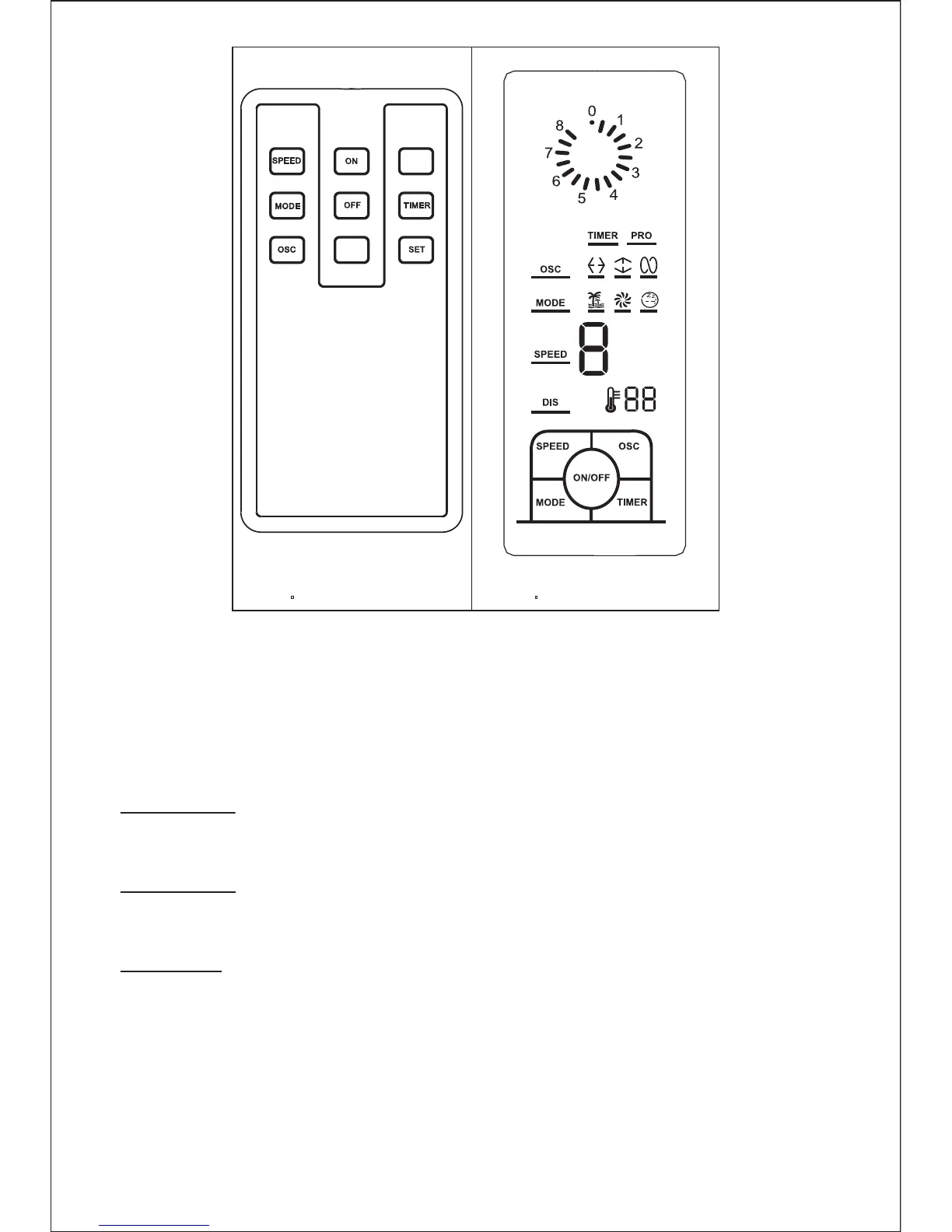
Fig.4 Fig.5
3. “DISP” key
Press the key, the LED display is on. The key is touched repeatedly, the
sequence is ON/OFF.
4. “MODE” key
Press this key to select mode. The sequence is normal, natural and sleep when
this key being touched repeatedly or continuously. The light can indicate mode state.
5. “TIMER” key
Press the “timer”key. The “timer” light is flashing the timer dial and the first finger
light are on. Each finger light represent half an hour in the time dial.
The fan is deliverying air/stop when the finger light is on/off. This key is touched
repeatedly for selecting the timer.
Normal wind
Press the “mode” key to select the normal wind, then press the “speed”
repeatedly to choose 4 speed.
Natural wind
Press the “mode” key to select the natural wind, then press the “speed”
repeatedly to choose 4 speed.
Sleep wind
Press the “mode” key to select the sleep wind, then press the “speed”
repeatedly to choose 4 speed.


 To Next Page