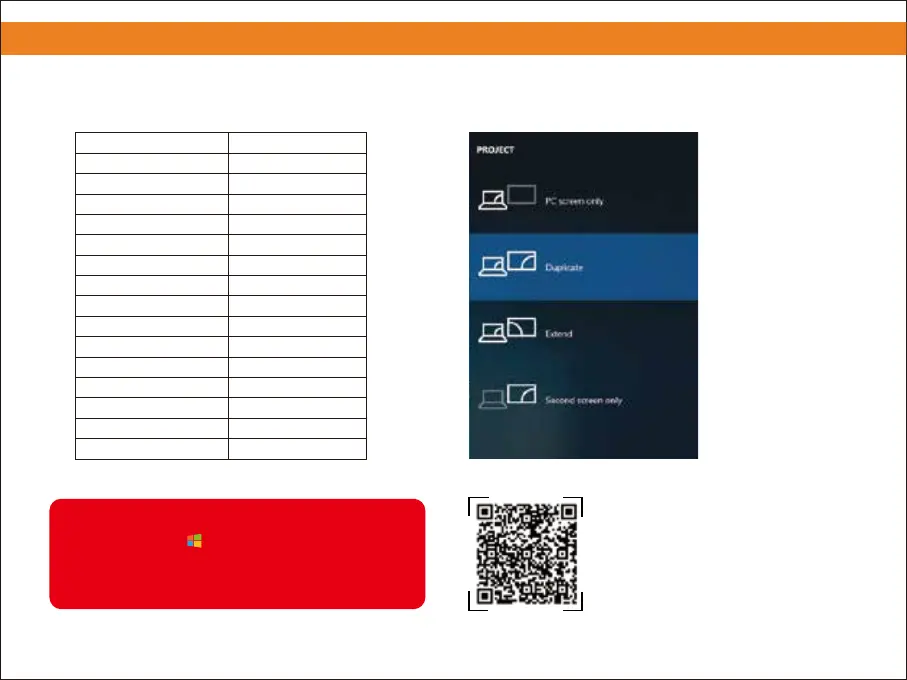
③ Use the appropriate shortcut key on the computer ④ As shown in the picture, select "Duplicate."
3. Connecting to a Laptop/ Computer
The user of windows 7 or over windows 7.
Simply press the +P, select “copy” to connect.
If the operation above is invalid, Please update
the computer graphics driver.
Acer
Samsung
Sony
Fujitsu
Haier
NEC
Panasonic
Sharp
Hitachi
TOSHIBA
Lenovo
Computer Brand Shortcut Key
Dell
HP
ThinkPad
Asus
Fn+F5
Fn+F4
Fn+F7
Fn+F10
Fn+F3
Fn+F3
Fn+F3
Fn+F5
Fn+F7
Fn+F5
Fn+F3
Fn+F8
Fn+F4
Fn+F7
Fn+F8
4
Please scan the QR code to watch
the video for detailed steps.


 To Next Page