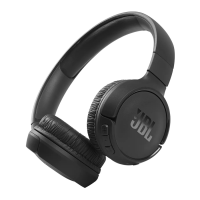
The JBL TUNE 750BTNC are wireless over-ear active noise-cancelling headphones with JBL Pure Bass Sound. They are designed for an immersive audio experience with punchy bass.
Function Description:
These headphones offer wireless Bluetooth streaming, allowing users to listen to high-quality sound from their Bluetooth® devices without the need for messy cords. The active noise-cancelling feature helps to tune out ambient noise, allowing for a more focused listening experience. A multi-point connection feature enables seamless switching between two Bluetooth® devices, for example, from a video on a tablet to a call on a mobile phone. Hands-free calls and voice control are supported, allowing users to manage calls and trigger voice assistants directly from the headphone earcups. The headphones also support wired listening via an included detachable audio cable, which extends the noise-cancellation capability.
Important Technical Specifications:
- Driver Size: 40 mm Dynamic Driver
- Frequency Range: 20 Hz – 20 KHz
- Sensitivity Passive Mode: 95 dB SPL/1 mW
- Sensitivity Active Mode: 100 dB SPL/1 mW
- Transducer Impedance: 32 ohm
- Max Input Power (Wired): 40 mW
- Transmit Sensitivity: -15 dBV/PA
- Bluetooth Transmitted Power: <5 dBM
- Bluetooth Transmitted Modulation: GFSK, π/4 DQPSK, 8DPSK
- Bluetooth Frequency: 2.402 GHz – 2.480 GHz
- Bluetooth Profile Version: A2DP 1.2, AVRCP 1.5, HFP 1.6, HSP 1.2
- Bluetooth Version: 4.2
- Headset Battery Type: Polymer Li-ion Battery (610 mAh/3.7 V)
- Power Supply: 5V --- 1A
- Charging Time: <2 hours from empty
- Music Play Time with BT on and ANC on: 15 hours
- Music Play Time with BT on and ANC off: 22 hours
- Music Play Time with BT off and ANC on: 30 hours
- Weight: 220 g
Usage Features:
- Power On & Connect: To power on, press and hold the power button for 2 seconds. The headphones will automatically enter pairing mode. Users can then select "JBL TUNE750BTNC" from their device's Bluetooth settings to connect.
- Manual Pairing: If the headphones are powered off, users can enter manual pairing mode by pressing and holding the power button for more than 5 seconds. Then, select "JBL TUNE750BTNC" from the device's Bluetooth settings.
- Button Commands:
- Power On/Off: Press and hold for >2s.
- ANC Control: Press and hold for >2s to toggle Active Noise Cancelling.
- Volume Up/Down: Short press the '+' or '-' buttons.
- Play/Pause: Short press the play/pause button (||).
- Next Track: Press and hold the forward button (>>) for >2s.
- Previous Track: Press and hold the backward button (<<) for >2s.
- Answer/End Call: Short press the phone button.
- Reject Call: Press and hold the phone button for >2s.
- Activate Voice Assistant (Bixby/Siri®/Others): Double-press the voice assistant button.
- Wired Listening: The headphones can be connected to devices using the included detachable audio cable for wired listening.
- Multi-Point Connection: The headphones can connect to a maximum of two Bluetooth devices simultaneously. To connect a second device, enter pairing mode with the second device after the first is connected. When switching music sources, pause music on the current device and select play on the second device. Phone calls always take priority. If a device goes out of range or powers off, manual reconnection may be needed. To disconnect multi-point, select "Forget This Device" on the Bluetooth devices.
- LED Behaviors:
- Low Battery: Red LED.
- Charging: Solid red LED.
- Fully Charged: Solid white LED.
- Power On/Off: White LED flashes twice.
- BT Connecting: Blue LED flashes.
- BT Connected: Solid blue LED.
- ANC On: White LED.
Maintenance Features:
- Charging: The headphones are charged via a USB cable. A full charge takes approximately 2 hours.
- Safety Instructions: Users should read and follow all safety instructions, including not exposing the apparatus to water, cleaning with a dry cloth, and protecting the power cord. Batteries should not be exposed to excessive heat, fire, or direct sunlight. The apparatus should only be used with the power supply and/or charging cable provided by the manufacturer.
- Battery Disposal: Batteries and accumulators should be disposed of separately from household waste. They must be recycled in an environmentally sound manner. Users should contact local waste-management officials for information on collection and recycling points.
- Product Registration: Users are encouraged to register their product via the relevant country-specific website to receive updates, new offers, and applications.
- Warranty: The product comes with a limited warranty covering defects in workmanship and materials for one year from the date of retail purchase. Warranty service should be obtained by contacting the dealer or JBL customer support. Unauthorized repairs will void the warranty.

 Need help?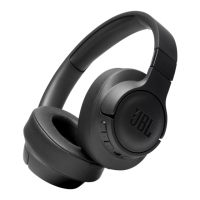





 To Next Page
 General