2
3-90-774256_R4 • 03/21
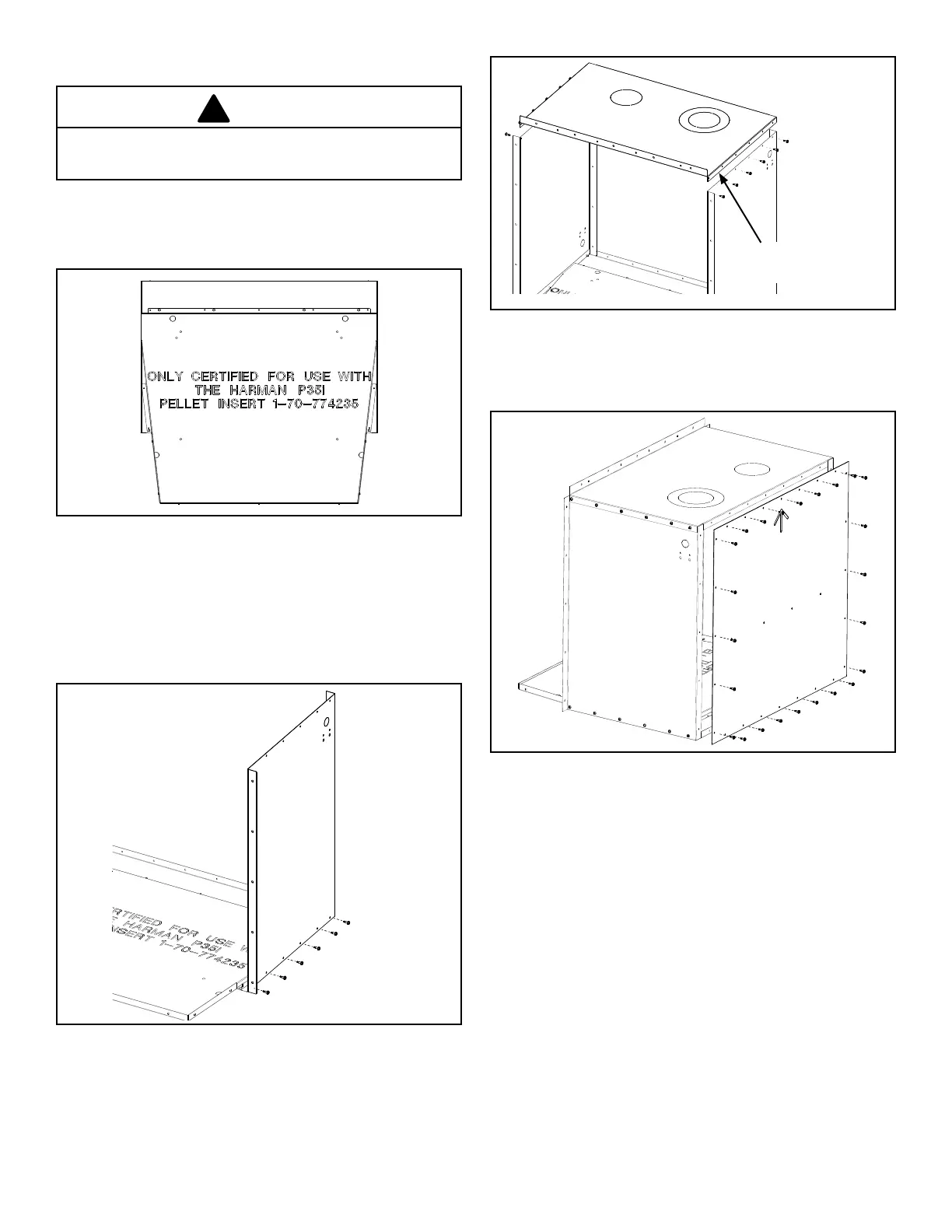
• Begin with the bottom panel lying at on the oor or
workbench. Place it with the writing facing upward.
Figure 1.
Use care when installing tek screws, do not strip the
holes.
CAUTION
• Stand the other side panel up to the left side of the
bottom, with the electrical box knockout at the bottom
rear corner, and secure it the same way.
• The top panel can now be placed onto the sides, with the
bend going out over the outside of the side panels. Align
the holes and secure with tek screws. Figure 3.
Figure 1 - View of the bottom panel
• Stand a side panel up to the right side of the bottom,
with the (un-used) electrical box knockout in the top rear
location. Notice the bend at the rear of the cabinet will
make the corner and at the front it will be bent outward to
makethefacingange.Lineuptheholesandsecurethe
side panel to the bottom with screws. Figure 2.
Figure 2 - View of the side panel
• Stand the rear panel up to the rear of the cabinet, be
sure the arrow is pointing upward. Secure the rear panel
to the outside of the cabinet. Figure 4.
Figure 4 - View of the rear panel
Figure 3 - View of the top panel
Bend on top goes outside
the side panels.
ZC Box Assembly


 To Next Page
 Loading...