EasyManua.ls Logo

Hasbro simon 1897 - User Manual

Hasbro simon 1897
3 pages
Print Icon
To Next Page IconTo Next Page
Loading...
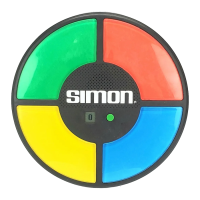
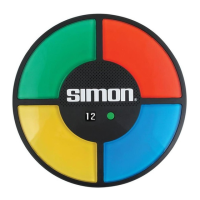
Touch-Sensitive
Color Lenses (4)
Touch near center of lens
with more than one finger
for best results
Action Button
- Turn unit ON
- Select Game Mode
- HOLD to turn OFF
LCD Screen
- Counts score
- Displays Game Mode
- Displays High Score
- Animations
Batteries Included. Replace with 3 x 1.5V AA/LR6 Batteries.
The challenge is to repeat the ever-increasing sequence of signals.
Do you have the memory and reflexes to beat Simon?
Think fast . . . Simon says, “Repeat my flashing lights and sounds!”
GETTING STARTED
Press the Action Button to turn Simon ON.
After the Startup Dance, the Screen will display
the Game Mode (G1 by default). Press the Action
Button to scroll between the 3 Game Modes.
After a moment, the game will start. The current
High Score for that Game Mode will display, and
then it’s time to play!
After a game ends and the Screen displays “PLAY
AGAIN”, press the Action Button to choose the Game
Mode and start a new game.
At any time, you can cancel your current game and
choose the Game Mode by pressing the Action
Button.
Simon shuts down automatically after a few seconds
of no use. You can also hold down the Action Button
for 3 seconds to turn the product off.
GAME 1: SIMON SAYS (1 or more players)
Correctly repeat a longer and longer sequence of signals.
HOW TO PLAY
Simon will give the first signal. (One of the Color
Lenses will light up, accompanied by a tone.)
Repeat that signal by touching the same Color Lens.
Simon will repeat the first signal and then add one
more.
Repeat those two signals in the same order.
Simon will continue to play the sequence and add one.
Continue to repeat Simon for as long as you can!
GAME 2: PLAYER ADDS (1 or more players)
In this Game, you control the sequence. Repeat your
own sequence, adding one signal each turn.
HOW TO PLAY
Simon will give the first signal. (This is the only signal
Simon will give you until the end of the game. It will
not
repeat the signals you play.)
Repeat that signal, and add one more.
Repeat the first two signals, and add one more.
Continue to repeat and add to the sequence for as long
as you can!
VICTORY
If you fail to complete the sequence in the correct
order or within the time limit, the Buzzer will sound
and the game will end.
See your score on the LCD Screen.
Simon will perform aVictory Dance” based on your
score. There are 4 different Victory Dances - see if you
can unlock them all!
Simon records your High Score so you can play to
beat it.
FOR 2 OR MORE PLAYERS
Simon will give the first signal.
Player #1 repeats this signal and adds one more.
Player #2 repeats the first two signals, and adds one
more.
Play continues clockwise, with each player repeating
the signals of the pre
vious sequence and adding one
more.
When a player messes up and the game ends, that
player is eliminated. Press the Action Button to start a
new game with the remaining players.
The last remaining player wins!
VICTORY
If you fail to complete the sequence in the correct order
or within the time limit, the Buzzer will sound and the
game will end.
See your score on the LCD Screen.
Simon will perform a “Victory Dancebased on your
score. There are 4 different Victory Dances - see if you
can unlock them all!
Simon records your H igh Score so you can p lay to beat it.
FOR 2 OR MORE PLAYER S
Take turns repeating Simon’s signals. The player that
messes up loses!
1
+
PLAYERS

Question and Answer IconNeed help?

Do you have a question about the Hasbro simon 1897 and is the answer not in the manual?

Overview

The Simon game is a memory and reflex challenge where players repeat increasingly long sequences of flashing lights and sounds. It is designed for ages 7 and up, and can be played by 1 or more players.

Function Description

The core function of the Simon game is to present a sequence of signals (flashing lights and accompanying tones) that players must then repeat by touching the corresponding touch-sensitive color lenses. The game features an "Action Button" for turning the unit on/off and selecting game modes, and an "LCD Screen" that displays the score, game mode, high score, and animations.

Game Modes

The device offers three distinct game modes:

  • Game 1: Simon Says (1 or more players)

    • In this classic mode, Simon initiates the sequence with a single signal.
    • Players repeat the signal by touching the correct color lens.
    • Simon then repeats the previous sequence and adds one new signal.
    • Players must repeat the entire, growing sequence in the correct order.
    • The game continues as long as the player(s) can correctly repeat the sequence.
    • For multiple players, players take turns repeating Simon's signals. The player who makes a mistake loses.
  • Game 2: Player Adds (1 or more players)

    • In this mode, players control the sequence.
    • Simon gives the initial signal, which is the only signal Simon will provide throughout the game.
    • The first player repeats Simon's initial signal and then adds one more signal of their choice.
    • Subsequent players repeat the entire previous sequence and add one more signal.
    • The goal is to continue repeating and adding to the sequence for as long as possible.
    • For multiple players, play continues clockwise. Each player repeats the signals of the previous sequence and adds one more.
    • When a player makes a mistake, they are eliminated. A new game can be started with the remaining players, and the last player remaining wins.
  • Game 3: Choose Your Color (2, 3, or 4 players)

    • This mode emphasizes group coordination and individual responsibility for a specific color.
    • How to Play (4 Players):
      • Before starting, each player chooses one of the four color lenses. Players can only touch their assigned color lens during the game.
      • The LCD screen indicates which colors are active (not eliminated).
      • Simon gives the first signal.
      • The player assigned to that color repeats the signal.
      • Play continues as in Game 1, but each player only touches their own color in the correct sequence.
      • If a player touches their color out of sequence or fails to touch it within the time limit, a buzzer sounds, and their color is eliminated.
      • Simon automatically starts a new game with only the remaining active colors.
      • The last remaining player wins.
    • For 3 Players:
      • Simon gives the first signal. Players wait until that color is eliminated.
      • Each player then quickly chooses one of the remaining three color lenses.
      • Play continues as described for 4 players.
    • For 2 Players:
      • Each player chooses two color lenses.
      • If one of a player's colors is eliminated, they continue playing with their remaining color.

Victory Conditions

  • In Game 1 and Game 2, if a player fails to complete the sequence correctly or within the time limit, a buzzer sounds, and the game ends.
  • The player's score is displayed on the LCD screen.
  • Simon performs a "Victory Dance" based on the score. There are 4 different Victory Dances to unlock.
  • The game records the high score for players to beat.
  • In Game 3, the last remaining player wins.

Important Technical Specifications

  • Power: Requires 3 x 1.5V AA/LR6 batteries (included).
  • Controls:
    • Four touch-sensitive color lenses.
    • One Action Button for power and mode selection.
  • Display: LCD screen for score, game mode, high score, and animations.
  • Audio: Tones accompany light signals, and a buzzer sounds for incorrect sequences.

Usage Features

  • Turning On/Off: Press the Action Button to turn the unit ON. Hold the Action Button for 3 seconds to turn it OFF. The unit also shuts down automatically after a few seconds of inactivity.
  • Game Mode Selection: After turning on, the LCD screen displays the default Game Mode (G1). Press the Action Button to scroll through the 3 Game Modes.
  • Canceling a Game: A current game can be canceled at any time by pressing the Action Button to choose a different Game Mode.
  • Touch Sensitivity: For best results, touch near the center of the color lens with more than one finger.

Maintenance Features

  • Battery Replacement:
    • If the LCD display or color lens lights become dim or malfunction, replace the batteries.
    • Use a Phillips-head screwdriver to remove the battery backing on the bottom of the product.
    • Replace with 3 x 1.5V AA/LR6 batteries, ensuring correct polarity.
    • After replacing batteries, press the Action Button to ensure proper functioning. (Most malfunctions are due to weak batteries).
  • Electrostatic Discharge: In environments with electrostatic discharge, the product may malfunction and lose memory. In such cases, remove the batteries, wait 5 minutes, and then replace them.
  • Battery Safety Information:
    • Non-rechargeable batteries are not to be charged.
    • Rechargeable batteries should only be charged under adult supervision and must be removed from the toy before charging.
    • Do not mix alkaline, standard (carbon-zinc), or rechargeable (Ni-Cd) batteries.
    • Do not mix old and new batteries.
    • Dispose of batteries safely; do not dispose of them in fire as they may explode or leak.
    • Insert batteries with the correct polarity.
    • Exhausted batteries must be removed from the toy.
    • The supply terminals are not to be short-circuited.
  • Disposal: The Wheelie bin symbol indicates that the product and batteries must not be disposed of with other household waste, as they may contain elements harmful to the environment and human health. Use designated collection points or recycling facilities. Refer to www.recyclenow.com for nearest facilities.

Additional Information

  • FCC Statement: The device complies with Part 15 of FCC Rules. It is subject to two conditions: (1) it may not cause harmful interference, and (2) it must accept any interference received. Changes or modifications not expressly approved by the manufacturer could void the user's authority to operate the equipment. The equipment has been tested and found to comply with Class B digital device limits, designed to provide reasonable protection against harmful interference in a residential installation. If the equipment causes harmful interference to radio or television reception, users are encouraged to try measures like reorienting the antenna, increasing separation between equipment and receiver, connecting to a different circuit, or consulting a dealer/technician.
  • Warning: Not suitable for children under 36 months due to small parts. Retain these details for future reference.
  • Manufacturer: Manufactured by Basic Fun, a Division of Good Stuff Co., LLC, Long Island City, NY 11101, USA.
  • Licensing: HASBRO and its logo and SIMON are trademarks of Hasbro and are used with permission. © 2013 Hasbro. All Rights Reserved.
  • Origin: Made in China.

Hasbro simon 1897 Specifications

General IconGeneral
BrandHasbro
Modelsimon 1897
CategoryGame Console
LanguageEnglish

Related product manuals