Step 1
Connect the power cable to Restore then plug
it into your power outlet. Always keep your
device plugged in.
Step 2
Download the Hatch Sleep app on your phone or
tablet from the Apple App or Google Play store.
Step 3
Complete the steps in the Hatch Sleep app to
connect your Restore. Wi-Fi is required.
My Restore
Controls
Rest Button
Press when you’re ready to rest.
Press again to move to the next step.
Press and hold to stop.
Rise Button
Press when you’re ready to rise.
Press again to move to the next step.
Press and hold to stop.
Alarm Toggle
Slide the alarm toggle to the
left to disable your alarm.
Slide right to enable again.
Volume
Tap the lower right and left corners to adjust
the volume.
Brightness
Tap above and below the clock display to adjust
the brightness of the main light.
Tap for the time
When the clock display is hidden, gently tap
Restore anywhere to check the time.
Clock Brightness
You can adjust the brightness of the
clock display in the Hatch app settings.
Quick Tips
Alarm Snooze
Press either the Rest or Rise button to
snooze your alarm. Press and hold to
stop the alarm.
Hatch support is a dream
Contact us at hatch.co/support
Follow @hatchforsleep and see what dreams
are made of.
Le soutien à Hatch est un rêve
Contactez-nous à hatch.co/support
Suivez @hatchforsleep et voyez de quoi sont
faits les rêves.
Meet your Hatch Restore

 Need help?
 General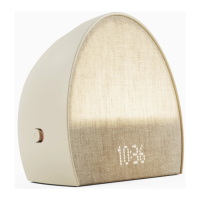

 To Next Page
