Protecting the Dishwasher from Freezing
Please take frost protection measures during the wintertime. After every wash cycle, take the following steps:
1. Turn off the dishwasher. Cut off electrical power from the dishwasher.
2. Turn off the water supply and disconnect the water inlet hose from the back of the unit.
3. Drain the water from the inlet hose and inlet port (Use a pan or bucket to catch the water).
4. Reconnect the water inlet hose to the inlet port.
5. Remove the filter system and use a sponge to absorb the water that is in the filter (sump) area.
If your dishwasher no longer works due to freezing or ice, please contact our after-sales service team.
General Tips
In order to keep your dishwasher in good working order, the following suggestions should be observed:
• Before cleaning or performing maintenance, always remove the plug.
• After every wash - Turn off the water supply to the appliance and leave the door slightly ajar so that moisture
and odors are not trapped inside.
• If the dishwasher will not be used for an extended period of time - It is recommended that you run a wash
cycle with the dishwasher empty, then power off the dishwasher, unplug the power cord, turn off the water
supply, force drain the water tank, and leave the appliance door slightly open. This will help the door seals to
last longer and prevent odors.
• Moving the appliance - If the appliance must be moved, try to keep it in a vertical position. Do not transport
the unit on its side or upside down.
• Water connection - Connect the female connector to your faucet and make sure it is fastened tightly in place.
Please Note: If the supplied water inlet hose does not fit your faucet, you may need to buy a faucet adapter
from a plumbing supply manufacturer. If you are unsure of what to do, please feel free to contact our after-sales
service team.
• Water drainage - The drain hose must be properly fitted to avoid water leaks. Ensure that the water drain
hose is not kinked or in any way impeded. If the sink is higher than the surface where you have placed your
dishwasher, it will be necessary to drain excess water into a bucket that is in a lower position than the
dishwasher. If you need a drain hose extension, be sure to use a similar drain hose, and that it is no longer than
12 feet long. Otherwise, the cleaning effect of the dishwasher could be reduced.
ERROR CODES
• 16 •
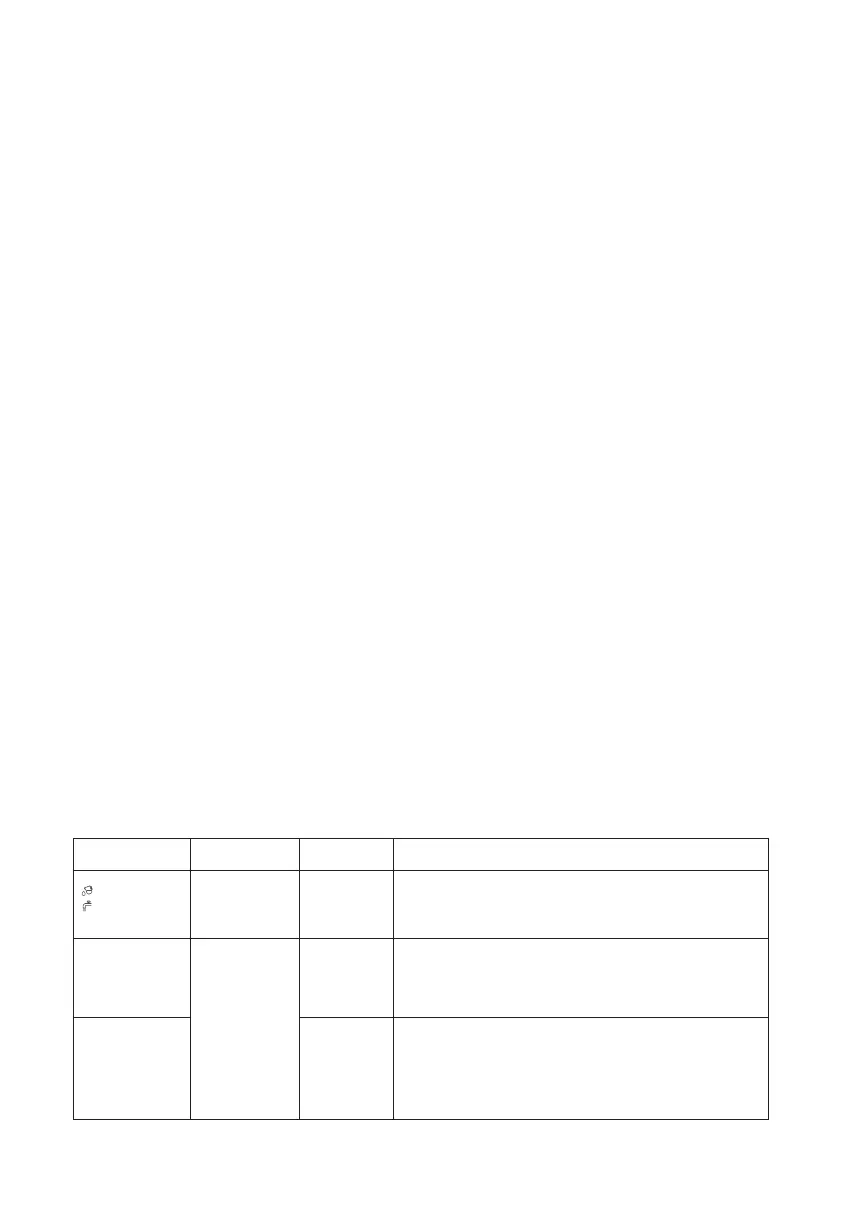
Codes Buzzer Sound Error Type Solutions
10 beeps
(once every
second)
5 beeps every
2 seconds
A fault in the
water inflow
1. Make sure the faucet is connected and turned on, or the
water tank is full.
2. Restart the appliance. If the icon still flashes red, please
contact HAVA support team.
“E2”
“E3”
(Water shortage
icon keeps
flashing red)
Draining error
1. Check the drain hose and make sure the hose is not kinked
or obstructed.
2. Turn off the appliance and check if anything is blocking the
filter system or drain hose.
3. Make sure all hoses are not blocked.
Overflow
1. Drain the water tank manually: pause the wash cycle and press
and hold both the Dry button and Power button simultaneously
for 3 seconds. Restart the appliance.
2. Tilt the machine backwards to 30-45 degrees and hold it in this
position for at least 2 minutes, allowing water to flow out from the
machine. Restart the appliance.


 To Next Page
 Loading...