Vehicle equipment
Please note that this manual contains all
the standard equipment, country -specific
equipment and special equipment for this
mo de l s e ri e s. Th us, so me eq ui p me n t or
features described in this manual may not
be installed onto your vehicle or are only
a vai l a b l e in so m e ma r k ets . Fo r f u r t h e r
configuration information, please refer to
relevant sales information or consult with your
distributor selling the vehicle to you.
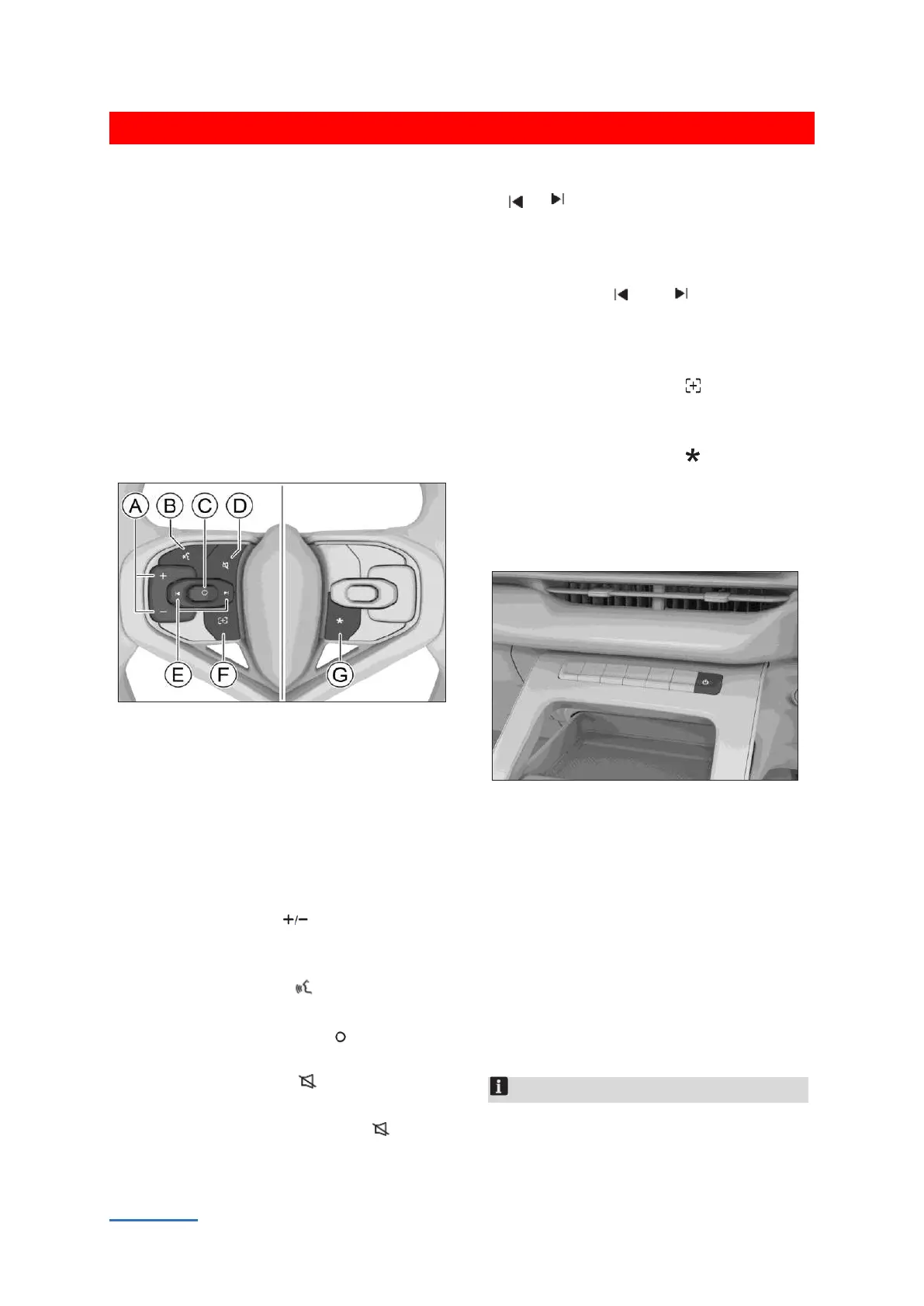
Steering wheel button
F339B644B8A8
Ⓐ Volume buttons
Ⓑ Voice button
Ⓒ Play/pause button
Ⓓ Mute button
Ⓔ Jump button
Ⓕ Custom button
Ⓖ Custom button
Press volume button to increase/decrease
volume. Press and hold the button to
continuously increase/ decrease volume.
Press the voice button to enable or disable
the system speech recognition.
Press the play/pause button play/pause the
multimedia.
Press the mute button to mute or unmute
multimedia.
Press and hold the mute button mute or
unmute navigation.
When playing media: Press the jump button
or to switch previous/next music and
long press the button to fast
forward/rewind.
When listening to a radio station: Press the
jump button or to search for
previous/next available station, and long
press the button to switch to previous/next
favorite station.
Press the Custom button to execute the
set function. Long press the button to enter
the button function setting interface.
Press the Custom button to execute the
set function. Long press the button to enter
the button function setting interface.
Power button
B71D4D5F30E2
Touch the button to enter mute mode (for
multimedia audio sources only). Touch the
button again to exit mute mode.
Touch and hold the button for about 2s to
enter screen standby mode. Touch the button
for a long time or touch any position on the
screen to light the screen.
Tap and hold the screen for more than 1 0
seconds, the system will be restarted.
Notice
The audiovisual system and instrument will
restart at the same time.


 To Next Page
 Loading...
