Shortcut panel
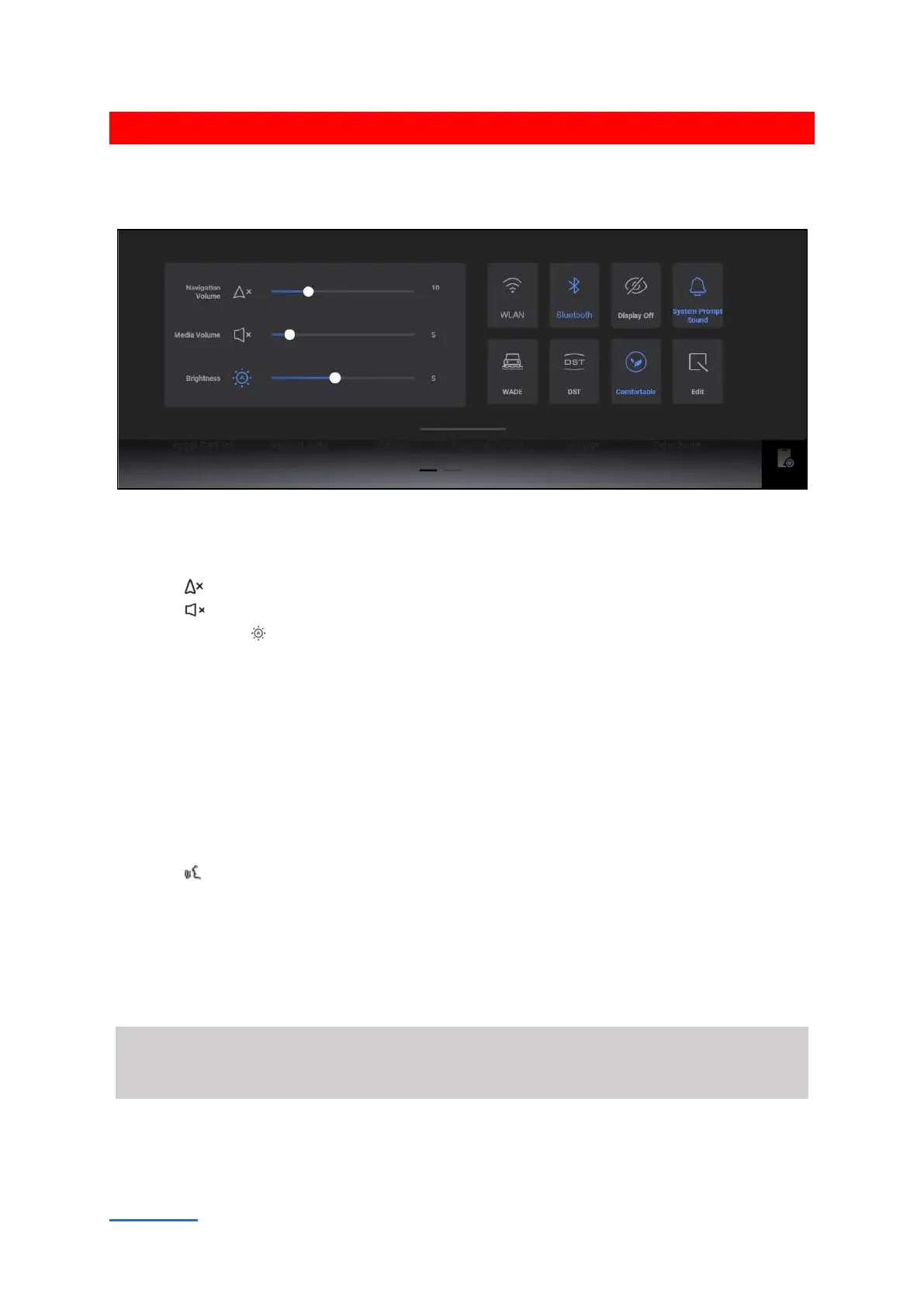
In most interfaces, sliding down from the top of the screen will call up the shortcut panel.
4A171377DD83
Brightness and volume adjustment
Tap and drag the sliding block to adjust related volume or brightness.
Press the button to enable or disable navigation mute function.
Press the button to enable or disable the media mute function.
Touch the button to enable/disable the automatic adjustment function. After the automatic
brightness adjustment function is enabled, the screen brightness fails to be manually adjusted.
Shortcut icons
Touch the switch directly to execute, switch, turn on or turn off the corresponding function. The
shortcut switch showed on the screen can be compiled or replaced.
Voice assistant
Voice Assistant can recognize and execute voice commands to control vehicle functions quickly and
improve operation convenience. There are several ways to activate the voice assistant:
Press voice button on the steering wheel.
Voice wake-up: via the default wake-up word of the system or the custom wake-up word.
The wake-up words can be found and set through【system settings】 → 【personalization】 →
【voice】.
Free of wake-up word: Use the voice command without waking up the voice assistant, like
“lowering the volume”.
⚠ Warning
Please pay attention to the surroundings and personal safety so as to prevent from severe accidents
such as crush, collision and so on when using voice assistant to control the vehicle .


 To Next Page
 Loading...
