This document describes the Havit HV-BT021, a 2-in-1 fiber optic Bluetooth adapter that functions as both a receiver and a transmitter.
Function Description:
The HV-BT021 serves as a versatile audio adapter, allowing wireless audio transmission and reception.
As a Bluetooth Transmitter (TX mode):
It can transfer music from various sources such as mobile phones, Walkmans, TVs, and computers to Bluetooth receivers, stereo Bluetooth headphones, and Bluetooth speakers using wireless technology. The product can store and record up to 4 devices. If more than 4 devices are paired, the latest device will replace the earliest one. Reconnection time varies based on the number of connected devices: 7 seconds for one device, 12 seconds for two, 17 seconds for three, and 22 seconds for four.
As a Bluetooth Receiver (RX mode):
It can function as a stereo Bluetooth headphone when an audio cable is plugged into the 3.5mm port. It can also connect to speakers to receive audio signals wirelessly. The product can store and record up to 8 devices. If a new device is paired, it will replace the earliest paired one. Reconnection time increases with the number of stored paired devices: 7 seconds for one, 12 seconds for two, 17 seconds for three, and 22 seconds for four.
The adapter supports low latency, though a delay of approximately 40 ms may still occur. It is compatible with music players, mobile phones, televisions, computers, and any other devices that support a fiber optic interface or 3.5MM audio interface output.
Important Technical Specifications:
- Bluetooth Version: V4.1, Class II
- Chipset: CSR BC8670
- Frequency: 2.402GHz-2.480GHz
- Receiver Working Time (AUX): 15 Hours
- Transmitter Working Time (AUX): 15 Hours
- Receiver Working Time (SPDIF): 12 Hours
- Transmitter Working Time (SPDIF): 12 Hours
- Charging Time: About 2 Hours
- Bluetooth Profile: RX: A2DP AVRCP, TX: A2DP
- Support Dual Stream (TX mode): One transmitter can connect to two Bluetooth speakers or headphones (using one CODEC at the same time).
- Support Dual Connection (Receiver mode): Supports connecting with two mobile phones.
- Support for Bluetooth Headset, Receiver, Speakers, and other device keys: 0000, 1111, 1234, 8888
- CODEC:
- TX: Priority APT-X, Second SBC, Third: APTX-LL; Fourth: FastStream
- RX: SBC
- APT-X LL: APTX low latency
- APTX tips:
- Single connection: Priority support for APT-X LL, 48KHZ CODEC (headset or speaker must also support APT-X).
- Two connections: It will automatically switch to SBC CODEC.
- Battery: 350mAh rechargeable lithium battery
- Charging Supply: 100-240V AC Adapter, 5VDC, ≥300mA
- Working Temperature: -10-55℃
- Net Weight: About 38.6g
- Dimension: 606018.4mm
Usage Features:
Package Contents:
- Fiber optic Bluetooth adapter *1
- Micro USB charging cable *1
- Dual 3.5mm audio cable *1
- Optical fiber audio cable *1
- User manual *1
- Happy card *1
Product Structure:
- A: Multi-function button (MFB), Power switch; Play/Pause (RX)
- B: Mode selection switch (TX: transmitter; RX: receiver)
- C: Interface selector switch (AUX: 3.5mm audio interface; SPDIF: optical interface)
- D: 3.5MM audio line interface (audio input/output)
- E: Optical fiber input interface
- F: Optical output interface
- G: Micro USB charging port
- H: LED indicator
Power ON:
Long press the power switch (MFB) for 3 seconds. The blue LED will flash twice. If no paired devices are recorded, it will automatically enter pairing mode with the blue LED flashing quickly.
Clearing the Pairing List:
Switch off the product in its current working mode (TX or RX). After 3 seconds, switch to the other working mode and turn it on. The pairing information for the former mode will be cleared. Note that TX/RX mode switching cannot be done within 3 seconds of powering off; otherwise, it may retain the previous mode.
Connecting Two Devices (TX mode):
- Turn on the adapter (long press MFB) and double-click the MFB to enter pairing mode. The blue LED will flash quickly.
- The adapter will automatically connect to the receiving device as soon as its Bluetooth is turned on.
- To connect two devices (A and B):
- After connecting to device A, double-click the MFB to switch to pairing mode. This will automatically disconnect from device A. You can then turn off Bluetooth on device A.
- Activate Bluetooth on device B; it will automatically connect to device B.
- Restart device A; it will automatically reconnect, and both devices will be connected simultaneously.
Connecting Two Devices (RX mode):
- To turn on the MFB, press it for about 3 seconds. The blue LED will flash twice. The adapter will automatically reconnect to the last paired device. If no device is connected, it will enter pairing mode (red and blue LEDs flashing alternately). Search for 'HV-BT021' on your Bluetooth device.
- Manually click to connect. The blue LED will flash steadily upon successful connection. If a password is required, use "0000", "1111", "1234", or "8888".
- To connect two devices (A and B):
- After successfully connecting to A, double-click the MFB to switch to pairing mode, which will disconnect A. Disable Bluetooth on A.
- Activate Bluetooth on B and search for "HV-BT021".
- Manually click on B to connect.
- Reactivate Bluetooth on A and click "HV-BT021" in the paired list. Both A and B will connect simultaneously.
- Note: While two mobile phones can be connected simultaneously, music can only be played from one at a time. Pause or stop music on one phone to play from the other.
SPDIF OR AUX Selection:
Select SPDIF or AUX based on the audio jack of your devices before turning on the adapter.
LED Indicator:
- Power ON: Blue LED flashes twice.
- Power OFF: Red LED flashes twice.
- Pairing: Red and blue LED alternately flash.
- No connection: Blue LED flashes twice every 3s.
- Connected: Blue LED lights up steadily.
- Low battery: Red LED flashes.
- Charging: Red LED lights up.
- Fully charged: (Red) LED is off.
Troubleshooting (FQA):
- Q1: Music delayed from speaker when connected with headphone and speaker.
- A: Check if the speaker has a delay issue or try another output device. The adapter supports low latency but may still have a ~40ms delay.
- Q2: Can I connect to a TV to transmit sound to a Bluetooth speaker?
- A: Yes. Connecting to two Bluetooth speakers or headsets (using the same CODEC) is also supported.
- Q3: Can it play music while charging?
- A: Yes, but it's not recommended as it may harm the battery.
- Q4: Why does the red LED flash while playing music?
- A: Indicates low battery; needs charging via the provided cable to a USB charger or computer.
- Q5: Can't connect to my phone.
- A: Ensure your phone supports Bluetooth and is detectable.
- First-time pairing: Long press MFB until blue LED flashes quickly. If blue LED flashes slowly after 3s, double-click MFB until blue and red LEDs alternately flash (RX) or blue LED flashes fast (TX) to enter pairing mode.
- Already paired: Turn on adapter; it will auto-connect to previously paired device. Blue LED stays on. It can connect to two previously and last paired devices simultaneously.
- Correct mode: For Bluetooth speakers/headphones, push to TX (blue LED flashes fast). For phones/laptops, push to RX (red and blue LEDs alternately flash).
- Q6: No music from sound system after connecting/pairing.
- A: Check:
- Sound system connected to adapter via audio cable.
- Music volume audible on both devices.
- For some systems, select "AUX" or "Line-in" as audio input.
- Ensure audio device plays music via Bluetooth. Some devices (e.g., computers) require manual selection of music output mode.
Maintenance Features:
Power Off:
Long press the MFB for 3 seconds. The red LED will flash twice (only once if released immediately). Do not restart within 3 seconds of powering off. It will automatically shut down if there is no connection for 5 minutes. If connection is unsuccessful, follow the procedural steps.
Low Battery:
The red LED will flash every second, and other LEDs will turn off, indicating the need to charge. If not charged, it will automatically power off.
Automatic Power Off:
- Shuts down automatically when battery voltage is below 3.1V.
- Shuts down automatically if no connection under non-matching record after 5 minutes.
- If a matching record exists, it will automatically power off if there's no connection for up to 6 minutes (after attempting to reconnect for 1 minute).
Charging:
Use the provided Micro USB cable to charge the adapter by connecting it to a computer or USB charger. Charge the product at least once a month if not used for a long time to maintain battery health.

 Need help?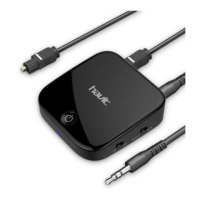

 To Next Page
 General