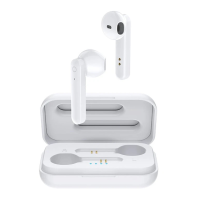
This document serves as a user's manual for the G1 True Wireless Sports Headphones, providing comprehensive instructions on their function, usage, and maintenance.
Function Description
The G1 True Wireless Sports Headphones are designed for a seamless audio experience, offering true wireless stereo (TWS) functionality. They consist of two individual headphones (left and right) and a charging box. Each headphone features a multi-function button (MFB), a microphone, and an LED indicator lamp. The charging box includes a USB charging port. These headphones support both binaural mode (using both headphones) and single-channel mode (using a single headphone). They are equipped with Bluetooth for wireless connection to mobile devices, allowing for audio playback, call management, and interaction with voice assistants like Siri (on iOS systems). The headphones are designed for sports use, implying a secure fit and potentially sweat resistance, though specific resistance levels are not detailed.
Usage Features
Accessories: The product comes with a comprehensive set of accessories to ensure a comfortable and customized fit, as well as convenient charging. These include two headphones, one charging box, one charging cable, two pairs of ear wings (sizes S and L), two pairs of ear caps (sizes S, M, and L), an instruction manual, a reference description, and an after-sale's card.
Wearing Method:
- Choosing Ear Caps and Wings: Users are advised to select the most suitable ear caps and ear wings from the provided options (S, M, L) to ensure a comfortable and secure fit.
- Plugging In: The earplug should be inserted along the ear canal into the ears.
- Revolving for Secure Fit: The headphone should then be revolved until the end of the ear wing is securely inserted into the ear ridge. This ensures stability during physical activity.
Binaural Mode (Using Both Headphones):
- Boot Method 1 (Automatic Pairing):
- Take out both headphones from the charging box.
- Both the left and right headphones' white LED lights will flash two times, indicating they are ready for connection.
- Select "Havit G1" from the Bluetooth list on your mobile device.
- The right headset's light will flash for five seconds, signifying a successful connection.
- Boot Method 2 (Manual Pairing):
- Take out both headphones.
- Short press the multi-function button on both headphones to initiate pairing.
- Select "Havit G1" from the Bluetooth list on your mobile device.
- The right headset's light will flash for five seconds, indicating a successful connection.
- Pairing Notes: The maximum duration for pairing mode is 180 seconds. If this period is missed, the LEDs on both headphones will flicker three times and then turn off, requiring the user to repeat the pairing procedure. Once paired, the headphones and mobile phone will automatically connect to the last paired device (if mobile Bluetooth is ON). The TWS connection between the headphones occurs within 4 seconds, and the connection time between the headphones and the mobile phone is approximately 8 seconds.
- Reconnection Failure: If the headphones do not reconnect after disconnection, they will automatically turn off after 3 minutes.
- Mono Mode Indication: If the search device name appears as "HAVIT G1 Mono," it indicates that there is no successful link between the left and right headsets. In this case, the headphones should be restarted according to the boot method.
Power Off:
- Method 1 (Automatic): Place both headphones back into the charging box.
- Method 2 (Manual): Long press the multi-function button on either headphone for 5 seconds.
Call Management:
- Answering/Ending Calls: Simply press the left or right headset's multi-function button once to answer or end a call.
- Call Waiting:
- To keep the current call and answer an incoming call, click the left/right headset button.
- To refuse an incoming call, press the left/right headset button for 1 second.
- To switch between two active calls, press the left/right headset button for 1 second.
- If one phone answers, the other remains on hold.
- To keep the current call and connect the held call, press the left/right headset button for 1 second.
- To hang up the current call and connect the held call, press the left/right headset button.
- Rejecting a Call: Press the left/right headset button for one second at any time to reject an incoming call.
- Siri Activation: On iOS systems, arbitrarily double-click the multi-function button on either the left or right headphone to activate or shut off Siri.
Music Playback:
- Play/Pause: Press the multi-function button on either the left or right headphone at any time to play or pause music.
- Previous Song: Long press the multi-function button on the left headphone for 2 seconds.
- Next Song: Long press the multi-function button on the right headphone for 2 seconds.
Single Channel Mode (Using One Headphone):
- To use a single headphone, simply remove any headphone from the charging box.
- If both headsets are removed before being connected, they will default to TWS mode and automatically connect as a pair.
- Pairing in Single Channel Mode:
- Turn on the headset; it will automatically enter Bluetooth pairing state, with the white light flashing once every 0.5 seconds.
- Turn on the mobile's Bluetooth function and search for the device.
- Click "HAVIT G1 Mono" or "HAVIT G1" to pair. (The left headset is named "HAVIT G1 Mono," and the right headset is named "HAVIT G1").
- The white indicator light will shine for 5 seconds, indicating successful Bluetooth pairing.
Maintenance Features
Charging Box Charging:
- Low Power Indication: If the charging box battery is less than 10%, its LED will keep flashing to indicate low power.
- Charging Status: When charging, the LED light will show a breathing flicker.
- Charging Complete: The white LED light will turn off once charging is finished.
Headphone Charging:
- Low Power Indication: When the headphone battery is less than 10%, the white light will flash two times every 5 minutes, accompanied by a hint voice (three times).
- Charging Time: Approximately 1.5 hours.
- Charging Status: When charging, the white light will show a breathing flicker.
- Charging Complete: The white light will turn off once charging is finished.
- The device has a built-in, non-removable, and rechargeable battery.
- Only the equipped USB cable should be used for charging.
- The charging current voltage is 5V/1A. The product cannot be recharged with a charger that exceeds these specifications.

 Need help?
 General

 To Next Page