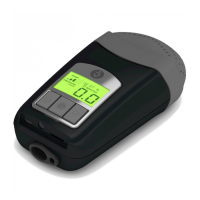
Ramp Settings
To adjust the device ramp settings:
1. With the Z1 is in standby mode, press and hold the Up Arrow Button for approximately
3 seconds until the “00 MINUTES” value flashes .
2. While “00 MINUTES” value is flashing, repeatedly press either of the Up/Down buttons
to increase or decrease the ramp time in 5 minute increments .
NOTE: Set the ramp time to “00 MINUTES” to disable the Ramp Mode .
3. When the desired ramp time value is reached, press and hold the Start/Stop Button for
approximately 3 seconds to save your ramp time setting (this setting will be saved even
when the Z1 is not powered) . The Z1 will return to standby mode .
NOTE: To return to standby mode without saving the new setting, press and release the
Start/Stop Button momentarily instead of holding it down .
Thursday, November 21, 2013 | Z1 Clinician Programming Reference, v1
Property of HDM. Confidential clinician information. Do not distribute.


 To Next Page
 Loading...