WINDOWS setup
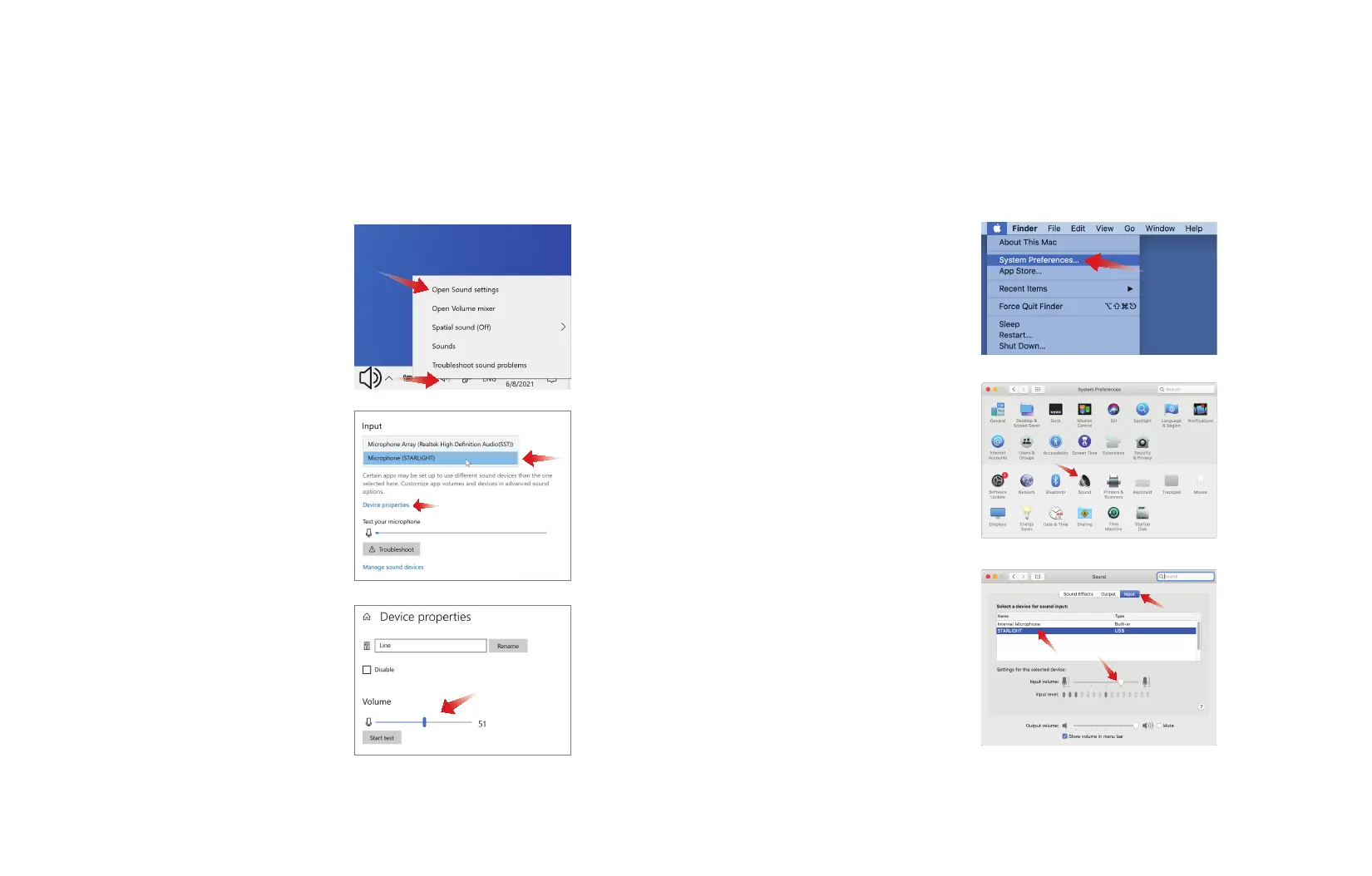
2. Scroll down to the Input section
then open the dropdown menu to
select Microphone (STARLIGHT)
as your selected input device.
3. To adjust the input volume to your
desired level go to Device Proper-
ties under the Input dropdown
menu. Use the volume bar at the
bottom of the menu to adjust the
input volume.
1. Right-click the small speaker icon in
the lower right corner of the screen,
select Open Sound settings.
Connect ROXY to a USB port on your PC using the provided USB cable. Your
computer will automatically recognize the USB device and install a driver.
os x setup
Connect ROXY to a USB port on your Mac using the provided USB
cable. Your computer will automatically recognize the USB device.
1. Select System Preferences
from the Apple menu.
2. Select the Sound
preferences.
3. Select the Input tab, then
select STARLIGHT from the
device menu. Use the volume
bar at the bottom of the
window to adjust the input
volume.


 To Previous Page
 Loading...