t=
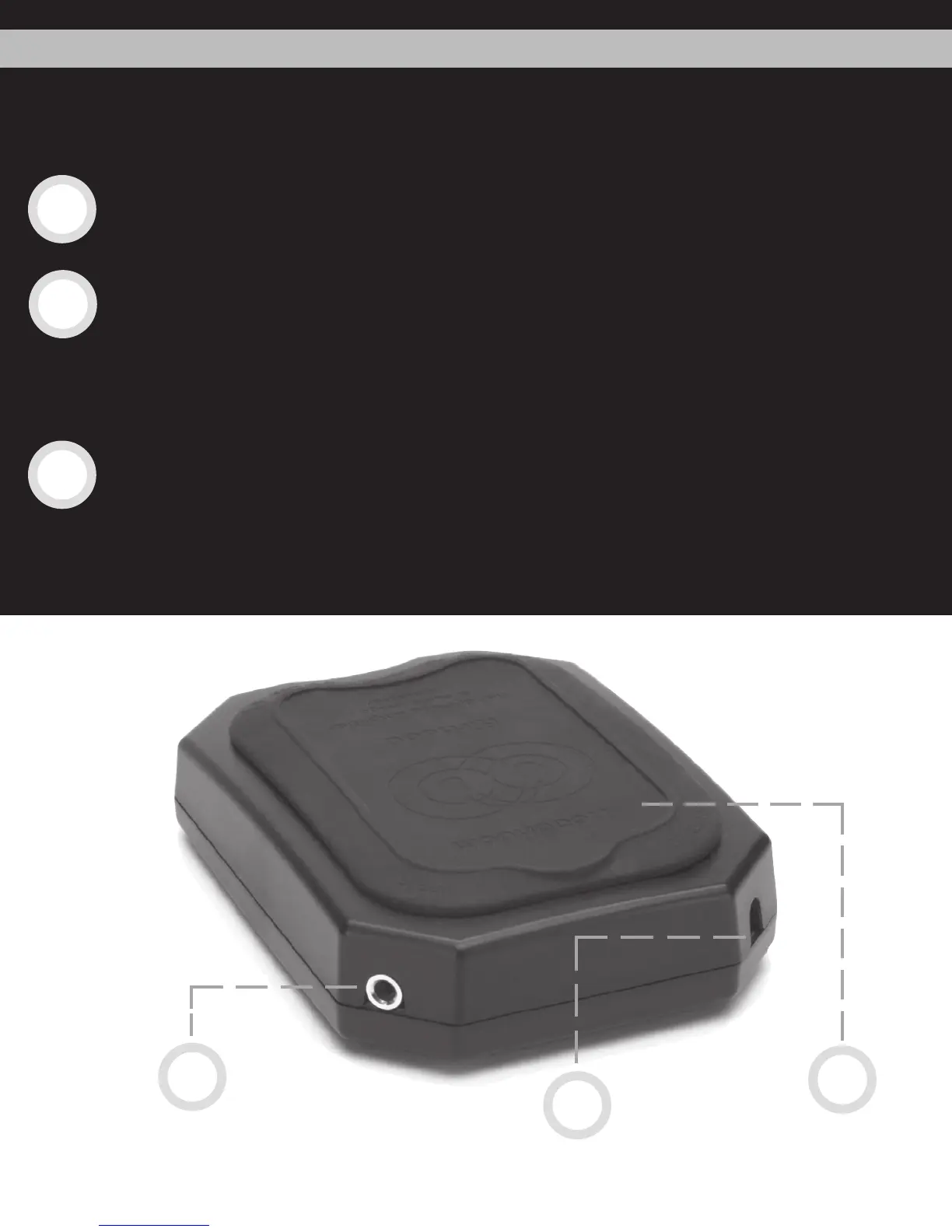
The jack on the left is the audio input. The included mini-to-mini cable connects the
AirHead to your portable player via this input.
The jack on the right is the power input, which allows you to use an AC adaptor to
power your AirHead at home or at the office. Visit www.headphone.com to purchase
an AirHead power supply. (You can also purchase an AC adaptor at an electronics
store. Look for any regulated adaptor with at least 300 mA of current and between 5
vdc and 12 vdc, center tip positive.)
On the top of the AirHead is a battery door. To replace your batteries (the AirHead
requires 4 AAA cells), simply pull up on the small tab sticking out of the back of the
battery door. This will lift the entire rubber door. This exposes the battery compart
-
ment; remove the old batteries and insert four new ones. (Note: always replace all
four batteries at once.)
4
Back of the AirHead
battery
door
Power
Input
Audio
Input
10.
8.
9.
8.
9.
10.
If you rotate the AirHead 1/2 turn, you’ll see the back of the AirHead, with two additional jacks,
one on each corner.


 To Next Page
 Loading...