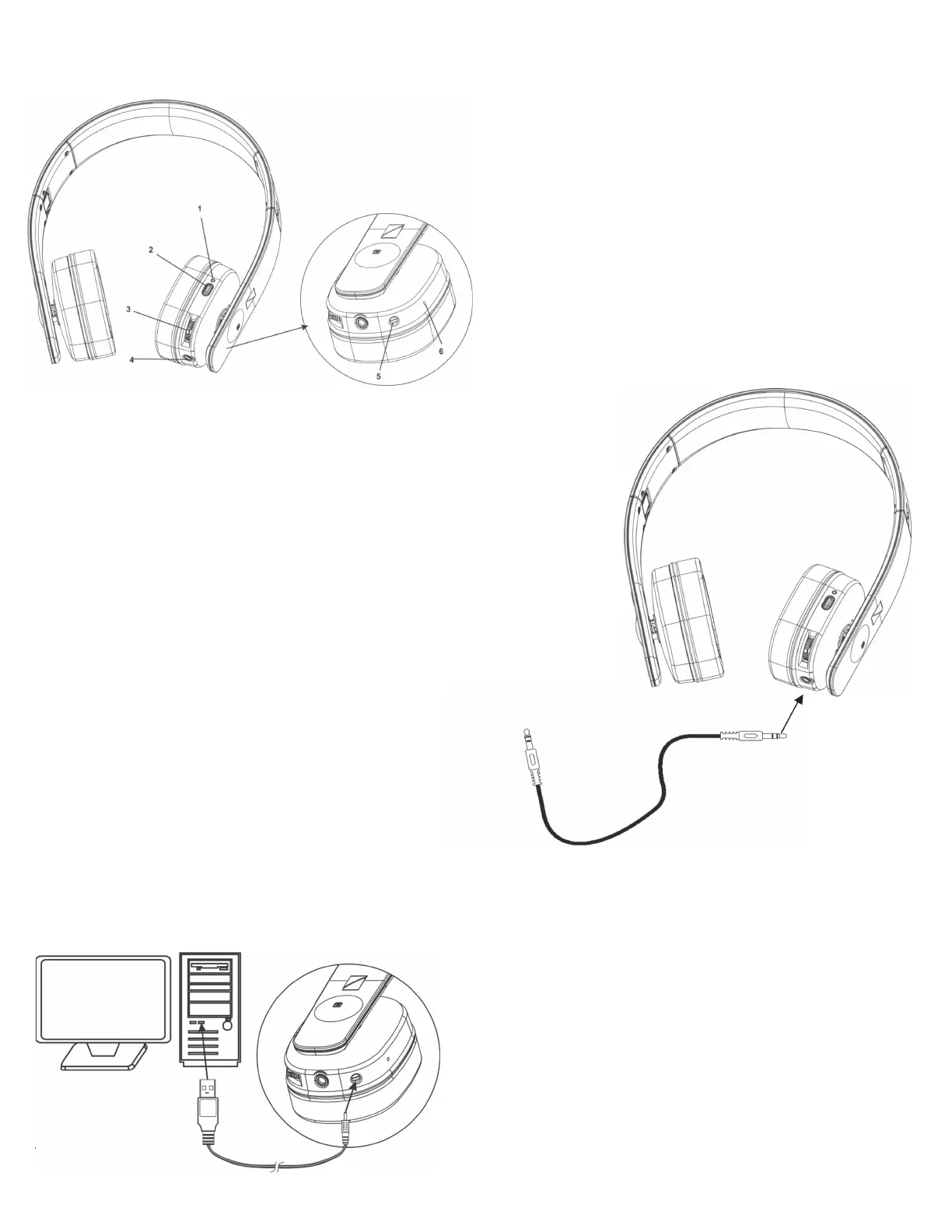
COMPONENT IDENTIFICATION
PAIRING
1. Press the Power button, the LEDs indicator light will be on.
Keep pressing the power button until the LED ashes in blue.
2. Enable your Bluetooth device such as cell phones, tablets or
other BT media, and make sure it is in discover mode.
3. Choose “8003763 HeadRush” in the list shown in the BT
device, enter “0000” if password is required.
4. When Bluetooth connection is made, the LED will ash slowly.
5. Listen to your music or make/take your telephone call on the
headphone
6. The transmission is approx. 10 meters. When the paired
receiver is out of range from the BlueTooth device, it will
disconnect. The transmission will be resumed by pressing the
power button on the receiver within the operating range.
Note: You may need to refer to your cell phone user guide for additional
support on pairing your Bluetooth device.
CHARGING
1. Make sure the headphone is fully charged before initial use.
2. Connect headphone with your PC by the supplied 2.5mm to
USB cable for charging.
3. A power adapter with a USB jack at 5V 500mA specications
can also be used.
4. The charging LED will illuminate when headphones are
charging. Charging is nished when LED turns Green.
TELEPHONE CALLS
TELEPHONE CALLS
1. If there is an incoming call when streaming music, the music
will be muted and ring tone will be heard.
2. Take your call by pressing the Power/Pair/Talk button. Press
once again when ending the call. Music will come out again
automatically.
3. To make a call, simply dial on your cell phone, and talk in the
headphone.
*Check the instruction manual for your cell phones, the process
may be dierent from the above.
LINE-IN
1. Connect the headphone with your audio device directly by
the supplied 3.5mm cable
2. The Bluetooth wireless music will be heard after the line-in
connection is made
TECHNICAL SPECIFICATIONS
Carrier Frequency: Blue Tooth 2.1
Battery Capacity: 3.7V 470mA via built-in Lithium
rechargeable battery
Frequency Response: 20Hz – 20KHz
Distortion: 0.5%
S/N Ratio: 65dB (typical)
Channel Separation: 50dB (Typical)
Operation Distance: Up to 10 meters (open area)
1. Power LED Indicator
2. Power / Pair / Talk
3. Volume+, Volume -
4. 3.5mm Audio In Jack
5. 2.5mm Charge in Jack
6. Microphone


 To Next Page
 Loading...