21
,W LV SRVVLEOH WR IUHHO\ FRQ¿JXUH WKH +(/,; '63
with our DSP PC-Tool software.
The user interface is designed for easy handling of
DOOIXQFWLRQVDQGDOORZVDQLQGLYLGXDODGMXVWPHQWRI
each of the eight DSP channels. Prior to connecting
WKH VLJQDO SURFHVVRU WR \RXU 3& YLVLW RXU ZHEVLWH
DQGGRZQORDGWKHODWHVWYHUVLRQRIWKH'633&7RRO
software.
Check from time to time for software updates. You
ZLOO¿QGWKHVRIWZDUHDQGWKHUHVSHFWLYHXVHUPDQX-
al on ZZZDXGLRWHF¿VFKHUFRP.
We strongly recommend to carefully read the user
manual (Sound Tuning Magazine) before using the
VRIWZDUHIRUWKH¿UVWWLPHLQRUGHUWRDYRLGDQ\FRP-
plications and failures.
Important: Make sure that the signal processor is
not connected to your computer before the software
DQG86%GULYHUDUHLQVWDOOHG
In the following the most important steps how to
FRQQHFWDQGWKH¿UVWVWDUWXSDUHGHVFULEHG
1. 'RZQORDG WKH ODWHVW YHUVLRQ RI WKH '63
3&7RRO VRIWZDUH DYDLODEOH RQ RXU ZHEVLWH
ZZZDXGLRWHF¿VFKHUFRP) and install it on
your computer.
2. Connect the signal processor to your computer
XVLQJWKH86%FDEOHWKDWLVLQFOXGHGLQGHOLYHU\
,I \RX KDYH WR EULGJH ORQJHU GLVWDQFHV SOHDVH
XVH DQ DFWLYH 86% H[WHQVLRQ FDEOH ZLWK LQWH-
JUDWHGUHSHDWHUDQGQRSDVVLYHH[WHQVLRQ
3. Turn on the signal processor and start the soft-
ware after the Status LED lights up green. The
operating software will be updated automatical-
O\WRWKHODWHVWYHUVLRQLILWLVQRWXSWRGDWH
4. 1RZ \RX DUH DEOH WR FRQ¿JXUH \RXU +(/,;
'63ZLWKRXULQWXLWLYH'633&7RROVRIWZDUH
1HYHUWKHOHVV LQWHUHVWLQJ DQG XVHIXO KLQWV FDQ
be found e.g. in our “Sound Tuning Magazine”,
which can be downloaded for free from our
website.
Caution: :H KLJKO\ UHFRPPHQG WR VHW WKH YRO-
ume of your car radio to minimum position during
¿UVW VWDUWXS $GGLWLRQDOO\ QR GHYLFHV VKRXOG EH
connected to the signal processor until general
VHWWLQJV LQ WKH '63 3&7RRO VRIWZDUH KDYH EHHQ
made. Especially if the DSP.2 will be used in fully
DFWLYHDSSOLFDWLRQVDZURQJVHWXSFDQGHVWUR\\RXU
speakers right away.
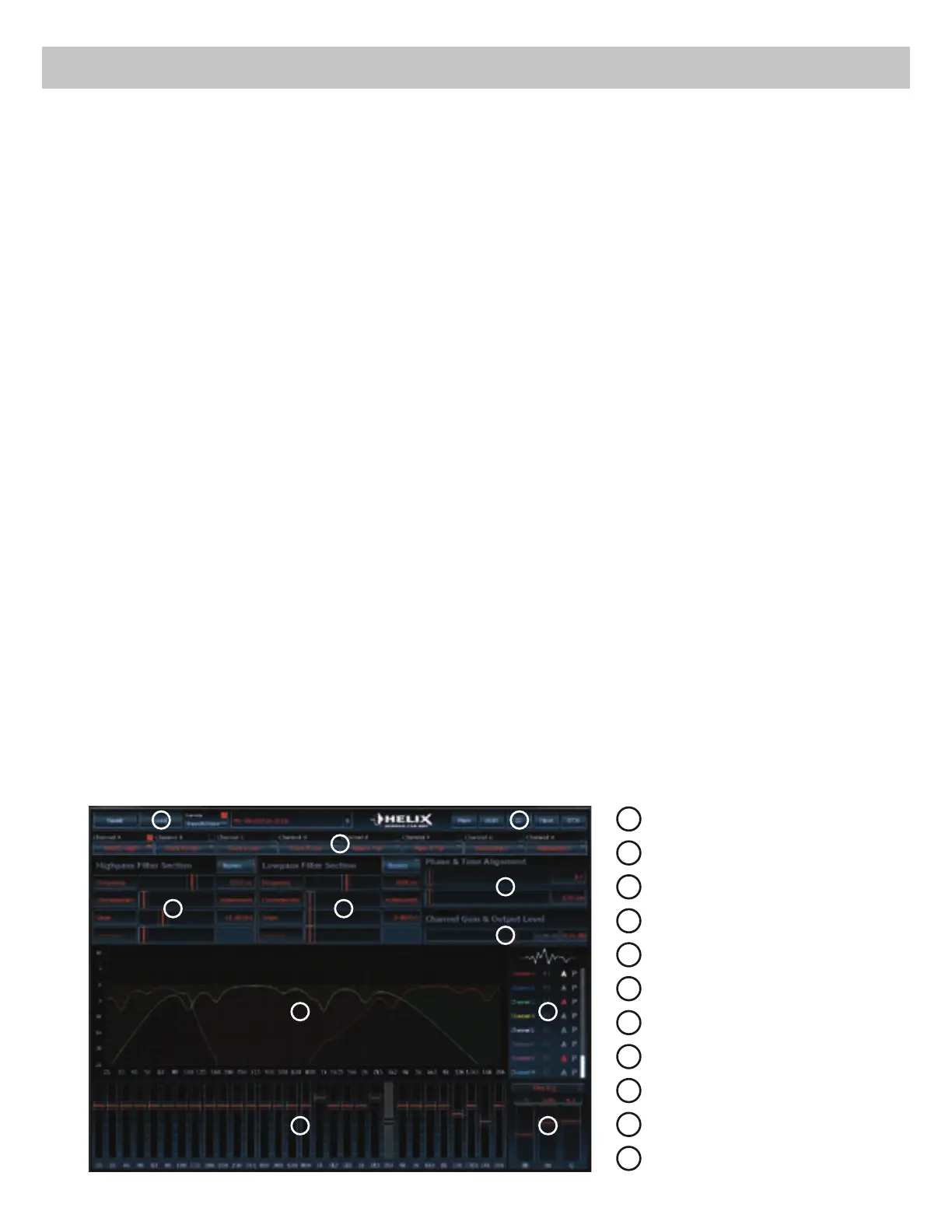
Connection to a PC
1
/RDGDQGVDYH
2
Main menu
3
Channel configuration
4
Highpass filter
5
Lowpass filter
6
Time alignment
7
2XWSXWOHYHO
8
Frequency graph
9
Range of frequency graphs
10
Equalizer
11
EQ fine adjustment
8
1
6
3
4
7
5
2
9
10 11


 To Next Page
 Loading...