14
Connectors and control units
7
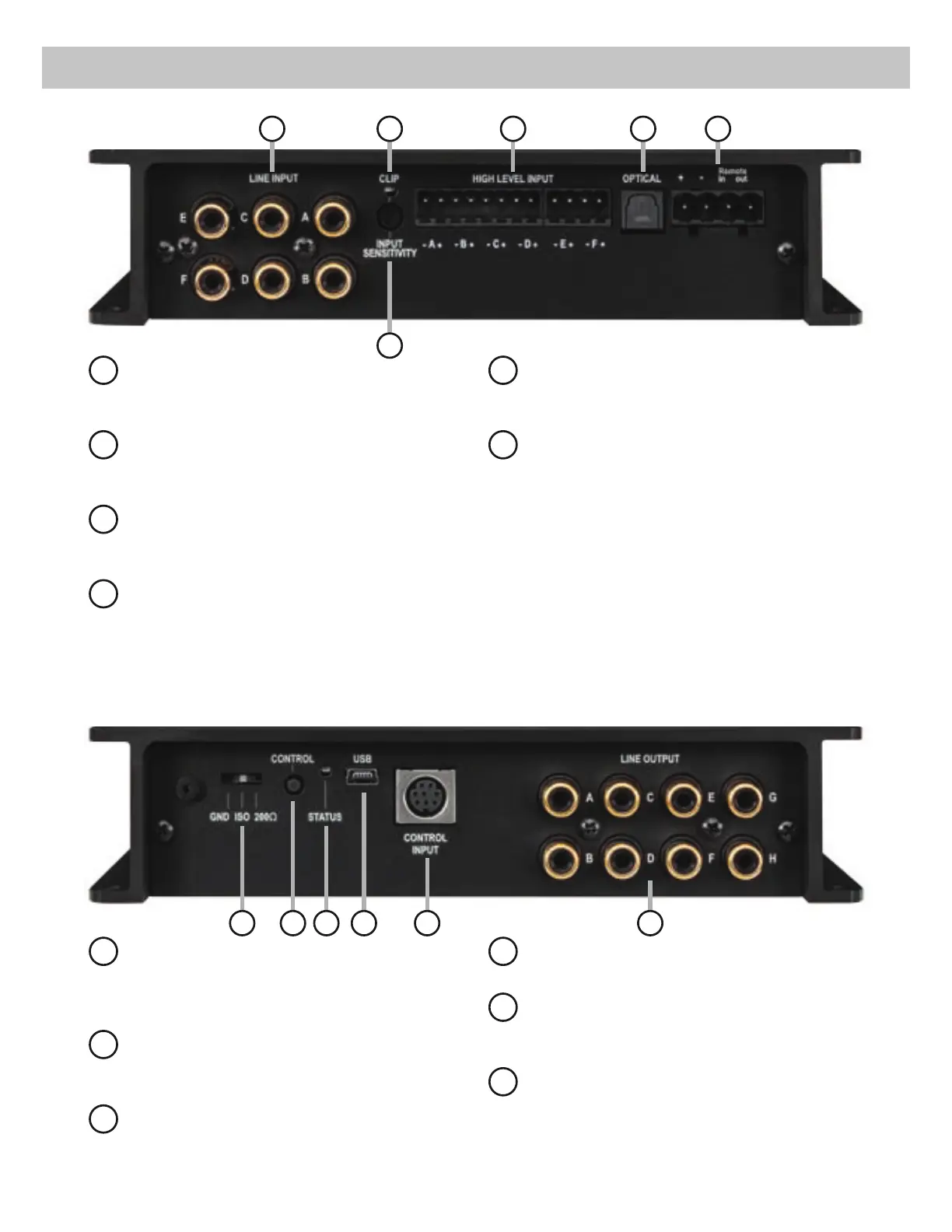
Ground lift switch
&DQ EH XVHG WR GH¿QH WKH FRQQHFWLRQ EH-
tween the grounding of the inputs and out-
puts.
8
Control pushbutton
Use this button to either switch between the
VHWXSVRULQLWLDWHDUHVHWRIWKHGHYLFH
9
Status LED
This LED indicates the operating mode of the
DSP and which setup has been chosen.
10
USB input
Connects the HELIX DSP.2 to your PC.
11
Control Input
Multifunction interface for e.g. an optional
remote control or other HELIX accessory.
12
Line Output
/LQHRXWSXWVIRUFRQQHFWLQJDPSOL¿HUV0DNH
sure that the remote output is used to turn on
WKHVHGHYLFHV
1
Line Input
5&$ LQSXWV IRU FRQQHFWLQJ SUHDPSOL¿HU
signals.
2
Clipping LED
This LED lights up red if one of the analog
LQSXWVLVRYHUGULYHQ
.
3
Input Sensitivity
&RQWURO IRU DGMXVWLQJ WKH LQSXW VHQVLWLYLW\ RI
WKHORZDQGKLJKOHYHOLQSXWV
4
Highlevel Input
+LJKOHYHO VSHDNHU LQSXWV IRU FRQQHFWLQJ D
factory radio or an aftermarket radio without
pre-amp / line outputs.
5
Optical Input
Optical input for digital stereo signals (SPDIF
format).
6
Power Input
Connector for the DC power supply with an
additional remote in- and output. The remote
RXWSXWKDVWREHXVHGWRVZLWFKRQH[WHUQDO
DPSOL¿HUV
7 8 9 10 11 12
1
3
42 5 6


 To Next Page