The HellermannTyton Cable Scout Cam is a WiFi inspection camera designed for visual inspection in confined spaces that are otherwise hard to see into, such as conduits, suspended ceilings, dry construction walls, and air shafts. It transmits video images in real time and allows for video and picture recordings.
Function Description:
The Cable Scout Cam provides real-time video viewing, video recording, and picture capturing. It features an 8 mm outer diameter camera head with dimmable integrated lighting, consisting of 8 mini LED lamps, to improve visibility in dark environments. The camera connects wirelessly to compatible devices (Android, iOS, Windows, MAC) via WiFi, allowing users to view the camera feed and control its functions through a dedicated app. The semi-rigid camera cable can be moved in any direction, and it comes with three attachments (hook, mirror, and magnet) for finding and salvaging small objects.
Important Technical Specifications:
- Model: YPC110
- Active pixel sensor: CMOS
- Image resolution: 1600x1200
- Horizontal angle of view: 72°
- Transmitting frequency: 2412-2612 MHz
- Minimum illumination: 0 Lux
- Power Supply: 3.7V 600mAh lithium battery
- Unobstructed effective range: 5-10 m
- Waterproofing grade: IP68 (lens tube only with supplied lens cover)
- Lens diameter: 5.5-8.0 mm
- Charging voltage and current: 5V-2A/1A/500 mA
- Focal distance: 3.1-7.6 cm
- Full Charging time: 1 hour
- Length: 10 m
- Compatibility: Android 4.2 and above; iOS 9.0 and above. Compatible with Windows and MAC operating systems.
- WLAN SSID: "inskam-***"
Usage Features:
- Basic Operation: Connect the camera's USB jack to the wireless transmitter. Press the power switch for three seconds to turn on the device; the indicator lamp on the base unit will light up. The LED light switch allows adjustment of the brightness of the LEDs in the camera head.
- App Control: The camera is controlled via the "Inskam" app, available on Google Play Store (Android) and Apple App Store (iOS). For Windows, software can be downloaded from www.kkmoom.com/camera.rar. For MAC, "Photo Booth," "Quick Time Player," or "VLC (Video Lan Client)" software can be used.
- Wireless Connection: Open WiFi settings on your device and connect to the camera's WiFi-SSID ("inskam***-xxx"). If prompted to switch to a different WiFi, select "Decline."
- Image Adjustment: The app allows zooming in and out using touch gestures and rotating the image.
- "Compared" Function: This feature enables displaying a picture on one side of the screen while continuing to film on the other side.
- Attachments: The camera comes with hook, mirror, and magnet attachments that can be screwed onto the camera head for retrieving small objects.
- Splash Guard: A splash guard should be screwed onto the camera head when using it in damp environments. The camera head is splash-proof (IP68 with the supplied lens cover), but the wireless transmitter base unit is not.
Maintenance Features:
- Charging: Charge the device with a suitable 5 Volt USB charger. The red light indicates charging and turns off when fully charged. A full charge takes approximately 1 hour and provides usage for about 90 minutes at 480 pixels, 80 minutes at 720 pixels, or 70 minutes at 1600 pixels. The blue light flashes when the battery needs recharging.
- Moisture Protection: The camera lens tube should be protected with the supplied splash-proof lens cover accessory when moisture is expected. If the lens fogs up, turn off the camera and allow the moisture to evaporate completely before use.
- Storage: Turn the camera off when not in use.
- Troubleshooting (No image or noise):
- Check the WiFi setting of your smartphone and ensure it's connected to the device.
- Verify the camera is connected correctly and tightly to the device.
- Disconnect and reconnect the camera.
- Close and reopen the app.
- Check battery level; recharge if the blue light flashes fast.
- Ensure the app has access to your image gallery in device settings to review pictures/videos.
- Avoid contact of the wireless transmitter base unit with liquids to prevent damage and electric shocks.
- The device is not shock resistant; avoid dropping it or using the camera head to strike objects.
- Do not expose the device to high temperatures or fire, as the battery may explode.
- Observe local regulations for safe disposal.
- Do not work under load.
- The product is intended for visual inspection in specific technical conditions and not for immersion in liquids.
- Observe laws and guidelines for the protection of personal rights and data protection when using the camera.
- The product complies with essential requirements of EC directive 1999/5/EG.
- Electrical products should not be disposed of with household waste; recycle where facilities exist.

 Need help?
 General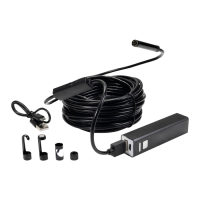

 To Next Page