12
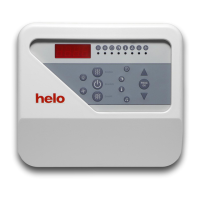
1. Push HUMIDITY
2. Push PROG OK
The indication lamp ”Humidity” starts to blink
3. Change the humidity with arrow buttons
4. Save the new setting with PROG OK
1. Push DURATION
2. Push PROG OK
The indication lamp ”Duration” starts to blink
3. Change the duration with arrow buttons
4. Save the new setting with PROG OK
Turn on the light and fan
Turn on the light
The light can be turned on when the control panel is in either off-mode or on-mode.
1. Push LIGHT
Turn off the light
1. Push LIGHT
Change the humidity
Change the duration
Turn on the fan
The fan can be turned on when the control panel is in either off-mode or on-mode.
1. Push FAN
Turn off the fan
1. Push FAN
Information for the user



 To Next Page
 Loading...