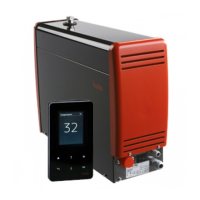
Control panel T1
Display
Activated
functions
Touch display
buttons
Button functions:
Takes you from a submenu to the front page.
Step back. Shows the temperature and the time when pressed on the front page.
Lighting control on/off.
OK button accepts the modified setting or move forward on e.g. time settings.
Arrow button, moves upwards in the menus.
Arrow button, moves downwards in the menus.
Start and stop. Select with the arrow buttons and press OK.
Changing the temperature setting.
Pre-set time setting. You can set the pre-time setting between 0 and 23.59 hours.
Settings. Move to the next menu.
Automatic locking, time setting adjustment 15 - 60 s. Settings in the menu, on/off.
The locking is opened from the settings menu or by pressing simultaneously
for 2 seconds the symbols.
START (KÄYN-


 To Next Page
 Loading...