6.8 in
FCC ID: 2AO23-QIC44 Model: QIC44 Input: DC9V/3.0A phone charging Output 1: MagSafe Charger 15W Output 2: AirPods Charger 5W
Made in Vietnam
This device complies with Part 15 of the FCC rules. Operation is subject to the following two conditions: 1) this device may not cause
harmful interference, and 2) this device must accept any interference received, including interference that may cause undesired
the user’s authority to operate the equipment.
NOTE: This equipment has been tested and found to comply with the limits for a Class B digital device, pursuant to Part 15 of the FCC
Rules. These limits are designed to provide reasonable protection against harmful interference in a residential installation. This
equipment generates, uses and can radiate radio frequency energy and, if not installed and used in accordance with the instructions,
may cause harmful interference to radio communications.
However, there is no guarantee that interference will not occur in a particular installation. If this equipment does cause harmful
try to correct the interference by one or more of the following measures:
• Reorient or relocate the receiving antenna.
• Increase the separation between the equipment and receiver.
• Consult the dealer or an experienced radio/TV technician for help.
This equipment complies with FCC radiation exposure limits set forth for an uncontrolled environment. This equipment should be
installed and operated with minimum distance 20cm between the radiator and your body. This transmitter must not be co-located or
operating in conjunction with any other antenna or transmitter.
Target Corp. Mpls. MN, 55403 Phone: 612-304-6073
• If you’re having issues charging use the tips below to help:
• Double check that the USB-C cable and Power Delivery wall plug are plugged in
• Certain cases may interfere with MagSafe
/wireless charging; remove the cases for
best results
• Double check the placement of the devices on the chargers; for best results, the center
of the devices should be on the center of the chargers
• MagSafe
charging is compatible with iPhone
12 and newer as well as other Qi-enabled
devices; please consult your device’s user manual if you are unsure if your device
is compatible
• Wireless earbud case charging is compatible with AirPods
with Wireless Charging Case,
AirPods Pro
and other Qi-enabled devices; please consult your devices user manual if
you are unsure if your device is compatible
• Remove credit cards and other cards with magnetic strips to prevent damage to the cards
• Keep the charger away from heat and direct sunlight
• Do not modify or repair this device
• Do not use in high temperatures or extreme weather
• Do not use chemical detergents to clean your device, use a soft dry cloth
• Immediately unplug it from its power source if it gets wet
before using
safety
Can’t get it to charge? Just have a question?
call us at: 877-698-4883 or: 877-MyTgtTech
e-mail us at: TargetTechSupport.com
need some help?
troubleshooting
MagSafe + Wireless charger Stand
front back
charging
• Thick cases as well as some materials can interfere with MagSafe
/wireless charging
• This is a high speed magnetic charging stand, make the most of the charger by using
source may charge your device at a slower speed
quick tips
• Wireless charger with MagSafe
charger
• USB-C to USB-C charging cable
• Power Delivery wall plug
• Solid Red - Charging your device
Solid White - Fully charged
Flashing Red - Foreign object detection, pieces of metal or other materials may cause
overheating and damage your charger or device; remove them immediately
indicators - wireless charger only
included
• Connect the Power Delivery wall plug to the wall outlet using the USB-C cable
DC 9V 3.0A minimum warning: please use UL compliant power supply
(note: this product does not support the Quick Charge protocol; it is recommended
that users choose a PD charger with no less than 20W for power supply)
• Use the adjustable ball joint to easily adjust the MagSafe
charger to your
preferred viewing angle
charging - set up
• Place your MagSafe
compatible device onto the MagSafe
charger; the device
will stick to the charging stand and the screen will indicate that it is charging
(note: MagSafe
compatible device can be placed vertically or horizontally)
• Remove credit
cards or any card with a magnetic strip to prevent damage
to the cards before charging
• Charge time will vary by device
charging - MagSafe
• Place your earbud case onto the wireless charger, face up, and align the center of the
case with the cross on the wireless charger or the device may not charge
• Ensure that the earbud case lid is closed
• Wireless charging indicator light will turn solid red to indicate it is charging
• Charge time will vary by device
charging - earbud case
usb-c port
MagSafe
charger
wireless
charger
adjustable
ball joint
wireless charging indicator
Does not
charge
Apple
Watch
When the devices
are properly
aligned, the
wireless charger
indicator light
will turn red
and/or the
MagSafe
devices
charging screen
will appear
If the wireless
device is not
aligned properly,
the indicator light
will not turn on; if
the MagSafe
device will not
stick to charging
pad, remove the
case and try again

 Need help?
 General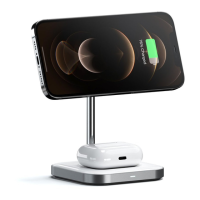

 To Next Page