6.6.3 Flight Trimming
00
6.7 Altitude Hold / Hover
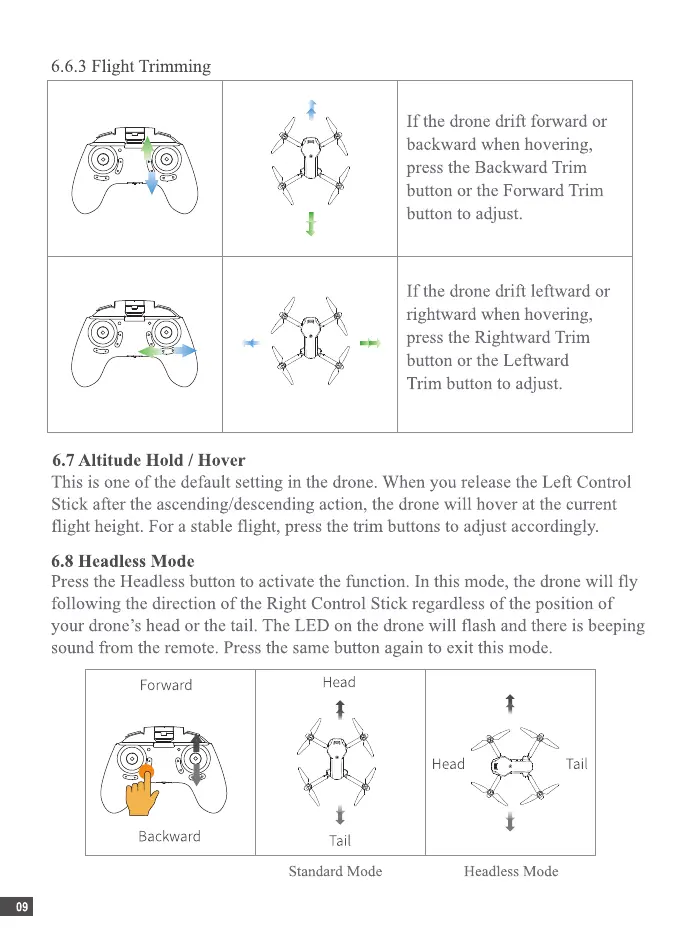
Ifthe drone drift forward or
backward when hovering,
press the Backward Trim
button or the Forward Trim
button to adjust.
Ifthe drone drift leftward or
rightward when hovering,
press the Rightward Trim
button or the Leftward
Trim button to adjust.
This is one of the default setting in the drone. When you release the Left Control
Stick after the ascending/descending action, the drone will hover at the current
flight height. For a stable flight, press the trim buttons to adjust accordingly.
6.8 Headless Mode
Press the Headless button to activate the function. In this mode, the drone will fly
following the direction of the Right Control Stick regardless of the position of
your drone's head or the tail. The LED on the drone will flash and there is beeping
sound from the remote. Press the same button again to exit this mode.
Forward
Backward
09
Head
Standard Mode
Head Tail
Headless Mode


 To Next Page
 Loading...