6.12 Circle Fly
Ensure that there are no obstacles within a radius of 5 meters around the drone.
Pressthe C button, and the drone will fly in circles. Press the button again to
exit this mode.
6.13 App Operation Guide
(i) Downloadandinstall Heygelo Sirius into your mobiledevice from App Store /
Google Play or scanning the QR code below.
For Android 4.4 or later For IOS 9.0 or later
(2)Turn on the dronefirst, goto theWIFI settingsof your mobile deviceand
connect to the wifi HEYGELO S90 ***
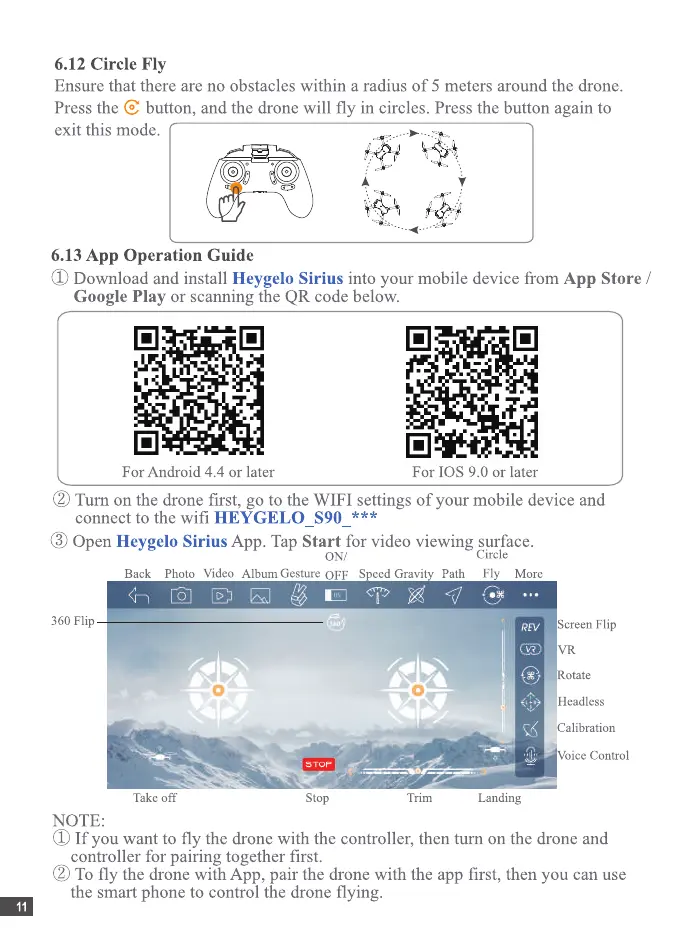
(3)OpenHeygeloSirius App. TapStart for videoviewing surface.
Circle
ON/
Back Photo Video A Ibum Gesture OFF Speed Gravity Path Fly More
45 A f/
360 Flip
o
Take off
NOTE:
ScreenFlip
Rotate
Headless
Calibration
Voice Control
STOP
Stop
Trim
Landing
(J)If you want to fly the dronewith the controller,thenturn on thedroneand
controller for pairing together first.
(2)To fly the dronewith App, pair the dronewith the appfirst, thenyou canuse
the smart phone to control the drone flying.


 To Next Page
 Loading...