FLIGHT PREPARATION
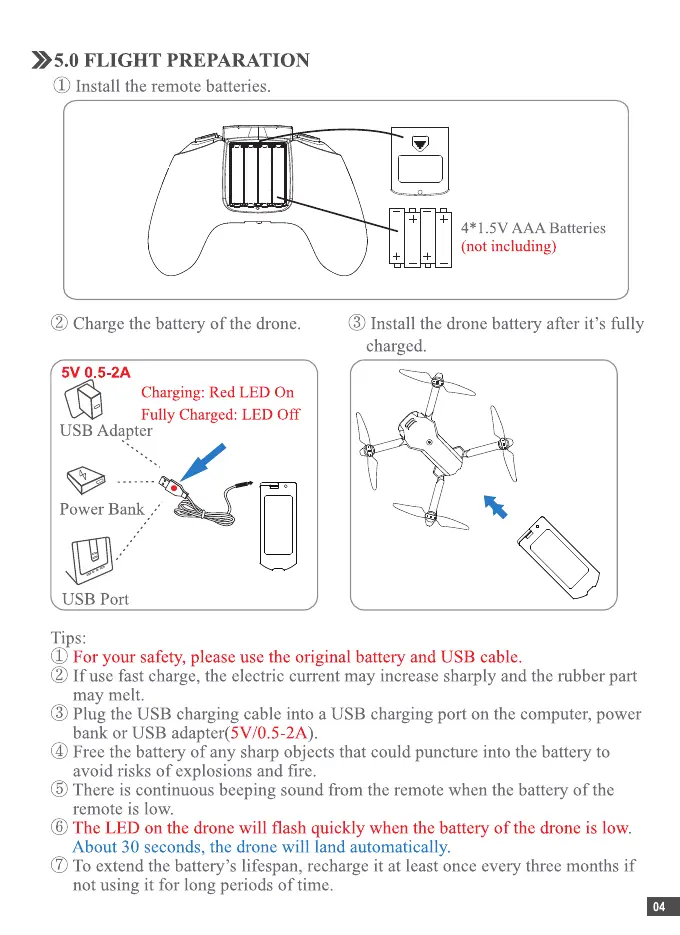
(J) Install the remote batteries.
(2)Chargethe battery of the drone.
5V 0.5-2A
Charging: Red LED On
Fully Charged: LED Off
USB Adapter
Power Bank
USB Port
Tips:
4* I .5V AAA Batteries
(not including)
($)Install the dronebatteryafter it's fully
charged.
(J)For your safety,pleaseusethe original batteryandUSB cable.
(2)If usefastcharge,the electriccurrentmay increasesharplyand therubberpart
may melt.
($1 Plug the USB chargingcableinto a USB chargingport onthe computer,power
bank or USB adapter(5V/O.5-2A).
(4)Freethe batteryof any sharpobjectsthat couldpunctureinto thebatteryto
avoid risks of explosions and fire.
(5)Thereis continuousbeepingsoundfrom the remotewhenthe batteryof the
remote is low.
@ The LED on the dronewill flash quickly whenthebattery of thedroneis low.
About 30 seconds, the drone will land automatically.
(t) Toextendthe battery'slifespan,rechargeit at leastonceeverythreemonthsif
not using it for long periods of time.
04


 To Next Page
 Loading...