22 EN
Using the appliance
B
Child lock
• The Child lock function prevents the machine being accidentally started or used by
unsupervised children.
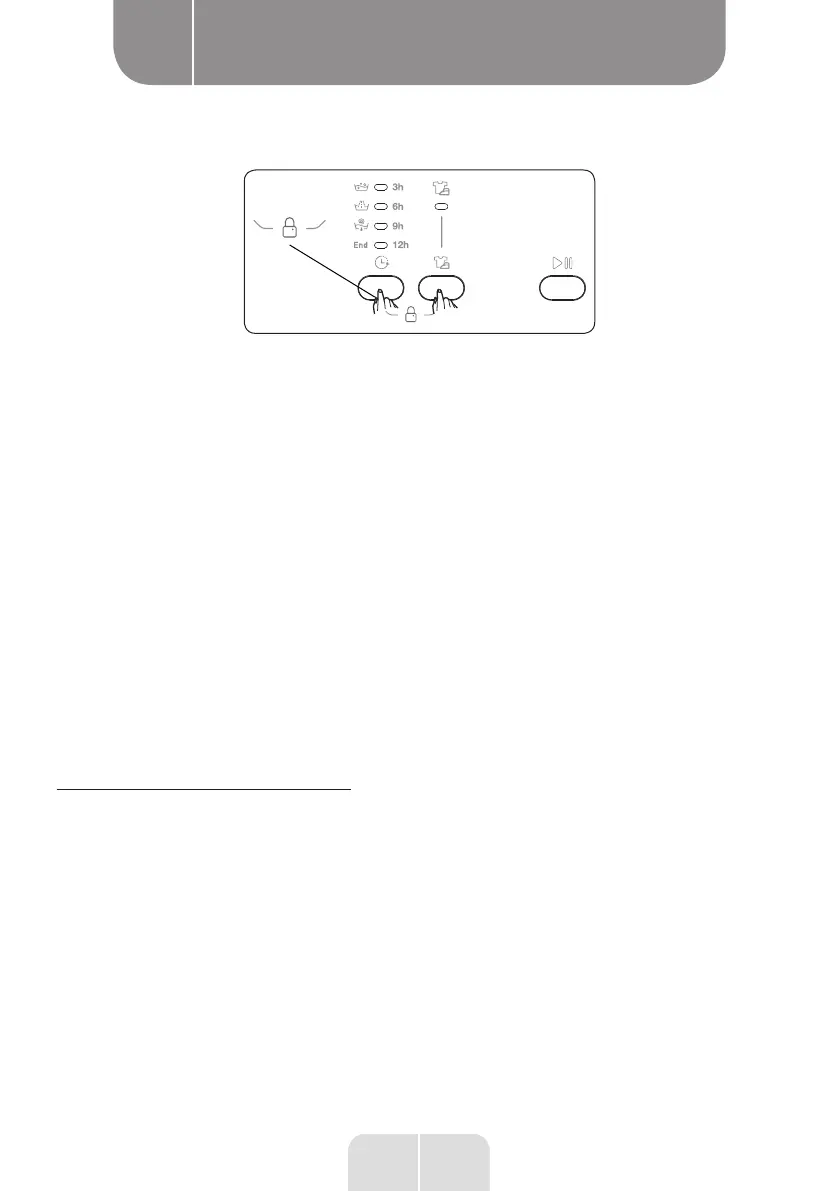
• To activate the Child lock, simultaneously press the additional function 1 and 2 buttons
and hold them down for at least 3 seconds. When the Child lock is activated, the additional
function indicators on the control panel light up.
• If a button is pressed once the Child lock has been activated, the additional function
indictors on the control panel start to flash.
• If the programme selector is turned to STOP before selecting another programme, when
the Child lock has been activated and a programme is already underway, the previously-
selected programme will continue from where it left off.
• To deactivate the Child lock, simultaneously press the additional function 1 and 2 buttons
and hold them down for at least 3 seconds. The additional function indicators on the screen
start to flash.
Cancelling a programme
Cancelling a programme at any time:
• Turn the programme selector to “OFF”.
• The wash cycle will stop and the programme will be cancelled.
• Turn the programme selector to any other programme to drain the machine.
• The machine then starts the necessary draining operation and cancels the programme.
You can then select and start a new programme.
End of programme


 To Next Page
 Loading...