EasyManua.ls Logo

Himedia COLONY COUNTER LA660 - User Manual

Himedia COLONY COUNTER LA660
2 pages
Print Icon
To Next Page IconTo Next Page
Loading...
COLONY COUNTER
L A 6 6 0
TM
HiMediaLaboratories
HiMedia Laboratories Pvt. Limited
TM
Your convenient route to accuracy
LA660D
COLONY COUNTER
L A 6 6 0
TM
HiMediaLaboratories
HiMedia Laboratories Pvt. Limited
TM
Your convenient route to accuracy
LA660D
Question and Answer IconNeed help?

Do you have a question about the Himedia COLONY COUNTER LA660 and is the answer not in the manual?

Summary

Introduction to Digital Colony Counter LA660

Instrument Setup and Accessories

Operating Conditions

Specifies that the counter operates under normal conditions but should avoid moisture and extreme temperatures.

Connecting the Accessories

Details how to connect the power cord and attach the magnifying lens and its holder.

Operating Procedures and Best Practices

Operating Procedure

Step-by-step guide for using the colony counter, including marking colonies and noting the count.

Tips for Contamination Avoidance

Provides methods to avoid contaminating petri plates during marking, such as marking the lid or bottom.

Ordering Information

Overview

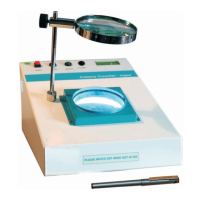
The HiMedia Laboratories Digital Colony Counter (LA660) is an instrument designed to simplify and accurately enumerate bacterial and yeast colonies in various research activities. It provides a convenient and efficient alternative to traditional manual counting methods, which often require high levels of concentration and are prone to error.

Function Description

The primary function of the LA660 is to count colonies of bacteria or other microorganisms growing on an agar plate. The device features a lighted surface where Petri plates are placed. The user marks off colonies on the outer surface of the plate using a felt-tipped pen, and the machine automatically registers each count. This method helps to avoid missing counts or double counting, ensuring accuracy and consistency in bacterial enumeration.

Important Technical Specifications

The LA660 operates on a standard power supply of 230VAC, 50Hz, single phase, requiring an EARTHED three-pin mains socket. While the manual does not specify the maximum count capacity or the size of the Petri plates it can accommodate, it is designed for general laboratory use. A key feature is its compatibility with any hard-tipped marker pen, eliminating the need for proprietary pens.

Usage Features

Setup:

  1. Power Connection: Connect the power cord to the instrument and plug it into an EARTHED 230VAC, 50Hz single-phase mains socket.
  2. Lens Assembly: Screw the Lens Holding Rod onto the Lens Holding Base on the instrument and tighten it using the L-handle located behind the instrument.
  3. Magnifying Lens Adjustment: Slide the Magnifying Lens onto the rod. Adjust the lens by sliding it up or down to achieve the desired focus level, ensuring sufficient height below the lens for pen usage.

Operating Procedure:

  1. Power On: Turn on the instrument by pressing the On/Off Switch.
  2. Plate Placement: Place the Petri Plate on the glass grid of the counter.
  3. Colony Counting: Remove the cap from the marker pen. Press the pen firmly and vertically onto a bacterial colony on the Petri Dish. The counter will register a count, emit a beep, and an ink dot will be marked on the Petri Dish. Continue this process until all colonies are counted.
  4. Reading: Once counting is complete, note the reading displayed on the counter.
  5. Manual Count (Optional): The "COUNT" push button switch (located next to the "RESET" switch) can be used for counting sparsely populated plates or for other specific counting purposes.
  6. Decrement Count: A "Decrement" switch is available to decrease the count by one if an error occurs.

Tips for Contamination Avoidance: To prevent contamination of the Petri plate by the marker pen, two methods are suggested:

  • Inverted Plate: If the Petri Plate has a thin layer of media, it can be kept upside down, and marking can be done on the bottom side (which is then on top).
  • Lid Marking: The lid can be kept over the plate, and marking can be done on the glass cover. However, in this case, due to the gap between the media and the marking, counting should be completed in one sitting without altering the view angle or moving/turning the plate or its cover.

General Usage Notes:

  • Always keep the cap on the marker pen when not in use to prevent drying or accidental marking.
  • The instrument is designed for use with any hard-tipped marker pen, offering flexibility and cost-effectiveness.

Maintenance Features

The manual provides general guidelines for the operating condition and care of the device:

  • Environmental Conditions: The Colony Counter is designed to operate under most normal conditions. However, it should not be exposed to moisture or extreme variations in temperature to ensure optimal performance and longevity.
  • Accessory Care: The accessory box includes a mainscord, marker pen, magnifying lens with hexholder and tightening screw, and a lens holding rod. Proper handling and storage of these components are essential.
  • Documentation: The device comes with a warranty certificate and an instruction manual, which should be consulted for detailed maintenance procedures and troubleshooting.

The LA660 is a robust and user-friendly instrument, simplifying the critical task of microbial colony enumeration in laboratory settings.

Himedia COLONY COUNTER LA660 Specifications

General IconGeneral
BrandHimedia
ModelCOLONY COUNTER LA660
CategoryLaboratory Equipment
LanguageEnglish