
 Need help?
Do you have a question about the Hiseeu WK-3C70 and is the answer not in the manual?
Connect the base station to power and the router, waiting for the network light.
Turn on the battery camera by pressing and holding the power button.
Explains the various sensors, lens, and ports on the camera unit.
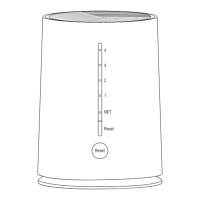
Describes the indicators, buttons, and ports on the base station unit.
Guide on how to register a new account using a mobile phone and verification.
Steps for logging into an existing account via the app.
Accessing Alarm push, Settings, Edit, and Delete options from the app.
Setting up synchronized alarms between the base station and cameras.
Managing storage, including SD card status and formatting.
Configuring the device's time synchronization and time zone.
Adjusting wireless channel settings for better signal strength.
Setting or changing the device's access password for security.
Information on subscribing to cloud storage services for video data.
How to watch recorded videos from the camera.
Switching between SD/HD quality and displaying multiple camera feeds.
Enabling sound collection, manual recording, and two-way audio communication.
Toggling viewing modes, accessing storage, and checking alarm logs.
Activating motion detection alarms and using the siren against intruders.
Using digital zoom to magnify the video feed, noting potential clarity loss.
Enabling and configuring smart detection alarms and notifications.
Adjusting the sensitivity of motion detection to reduce false alarms.
Setting specific times for detection (all day, day, night, or custom).
Selecting video recording methods like Optimal Battery Life or Uninterrupted recording.
Selecting auto, off, or always-on infrared night vision for different lighting conditions.
Checking cloud storage usage and subscription details.
Downloading video recordings directly from the TF card.
Troubleshooting steps when a camera fails to display an image.
Solutions for when the device appears offline or disconnected.
Guidance on correctly displaying camera feeds within the EseeCloud application.
Steps to ensure alarm notifications are received correctly.
Instructions on using the SD card for video recording and troubleshooting.
 General
| Lens | 3.6mm |
|---|---|
| Connectivity | Wi-Fi (2.4GHz) |
| Compatibility | iOS, Android |
| Night Vision | Up to 65ft/20m |
| Audio | 2-way audio |
| Storage | Micro SD card (up to 128GB) |
| Motion Detection | Yes |
| Operating Temperature | -4°F - 140°F / -20°C - 60°C |

 To Next Page